
You are here:
Hierarchies
Find out the hierarchy path of a field. The field's hierarchy path and the direction of the hierarchy path are determined by the parent field that you select. You can also include the field within the hierarchy path.
Required Editions
| View supported editions. |
A Text type field stores the hierarchy path. Use the hierarchy path that’s stored in this field to transform data in subsequent nodes.
The result of a hierarchy node includes all the fields from the source node and the field containing the hierarchy path.

Note The hierarchy node doesn’t provide the field value that’s stored at every hierarchy level,
it provides only the hierarchy path.
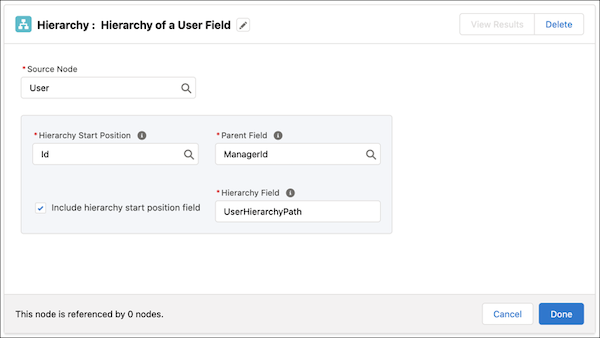

Example Let’s say your company wants to determine the managerial hierarchy of your employees.
In the Data Processing Engine definition, select the User object as the data source. The
Hierarchy node uses the User data source node as its data source. Use the User data source
node as the data source for the hierarchy node. For Hierarchy Start Position, select Id as the
field that you want the hierarchy for. For Parent Field, select ManagerId as the field that
determines the hierarchy path. Then select the Include hierarchy start position field checkbox
to include the value of the Id field in the hierarchy path.
| Employee Name | User Id | Manager Name | Manager Id | Hierarchy Path |
|---|---|---|---|---|
| Roberto Alvarez | 1 | Lance Park | 3 | 1 / 3 / 4 / 5 |
| Gabriela Livingston | 2 | Erin Donaghue | 4 | 2 / 4 / 5 |
| Lance Park | 3 | Erin Donaghue | 4 | 3 / 4 / 5 |
| Erin Donaghue | 4 | Ada Balewa | 5 | 4 / 5 |
| Ada Balewa | 5 | - | - | 5 |
- Aggregate Data Across Multilevel Hierarchies in Data Processing Engine
Perform multilevel rollups of measures for parent-child relationships. Aggregate values from leaf nodes upward through all levels of a hierarchy, such as Child Accounts to Accounts. Hierarchical aggregation is available only for CRMA runtime definitions.
Did this article solve your issue?
Let us know so we can improve!
