You are here:
Define Execution Rules for a Decomposition Rule
To apply logic that determines when a specific decomposition rule runs, define execution rules that specify the conditions for the rule. By default, products decompose into fulfillment line items independent of execution rules.
Required Editions
| Available in: Salesforce Classic (not available in all orgs) and Lightning Experience |
| Available in: Enterprise, Unlimited, and Developer Editions |
| User Permissions Needed | |
|---|---|
| To define conditions for when a decomposition rule runs: | Fulfillment Designer OR DRO Admin User |
To prevent order orchestration failures during decomposition or plan composition, complete these configuration prerequisites:
- For every context definition attribute you create, define a corresponding tag and map it to an sObject field.
- Confirm that all tags are present so that resources appear correctly in the Condition Builder.
- Confirm that all attributes are mapped to prevent incorrect condition evaluations during rule execution.
- To apply changes to the context definitions, clone the DRO RuleLibrary version, associate the new context definition, and activate it.
To control when a decomposition rule executes, create an execution rule. Execution rules contain the conditions that must be met before the decomposition rule is executed.
- From the App Launcher, find and select Dynamic Revenue Orchestrator.
- From the app navigation menu, select Products.
- Click a product.
- Click the Decomposition tab and select a decomposition rule.
- In the side panel, click Execution Rules tab.
- Click Configure Execution Rules.
-
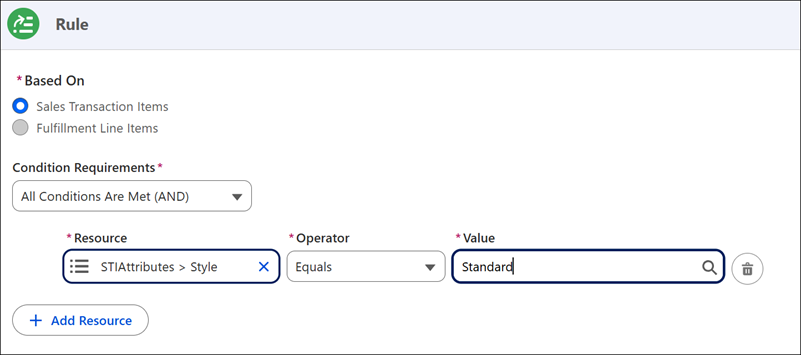
In the create rule pane, enter conditions and save your work.
 Note In the Based On section, you can't select Fulfillment Line Items, because only order line items are decomposed.
Let's explore an example of a execution rule in action:
Imagine that you're selling carry bags for laptops. In your commercial catalog, you simply list Laptop Bag, but the product also has attributes for color and style. Style can be either Standard or Premium. When a laptop bag order comes in and needs to be fulfilled, you can define decomposition rules for each laptop bag style that map to the technical products for Standard and Premium laptop bags.
To control which technical product goes to the fulfillment team, create an execution rule that evaluates the Style attribute for each decomposition rule.
For the Standard bag decomposition rule, go to the execution rule builder. In the Create Rule conditions pane, find the Style attribute in the Resource field. Set the Operator to Equals, and select the Standard value.
Repeat these steps for the Premium bag style, only this time select Premium for the Style attribute.