Order Orchestration in Agentforce Revenue Management
Dynamic Revenue Orchestrator (DRO) breaks down a single commercial order into multiple,
manageable fulfillment steps. You can execute a tailored fulfillment plan for each product or
service.
Required Editions
Available in: Enterprise, Unlimited, and Developer
Editions
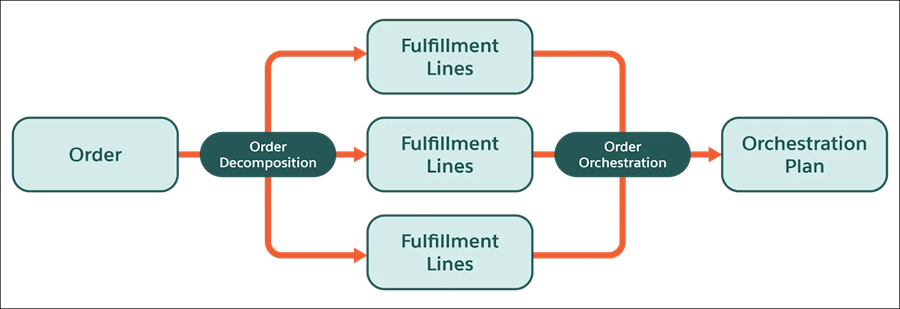
Dynamic Revenue Orchestrator breaks down a customer's commercial order into the individual
technical products, services, and tasks that are needed to fulfill it. The decomposition
process bridges the gap between how a product is sold by sales reps and how it is actually
delivered and managed by your order fulfillment team.
After order items are decomposed into fulfillment line items, an orchestration fulfillment
plan tracks the stages and tasks required to fulfill the order to completion. A fulfillment
plan can contain prioritization rules, SLAs, external callouts, automated tasks, manual tasks,
and order fallout contingencies.
You can use DRO to orchestrate Industries Configure, Price, Quote (CPQ) orders. Because DRO
is preintegrated with Industries CPQ, you can use DRO without migrating commercial product
data out of Enterprise Price Catalog (EPC). See Salesforce Release Note: Integrate DRO with Industries
CPQ.
Here's a high-level summary of the steps required to build your DRO solution.
Create your technical product catalog.
Define how products decompose using decomposition rules, field mapping, and execution
rules.
Create fulfillment plans using a visual plan editor in the fulfillment workspace.
Define fulfillment steps and product fulfillment scenarios for each of your fulfillment
plans.
Define rules for handling SLA jeopardy and order fallout.
Monitor orchestration in real time using the fulfillment orchestration dashboard.
To migrate product fulfillment decomposition rules, fulfillment scenarios, fulfillment step
definitions, and fulfillment task assignment rules between Salesforce orgs, use Data API.
For high-volume data transfers, use Bulk API to move these records and their associated
condition data.
Did this article solve your issue?
Let us know so we can improve!
Loading
Salesforce Help | Article
Cookie Consent Manager
General Information
Required Cookies
Functional Cookies
Advertising Cookies
General Information
We use three kinds of cookies on our websites: required, functional, and advertising. You can choose whether functional and advertising cookies apply. Click on the different cookie categories to find out more about each category and to change the default settings.
Privacy Statement
Required Cookies
Always Active
Required cookies are necessary for basic website functionality. Some examples include: session cookies needed to transmit the website, authentication cookies, and security cookies.
Functional Cookies
Functional cookies enhance functions, performance, and services on the website. Some examples include: cookies used to analyze site traffic, cookies used for market research, and cookies used to display advertising that is not directed to a particular individual.
Advertising Cookies
Advertising cookies track activity across websites in order to understand a viewer’s interests, and direct them specific marketing. Some examples include: cookies used for remarketing, or interest-based advertising.