
You are here:
Customer Acquisition Management (Managed Package)
Customer Acquisition Management is an Energy & Utilities Cloud application that provides utility customers the ability to compare product offerings and service rates. As an energy supplier or utility company, you can integrate this application into your customer portal and automate new customer acquisition.
 This app is part of the Energy and Utilities Cloud managed package.
Use the Customer Acquisition Management application to:
-
Configure customized products and product bundles.
-
Price products and product bundles based on multiple factors such as customer location, meter types, or usage.
-
Automate digital guided-selling of utility products, services, and offers. Guide your customers to choose best-fit products based on the combination of user input.
-
Set up and automate the customer enrollment and order management process.
Customer Acquisition Management is accessed by prospective customers who visit your digital experience site to browse products. They can then select products and enroll in services that meet their needs.
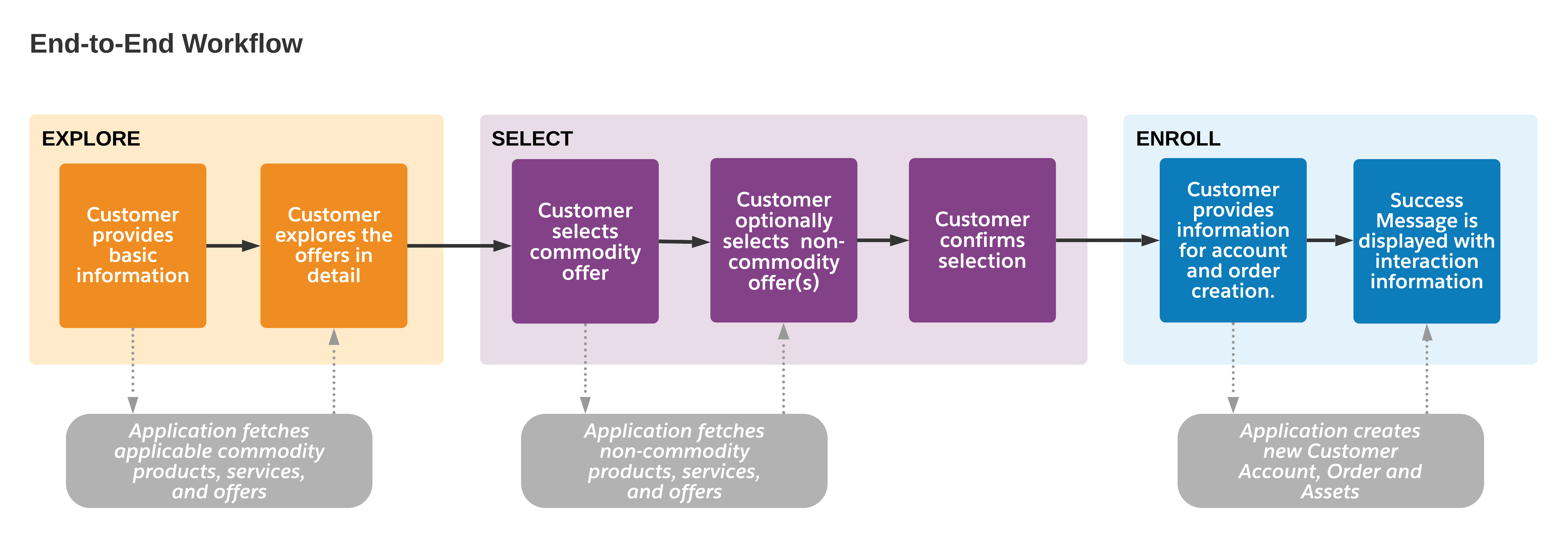
Here's a high-level workflow of a customer journey from explore to enroll.
Customer Acquisition Management Components and Integrations
Customer Acquisition Management consists of a portfolio of application components:
-
Customer Acquisition Management uses the Energy & Utilities Data model. See the Energy and Utilities Cloud Developer Guide.
-
Reference product model and product configurations to drive the customer acquisition journey. See Understand the Reference Product Model in Customer Acquisition Management for Energy & Utilities.
-
Reference UI which you can use to understand the application and process flow. See Understand the Reference UI for Energy & Utilities.
-
Standard Digital Commerce: Standard Digital Commerce improves the performance and scalability of the existing Digital Commerce APIs. For more information, see Standard Digital Commerce.
-
Library of core components that are used to implement the Customer Acquisition Management. You can view the complete list of components in Bill of Materials for Customer Acquisition Management.
Get started with Customer Acquisition Management:
- Learn About Customer Acquisition Management
Learn about the reference product model, user interface, and application constraints for Energy & Utilities Cloud Customer Acquisition Management application. - Set Up Customer Acquisition Management
Setting up the Customer Acquisition Management application for Energy & Utilities Cloud requires that you configure your Salesforce Org, download and deploy application components, and configure permissions. - Configure Customer Acquisition Management
Customer Acquisition Management comes configured by default with a reference product model you can use to explore how the app works. Learn how to implement your own product model and customize the Customer Acquisition Management application. - Perform Routine Maintenance Jobs
As an administrator, you sometimes need to perform maintenance jobs to ensure that the latest products and offers are displayed to your customer with the correct pricing information. - Troubleshoot Customer Acquisition Management
Resolve commonly encountered problems while setting up or using the Customer Acquisition Management application. For each listed problem, a workaround or a probable cause of the issue is provided. In case you do not find your issues listed on this page, or the workaround provided does not work for you, contact Salesforce Support.
