
You are here:
Use Large Account Sales Management for Energy & Utilities
Learn how to use Large Account Sales Management to manage prospective leads, sales opportunities, and multi-site quotes and orders.
After you set up Large Account Sales Management, your sales team can use it to manage complex, large-transaction leads and opportunities and create multi-site quotes and orders. Large Account Sales Management also supports bulk upload and grouping of service points. These features enable your sales teams to manage thousands of line items throughout the sales cycle.
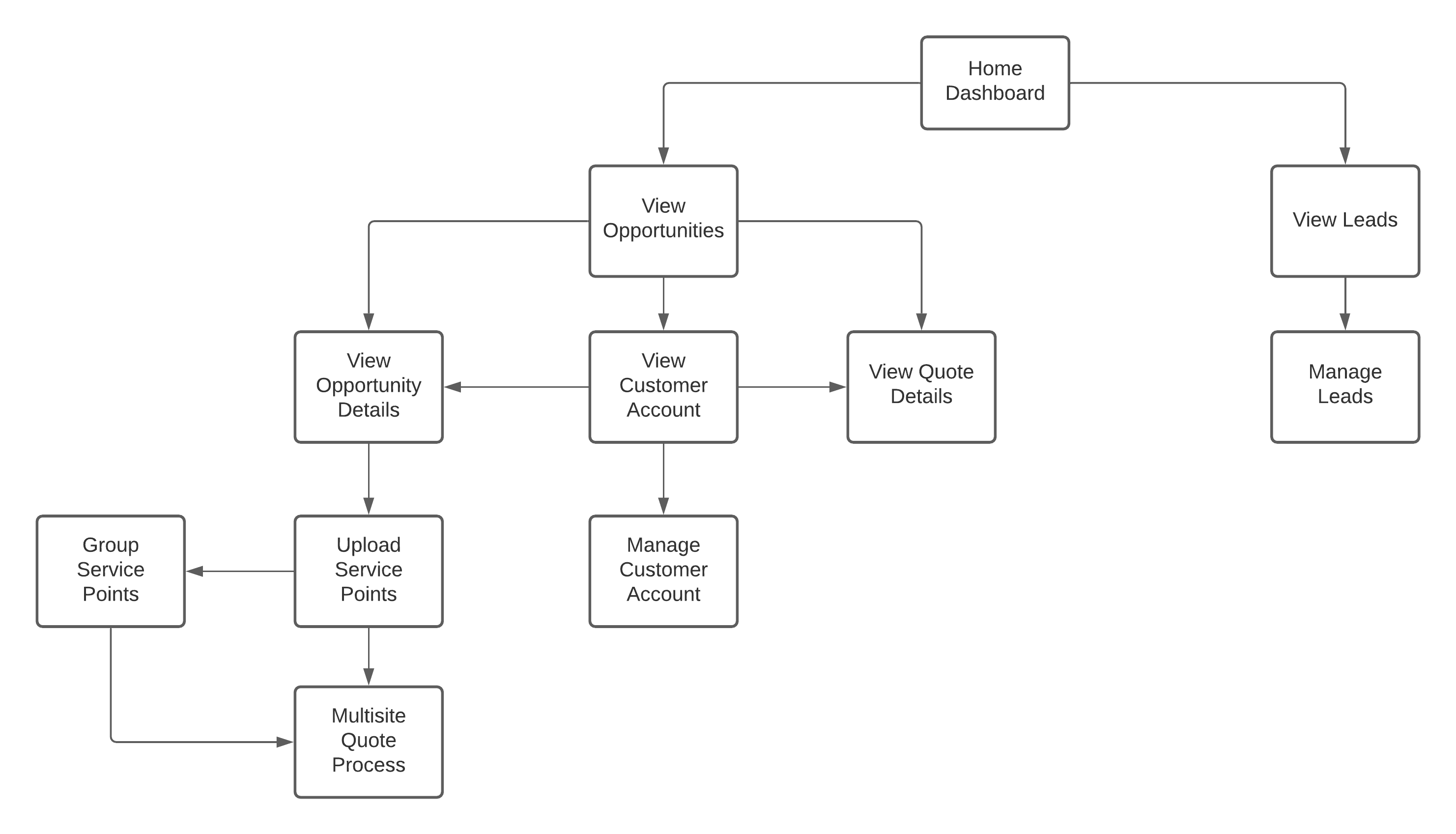
Home Page Overview
The Large Account Sales Management application Home page is a dashboard that displays the list of leads and opportunities associated with the customer assigned to an agent or team lead. The Home page serves as the starting point for all the application workflows.
The Home page consists these panels and tabs agents can use to manage the sales pipeline:
-
Leads Tab: The Leads provides a list of active leads associated with the customer account assigned to a sales agent. To learn more about Leads in Salesforce, see Manage Leads.
-
Opportunities Tab: The Opportunities tab lists all the opportunities for the customer accounts assigned to a sales agent. Each row in the list contains the opportunity name, the associated account, the current stage of the opportunity, any quotes associated with the opportunity, the probability of closing the opportunity in percentage, the close date, and revenue size.
-
Sales Pipeline: The sales pipeline provides a visual representation of prospects. Using the sales pipeline metrics the sales agents or team leads can get an estimate of what stage each sales opportunity is in.
-
Events Panel: The events panel displays the list of events that are scheduled for the present day. This enables the sales agents and team leads to plan ahead for their day and track their meetings with customers, prospects, and colleagues.
Start using the Large Account Sales Management application to:
- Large Account Sales Management Home Page Overview for Energy & Utilities
The Large Account Sales Management application provides an interface that gives you a 360-degree view of leads and opportunities associated with the customer accounts assigned to an agent. It also provides tools to the agents to convert the leads and opportunities into quotes and contracts. - Explore Account Details in Large Account Sales Management
The Large Account Sales Management Accounts page gives a detailed view of the customer accounts assigned to an agent. The Accounts page consists of multiple panels and tabs which provide a personalized view of each customer that includes leads, opportunities, quotes, digital conversations, interactions or related records, and more. - Manage Opportunities and Service Points in Large Account Sales Management
Opportunities are a record of potential, won, and lost deals. The Large Account Sales Management application helps you track and manage the information stored for each opportunity record. In addition to standard Salesforce functionality, Large Account Sales Management application provides customized workflows for the Energy & Utilities industry. These workflows assist sales agents to upload site data, group sites, and proceed with multi-site quoting, helping you to provide a personalized experience to your utility customers. - Manage Quotes in Large Account Sales Management
Quotes represent the proposed prices of your company’s products and services. You create a quote from an opportunity and its products. Each opportunity can have multiple associated quotes, and any one of them can be synced with the opportunity. - Manage Accounts for Energy & Utilities
Large Account Sales Management application provides a sales-focused 360-degree view of the customer accounts that are assigned to you.
