You can create an action plan template and its generated action plans for various
objects, depending on the products and licenses available in your org. You can also create them
for custom objects that have Activities enabled.
Required Editions
Available in: Lightning Experience
Available in: Automotive Cloud, Consumer Goods Cloud, Education Cloud, Financial
Services Cloud, Government Cloud with Lightning Scheduler, Health Cloud, Manufacturing Cloud,
Nonprofit Cloud, and Public Sector Solutions. View edition
availability.
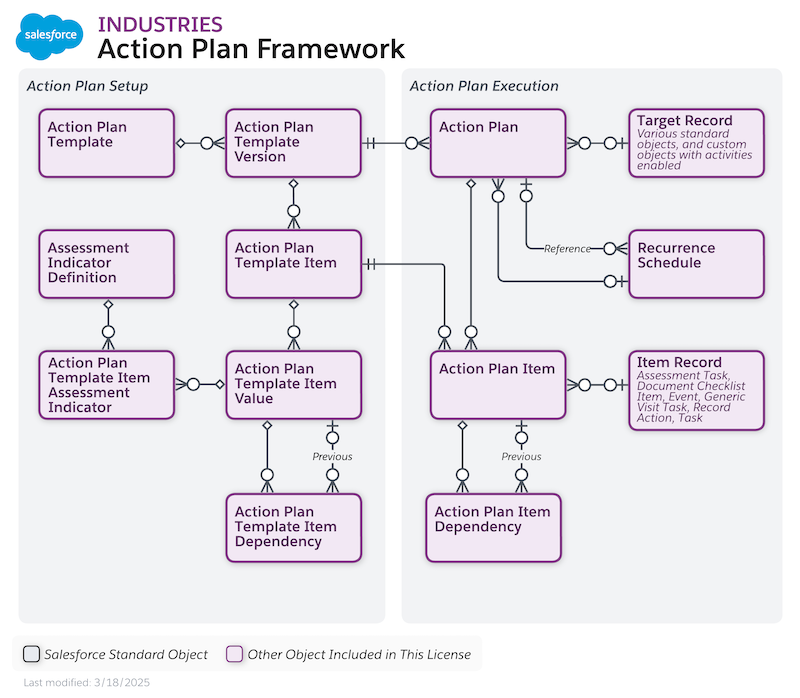
Here’s the Action Plans data model.
The types of items that can be included in an action plan template and its generated action
plans include:
Document Checklist Item (available when Financial Account is the target object)
Task
Note Some Salesforce products support additional action plan item types.
Target objects are:
Account (applicable to both Person Accounts and Business Accounts)
Asset Account Participant
Asset Contact Participant
Asset Milestone
Assets and Liabilities
Benefit
Benefit Assignment
Business License Application
Business Milestone
Campaign
Card
Care Plan
Case
Claim
Contact
Contract
Emergency Request
Financial Account
Financial Deal
Financial Goal
Financial Holding
Fleet
Goal Assignment
Individual Application
Insurance Policy
Insurance Policy Coverage
Lead
Opportunity
Person Life Event
Preliminary Application Reference
Program
Public Complaint
Record Alert
Regulatory Code Violation
Residential Loan Application
Violation Enforcement Action
Vehicle
Vlocity Scheduled Job
Custom objects that have activities enabled
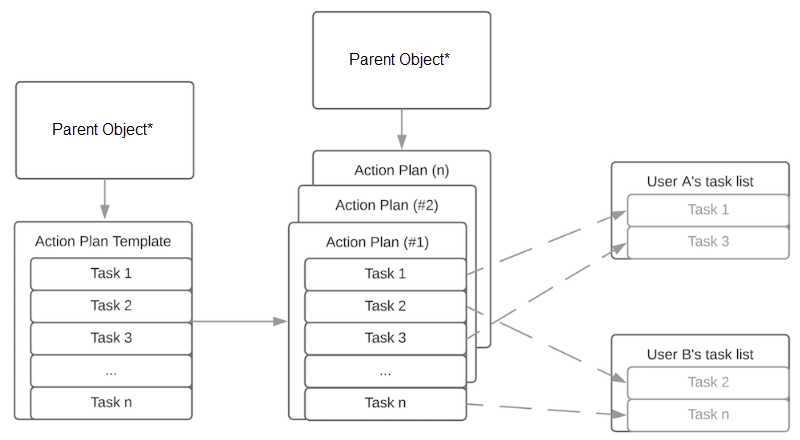
In an action plan template, assign each task or other item to a person, a role,
a queue, or the action plan creator. When creating templates with the UI, the plan creator
becomes the plan owner. When creating templates using the API, you can designate a plan owner
different from the plan creator.
Did this article solve your issue?
Let us know so we can improve!
Loading
Salesforce Help | Article
Cookie Consent Manager
General Information
Required Cookies
Functional Cookies
Advertising Cookies
General Information
We use three kinds of cookies on our websites: required, functional, and advertising. You can choose whether functional and advertising cookies apply. Click on the different cookie categories to find out more about each category and to change the default settings.
Privacy Statement
Required Cookies
Always Active
Required cookies are necessary for basic website functionality. Some examples include: session cookies needed to transmit the website, authentication cookies, and security cookies.
Functional Cookies
Functional cookies enhance functions, performance, and services on the website. Some examples include: cookies used to analyze site traffic, cookies used for market research, and cookies used to display advertising that is not directed to a particular individual.
Advertising Cookies
Advertising cookies track activity across websites in order to understand a viewer’s interests, and direct them specific marketing. Some examples include: cookies used for remarketing, or interest-based advertising.