
You are here:
Branch Management
Track branch performance and productivity with Branch Management.
The Branch Management data model, console app, and Record Association Builder enable branch managers and admins to track the work output of branches, employees, and customer segments. Branch Management works with existing Financial Services Cloud features, and prepares an organization for relationship marketing at the branch level.
The Branch Management data model lets you define your branch structure and employee and partner assignments so you can track activities and performance by branch.
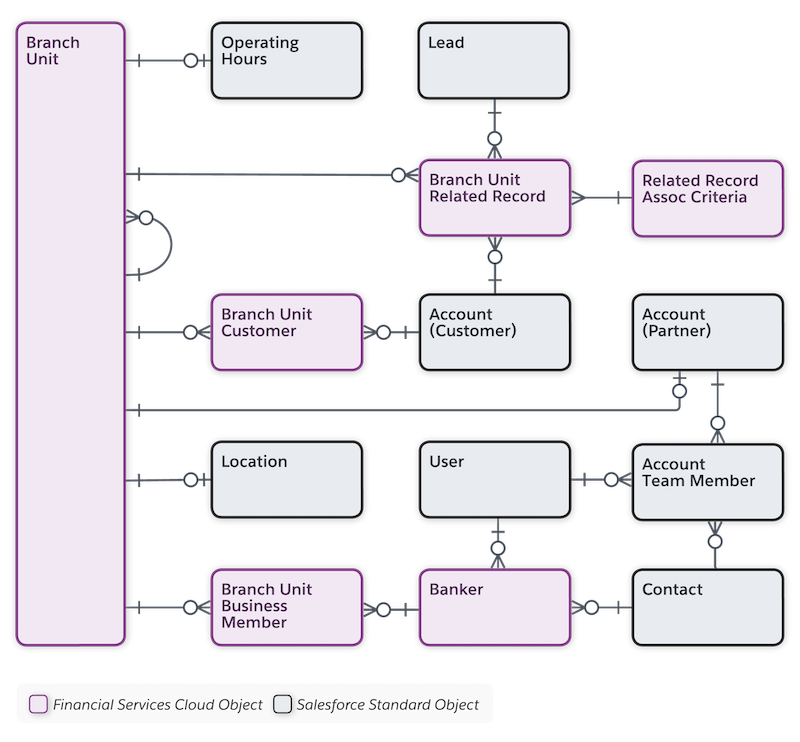
Branch Unit is the central object in the branch management data model. Branch unit records store basic information such as the branch’s name, its parent branch, and its branch manager. Capture more branch information by relating objects like Location and Operating Hours.
The Banker object represents a user or contact who can fill a banker role for one or more branches. Banker is a Branch Unit Business Member type that’s predefined for the banking industry.
Use the Branch Unit Related Record to track data about the records that are created at your branch. For example, identify the branch and user that created the record and the association criteria that triggered the record creation.
Attribute customers and other records to specific branches using the Branch Unit Customer and Branch Unit Related Record objects.
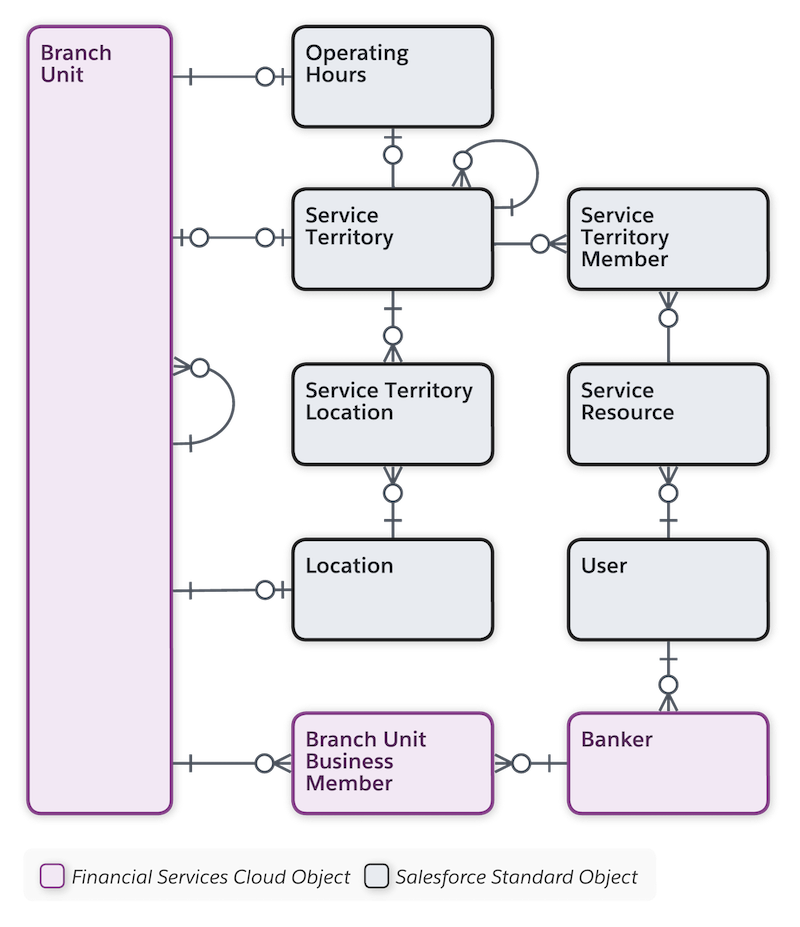
Branch managers can align branch hierarchies with service territories and account hierarchies as needed. Optionally link branches and associated records to the key Service Cloud objects (Service Territory, Service Territory Member, and Service Resource) that power Lightning Scheduler and Salesforce Field Service.
Explore and Learn
Watch this video to understand how Interest Tags works for Financial Services Cloud.
If you aren’t able to watch
the view in full screen, open the video on a new tab:  Branch Management in Financial Services.
- Configure Branch Management in Financial Services Cloud
Configure your org to get the most from Branch Management features. - Work with Branch Management
The Branch Console app provides quick access to branch management tools. Branch managers or admin users define branch units and hierarchies, and enable bankers and other business members for assignment to specific branches. Bankers and other users select the branch they’re currently assigned to so that leads and accounts are associated with the correct branch. - Considerations and Limitations for Branch Management
Here are some things to keep in mind as you implement Branch Management features.
