
You are here:
Compliant Data Sharing
The Compliant Data Sharing feature lets admins and compliance managers configure advanced data sharing rules, so that they can improve compliance with regulations and company policies. They can control and monitor what data gets shared with whom, without writing complex code.
Required Editions
| Available in: Lightning Experience |
| Available in: Professional, Enterprise, and Unlimited Editions in Financial Services Cloud |
| Available in: Enterprise, Unlimited, and Developer Editions with Nonprofit Cloud |
| Available in: Enterprise, Performance, Unlimited, and Developer Editions with Public Sector Solutions |
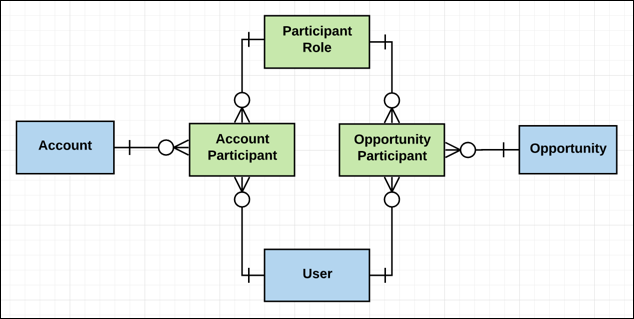
Compliant Data Sharing uses a setup object and several junction objects.
Standard Objects:
- Account Participant: A junction object that stores a relationship between a user or participant group, a participant role, and an account record. Account participants for a record are shown in the Account Participants related list.
- Opportunity Participant: A junction object that stores a relationship between a user or participant group, a participant role, and an opportunity record. Opportunity participants for a record are shown in the Opportunity Participants related list.
Custom objects:
- Participant: Represents information about a participant in the context of a custom object record.
- Participant Role: A setup object that defines an available role for a parent object and an associated data access level.
- Control Who Sees What with Compliant Data Sharing
Compliant Data Sharing is an addition that Salesforce offers for sharing data. - Configure Your Org for Compliant Data Sharing
Configure your org to get the most from the advanced data sharing capabilities of the Compliant Data Sharing feature. - Manage Participant Roles in Compliant Data Sharing
Compliant Data Sharing uses participant roles to define how users and participant groups relate to a record. Each participant role specifies the access level it grants to a record when assigned to a participant. - Configure Page Layouts for Compliant Data Sharing
Add related lists that display object participants to page layouts. - Manage Users in Compliant Data Sharing
Assign the Compliant Data Sharing permissions and object access to users depending on their needs. After a user is assigned a participant role for a record or as a member of a participant group, they can’t be deactivated. Delete all associated junction objects and remove them from all participant groups before deactivating them. - Manage Participant Groups in Compliant Data Sharing
Compliant Data Sharing uses participant groups to define groups of users with the same role in their record interactions. - Set Up an Object for Public and Private Sharing in Compliant Data Sharing
It gets a little tricky when you want to share most records for an object publicly but that object also has some records that are visible only to some users. For example, a Grantmaking Experience Cloud site can show most funding opportunities to all users but it also has some funding opportunities that are available only by invitation and not publicly visible. - Work with Compliant Data Sharing
Administrators can enable Compliant Data Sharing for Account and Opportunity objects. Administrators and compliance managers then configure data sharing roles with associated access levels to adhere to compliance with regulations and company policies. An account or opportunity record owner shares a record with other relevant users. - Considerations and Limitations for Compliant Data Sharing
Here are some things to keep in mind when you implement Compliant Data Sharing (CDS).
Did this article solve your issue?
Let us know so we can improve!
