
You are here:
Grant User Access to Objects and Participant Objects and Fields in Compliant Data Sharing
To create and edit participant records, users need access to the parent objects and to the participant object’s Active field.
Required Editions
| Available in: Lightning Experience |
| Available in: Professional, Enterprise, and Unlimited Editions in Financial Services Cloud |
| Available in: Enterprise, Unlimited, and Developer Editions with Nonprofit Cloud |
| Available in: Enterprise, Performance, Unlimited, and Developer Editions with Public Sector Solutions |
| User Permissions Needed | |
|---|---|
| To configure participant groups: | Configure Compliant Data Sharing System Permission |
| To be a member of a participant group: | Use Compliant Data Sharing System Permission |

Important Where possible, we changed noninclusive terms to align with our company
value of Equality. We maintained certain terms to avoid any effect on customer
implementations.
For example, Account and Account Participant objects share a master-detail relationship, as do the Opportunity and Opportunity Participant objects. As such, participant record level access derives from the parent Account or Opportunity object.
A user’s profile must allow read, create, edit, and delete access to the parent object for a user to create, edit, and delete related participant records.

Note To view records, enable read access to the Active field on the participant object.
To mark participants as active, enable edit access to the Active field on the participant object.
Validate a user’s access levels for the parent objects and related participant fields.
- From Setup, in the Quick Find box, enter Profiles, and then select Profiles.
- Click Edit next to the profile that you want to change.
- In Standard Object Permissions, validate that the profile has Read, Create, Edit, and Delete permissions to the parent object, such as Account. If not, grant the permissions and click Save.
-
In Field-Level Security, Standard Field-Level Security, click View
next to Account Participant.
If you can’t find the Field-Level Security section, make sure that you’re not editing the profile. Use CTRL+f to find the section.
-
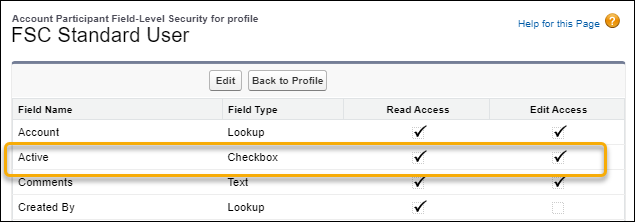
Validate that the profile has Read and Edit access to the Active field on the Participant
object. If not, grant the permissions and click Save.
- Repeat steps 3 through 5 for other objects and user profiles.
Did this article solve your issue?
Let us know so we can improve!
