
You are here:
Configure the Group Builder Edit Window (Managed Package)
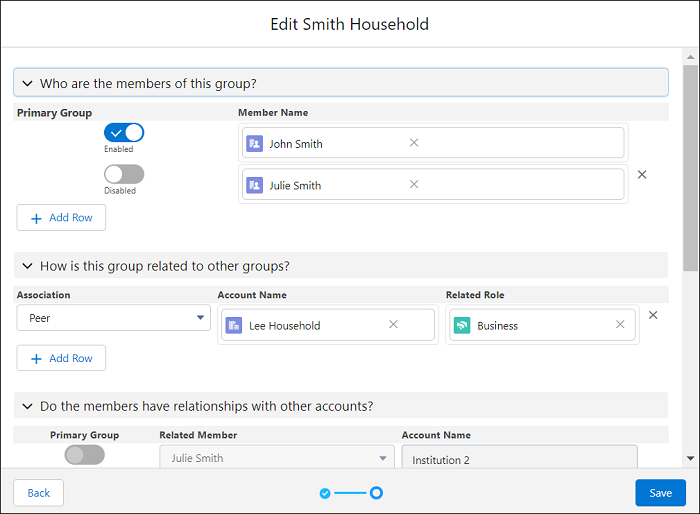
In the Group Builder Edit window, view, create, and update the records that are part of a household group.
 This is a Financial Services Cloud managed package feature.
To show the Group Builder Edit window, click the Edit button on the Group Members (Configurable) - Financial Services Cloud component, Group Members - Financial Services Cloud component, Relationship Group List - Financial Services Cloud component, or the Relationship Map - Financial Services Cloud component.
Configure the window to show up to four sections:
- Who are the members of this group?
- Shows the members that are part of the group.
- Account Contact Relationship object.
- This section is always shown in the window.
- How is this group related to other groups?
- Shows other groups that are related to this group.
- Account-Account Relationship object.
- Do the members have relationship with other accounts?
- Shows the relationships of the contacts of this group with other accounts.
- Account Contact Relationship object.
- Do the members have relationships with other people?
- Shows the relationships of the contacts of the group with other contacts.
- Contact-Contact Relationship object.
To let your users manage different relationships in a household group, show or hide sections in the window. Create field sets to show fields that are the most relevant to your users.
- Update the Feature Flag Setting Page Layout (Managed Package)
Financial Services Cloud offers advanced features to improve performance and workflow. You’ll find these features grouped under Feature Flag Setting in the Custom Metadata Types page. Use these settings to customize your org for your business needs. Add the Active checkbox to the Feature Flag Setting page layout. - Enable Management of Member Relationships with Other Accounts (Managed Package)
Use the Enable Relationships with other Accounts custom metadata types to enable expanded relationship group hierarchies and relationship cyclic validation. Select the Active checkbox to show the Do the members have relationships with other accounts? section of the Group Builder Edit window. - Enable Management of the Member’s Relationships with Other People (Managed Package)
Use the Enable Relationships with Other People custom metadata types to enable expanded relationship group hierarchies and relationship cyclic validation. Select the Active checkbox to show the Do the members have relationships with other people? section of the Group Builder Edit window. - Create Field Sets for the Group Builder Edit Window (Managed Package)
Configure the fields that show in the Group Builder Edit window. - Update the Field Sets in the Group Builder Edit Window (Managed Package)
Customize the field set that show in the Group Builder Edit window. - Add the Edit Group Record Action to an Account Node in ARC (Managed Package)
Customize the ARC Relationship Graph Component with a record action to open the Group Builder Edit window on Account nodes.
