
You are here:
Financial Deal Management
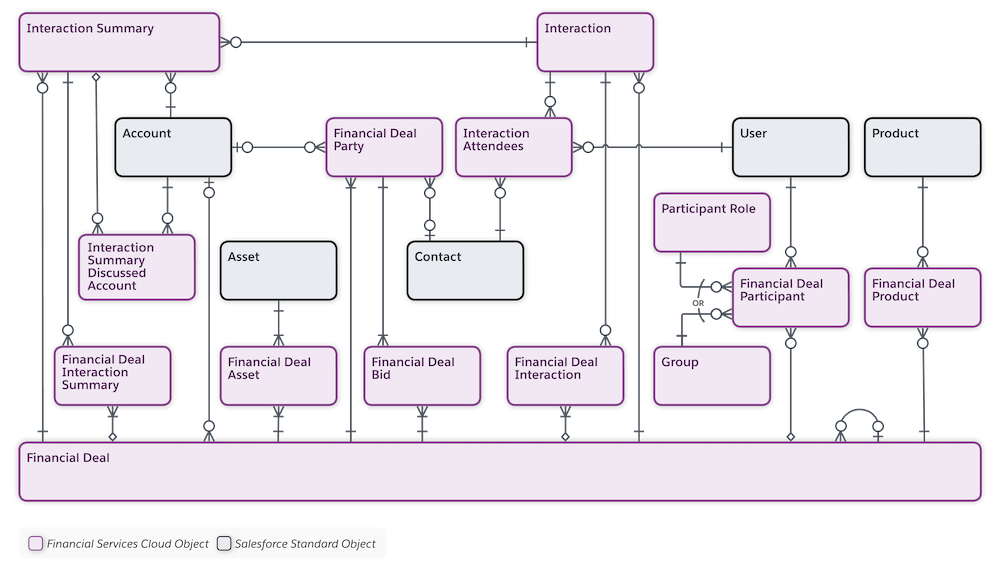
Track and manage a financial deal lifecycle. By using the Financial Deal Management data model, deal teams can manage every aspect of deal-related information and take advantage of compliant, role-based data sharing options. They can create new financial deal records that specify a deal’s stage, status, probability of deal success, and more. And to maintain compliance, they can share deal records that contain confidential information only with relevant stakeholders.
Explore and Learn
Watch this video to understand how Financial Deal Management works for Financial Services Cloud.
If you aren’t able to watch the view in full screen, open the
video on a new tab:  Financial Deal Management for Financial Services Cloud.
- Enable and Configure Financial Deals
To enable the financial deal management feature in your Salesforce org, enable the Deal Management setting. - Configure Sharing Settings for Financial Deals
Give your users access to financial deals using Salesforce data sharing features such as organization-wide defaults, role hierarchy, and rules. Like all standard objects, the Grant Access Using Hierarchies option is enabled for the Financial Deal object. As a result, users in a role hierarchy have access to financial deals for all users that are below them. To prevent users from gaining automatic access to financial deals owned by or shared with their subordinates in the hierarchy, disable the Role Hierarchy-Based Sharing for Deal Management setting. You can’t disable this option from the Organization-Wide Defaults list on the Sharing Settings page. - Work with Financial Deals
With Financial Deal Management data model, deal teams can take detailed meeting notes, specify the confidentiality level of a deal, its status, the probability of it closing successfully, and more. To maintain compliance, deal teams can also share notes that contain confidential information only with relevant stakeholders.
