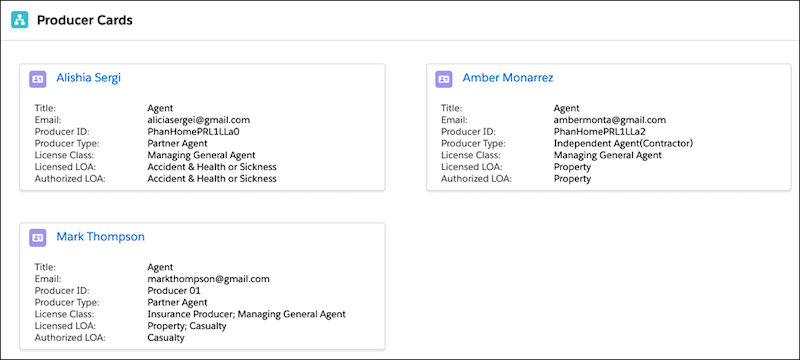
Your sales managers can easily view key information about their producers from multiple
objects, without going through multiple related lists.
Required Editions
Available in: Lightning Experience
Available in: Professional, Enterprise, and Unlimited
Editions
On the account or contact record page, from Setup, select Edit
Page.
Drag the Relationship Card component to the page.
Click anywhere on the component to select it.
In the Properties pane, under Card Types, click Select.
Select Producer Account Configuration or Producer
Contact Configuration, depending on the record page you are on.
Save your changes.
On a distributor’s record page (Account), sales managers see one card for each producer
working with that distributor. On a producer’s record page (Contact), they see one card for
the producer.
This table lists the labels on a producer card and their source fields.
Label
Description
Source Field
Title
Title of the producer, such as Agent.
Contact.Title
Email
Producer’s email address.
Contact.Email
Producer ID
A unique identifier for the producer.
Producer.Name
Producer Type
Type of the producer, such as Partner Agent, Captive Agent, or Independent
Agent.
Producer.Type
License Class
The class that the distributor’s license belongs to, such as Insurance
Producer, Managing General Agent, or Public Adjuster.
BusinessLicense.LicenseClass
Licensed LOA
The line of authority (LOA) that the producer has a license for. A producer can
have licenses for multiple LOAs, such as Property, Casualty, and Health.
BusinessLicense.LineOfAuthority
Authorized LOA
The line of authority for which the insurance company has authorized the
producer to act as its agent.
BusinessLicense.LineOfAuthority WHERE LineOfAuthority IS IN
DistributorAuthorization
Did this article solve your issue?
Let us know so we can improve!
Loading
Salesforce Help | Article
Cookie Consent Manager
Cookie Consent Manager
General Information
Required Cookies
Functional Cookies
Advertising Cookies
General Information
We use three kinds of cookies on our websites: required, functional, and advertising. You can choose whether functional and advertising cookies apply. Click on the different cookie categories to find out more about each category and to change the default settings.
Privacy Statement
Required Cookies
Always Active
Required cookies are necessary for basic website functionality. Some examples include: session cookies needed to transmit the website, authentication cookies, and security cookies.
Functional Cookies
Functional cookies enhance functions, performance, and services on the website. Some examples include: cookies used to analyze site traffic, cookies used for market research, and cookies used to display advertising that is not directed to a particular individual.
Advertising Cookies
Advertising cookies track activity across websites in order to understand a viewer’s interests, and direct them specific marketing. Some examples include: cookies used for remarketing, or interest-based advertising.