Set up an Integration to Get Credit Score History from Equifax
Integrate your Salesforce org with Equifax to access consumer credit history by using
the integration definition template. Set up provider operations to obtain credit history as a JSON
response or a PDF document.
Required Editions
Available in: Lightning Experience
Available in: Professional, Enterprise, and Unlimited Editions
User Permissions Needed
To create the integration definition for Equifax:
Digital Lending permission set
Get the equifax credentials from your Equifax account page.
In Setup, in the Quick Find box, enter Integration Definitions, and
then select Integration Definitions.
Click New and select Use a template.
Select EquifaxOneViewUS as the provider name.
For the Provider Operation Name, choose requestConsumerCreditReport
to get the JSON response with the credit history.
Enter a name and developer name.
Click Next.
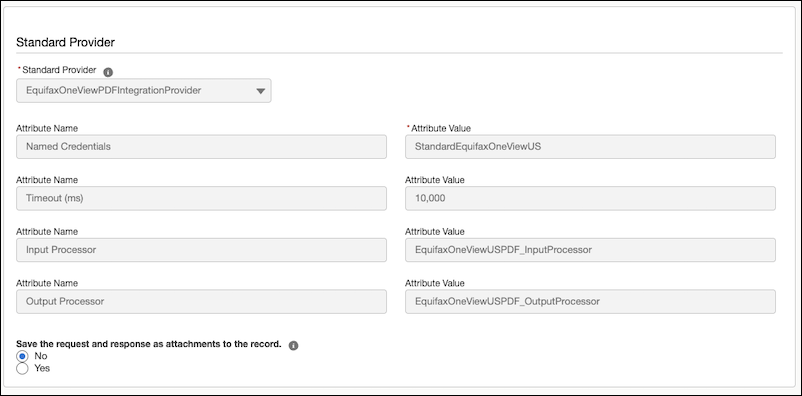
Click Configure External Credential.
The Input and Output Processors are populated automatically.
The integration definition is invoked by the EquifaxOneViewUSInputProcessor integration
procedure. The EquifaxOneViewUSInputProcessor integration procedure calls the
EquifaxOneViewUSInputProcessor data mapper.
The
EquifaxOneViewUS_InputProcessor_Procedure_1 input processor calls the
EquifaxOneViewUSInputProcessor data mapper. Similarly,
EquifaxOneViewUS_OuputProcessor_Procedure_1 output processor calls the
EquifaxOneViewUSOuputProcessor data mapper.
Enter the credentials created during the Equifax account configuration.
Save your changes
Activate the integration definition.
From the Named Credentials setup page, verify if the StandardEquifaxOneViewUS named
credential and its associated principal are created. Ensure that you can only see the Client ID
but not the Client Secret when checking the principal credentials.
To get the credit history
report in PDF format, create an integration definition using the EquifaxOneViewUS template.
Select requestConsumerCreditReportPDF as the provider operation
name.
Note To get the credit history report in PDF format, first set up the
integration definition by using the requestConsumerCreditReport provider
operation.
Did this article solve your issue?
Let us know so we can improve!
Loading
Salesforce Help | Article
Cookie Consent Manager
General Information
Required Cookies
Functional Cookies
Advertising Cookies
General Information
We use three kinds of cookies on our websites: required, functional, and advertising. You can choose whether functional and advertising cookies apply. Click on the different cookie categories to find out more about each category and to change the default settings.
Privacy Statement
Required Cookies
Always Active
Required cookies are necessary for basic website functionality. Some examples include: session cookies needed to transmit the website, authentication cookies, and security cookies.
Functional Cookies
Functional cookies enhance functions, performance, and services on the website. Some examples include: cookies used to analyze site traffic, cookies used for market research, and cookies used to display advertising that is not directed to a particular individual.
Advertising Cookies
Advertising cookies track activity across websites in order to understand a viewer’s interests, and direct them specific marketing. Some examples include: cookies used for remarketing, or interest-based advertising.