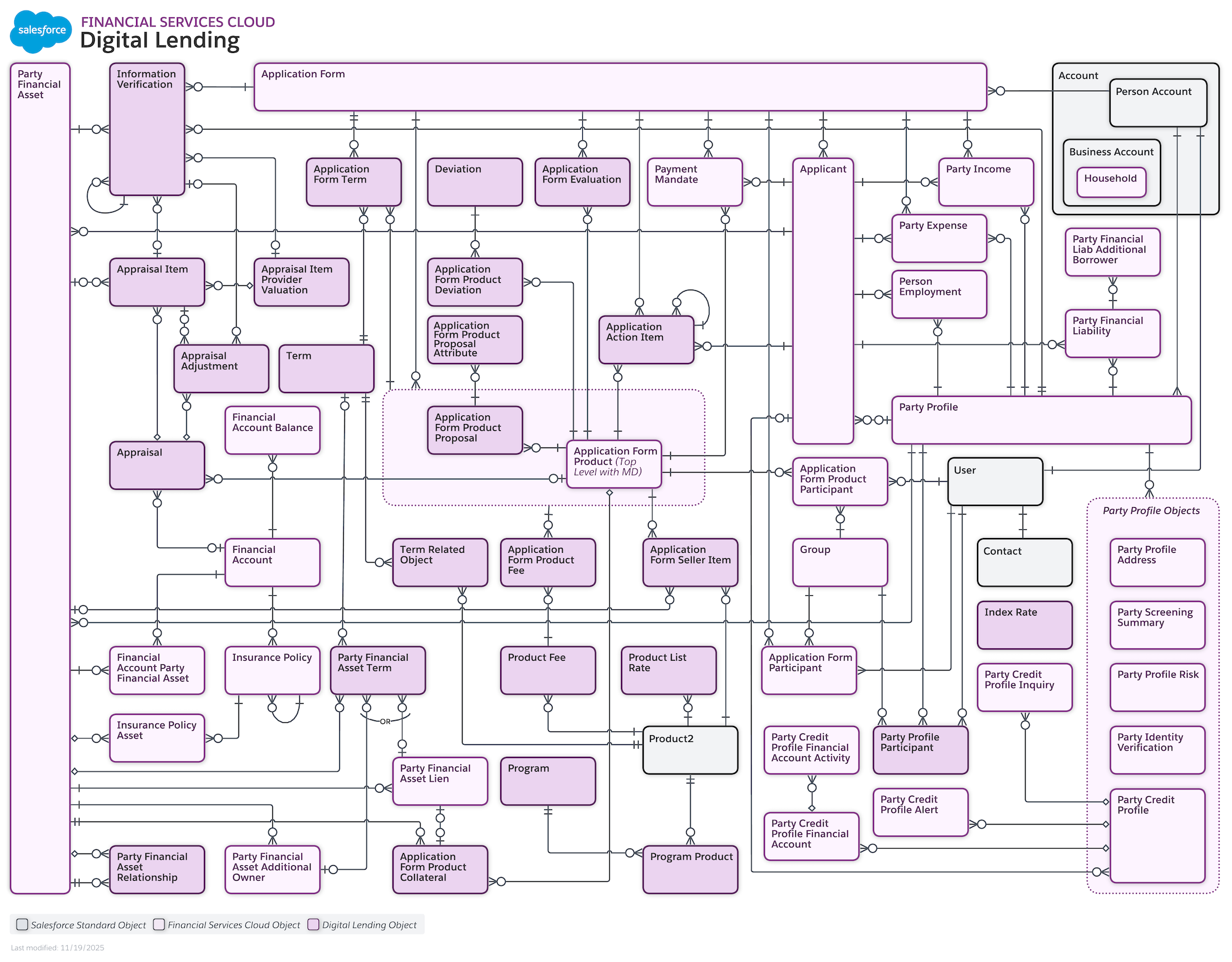
Configure a digital lending lifecycle to streamline loan applications for clients,
relationship managers, and underwriters. Consolidate data and verification results into a
unified workbench to accelerate decision-making and reduce manual overhead.
Required Editions
Available in: Lightning Experience
Available in: Professional, Enterprise, and Unlimited
Editions
Your customers can apply for a loan during a time that’s convenient for them by using Digital
Lending self-serve experience. An easy-to-configure Experience Cloud template supports the
self-serve channel loan application experience to meet the needs of your clients. To show
categories, products, and product attributes in Experience Cloud, use Product Catalog
Management. To determine the categories and products that an applicant sees based on their
Account context, and determine applicant loan eligibility, create product qualification rules.
The seamless process with automated checks help users complete a loan application quickly and
easily.
Digital Lending agent-assisted application experience provides your relationship managers and
loan officers with a seamless loan application process. Show a banker the loan products that
the applicant is eligible for by creating loan products, catalogs, attributes,
classifications, and rules by using Product Catalog Management. Guide bankers through the loan
application process, show contextual information, and provide access to relevant tasks by
using OmniStudio components and Stage Management.
Give underwriters easy access to loan application details to make informed decisions by using
Underwriter Workbench. The underwriters can get a consolidated view of a submitted loan
application on the application form product record page. They can view and edit assets,
liabilities, and collateral details, assign action items, confirm pricing, verify integration
results, such as Know Your Customer and credit checks, and approve or reject an application,
or send it for higher level approvals.
To configure settings, features, components, and a data model to create an end-to-end example
of Digital Lending implementation, complete the steps documented in Set Up and Manage Digital
Lending. Or, download and implement a GitHub repository of sample data to leverage the data
model and processes, and configure settings, features, and components to create an end-to-end
Digital Lending implementation. The repository provides a set of setup business and metadata
to help you accelerate your implementation of Digital Lending.
Did this article solve your issue?
Let us know so we can improve!
Loading
Salesforce Help | Article
Cookie Consent Manager
General Information
Required Cookies
Functional Cookies
Advertising Cookies
General Information
We use three kinds of cookies on our websites: required, functional, and advertising. You can choose whether functional and advertising cookies apply. Click on the different cookie categories to find out more about each category and to change the default settings.
Privacy Statement
Required Cookies
Always Active
Required cookies are necessary for basic website functionality. Some examples include: session cookies needed to transmit the website, authentication cookies, and security cookies.
Functional Cookies
Functional cookies enhance functions, performance, and services on the website. Some examples include: cookies used to analyze site traffic, cookies used for market research, and cookies used to display advertising that is not directed to a particular individual.
Advertising Cookies
Advertising cookies track activity across websites in order to understand a viewer’s interests, and direct them specific marketing. Some examples include: cookies used for remarketing, or interest-based advertising.