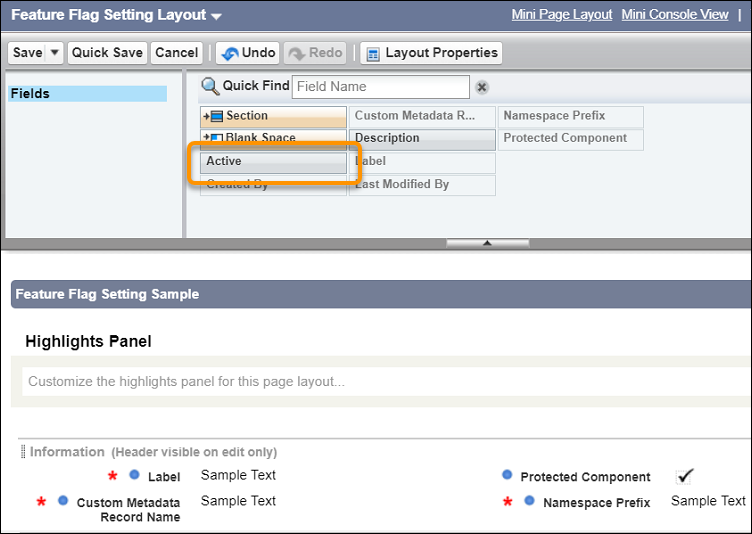
Update the Feature Flag Setting Page Layout (Managed Package)
Financial Services Cloud offers advanced features to improve performance and workflow.
You’ll find these features grouped under Feature Flag Setting in the Custom Metadata Types page.
Use these settings to customize your org for your business needs. Add the Active checkbox to the
Feature Flag Setting page layout.
Required Editions
Available in: Lightning Experience
Available in: Professional, Enterprise, and Unlimited
Editions
User Permissions Needed
To view the Group Builder Edit window
Financial Services Cloud Extensions OR FSC Sales OR FSC Service
This is a Financial Services Cloud managed package feature.
Feature Flag Setting
Description
Enable Enhanced Error Handling
Prevents silent failure of validation rules during trigger execution.
Enable Primary Contact after Undelete
Applicable to Individual accounts. When you restore a deleted Individual account from
the org’s recycle bin, this setting resets that account as the primary contact.
Enable Relationship Group Hierarchy
Enables the creation of expanded account hierarchies for groups. For example, adding a
subsidiary to a parent company or a household to another household.
Enable Relationships with other Accounts
When active, shows the Do the members have relationships with other accounts? section
of the Group Builder Edit window.
Enable Relationships with other People
When active, shows the Do the members have relationships with other people? section of
the Group Builder Edit window.
Query Optimization
Optimizes querying capabilities for orgs with large data sets and provides a database
query performance gain of 40–60%. Auto-enabled for new package installations starting Winter
’21.
From Setup, in the Quick Find box, enter Custom Metadata, and then
select Custom Metadata Types.
Select Feature Flag Setting.
Click Edit for Feature Flag Setting Layout.
Drag
the Active field from the palette to the Information section.
Save your changes.
Did this article solve your issue?
Let us know so we can improve!
Loading
Salesforce Help | Article
Cookie Consent Manager
General Information
Required Cookies
Functional Cookies
Advertising Cookies
General Information
We use three kinds of cookies on our websites: required, functional, and advertising. You can choose whether functional and advertising cookies apply. Click on the different cookie categories to find out more about each category and to change the default settings.
Privacy Statement
Required Cookies
Always Active
Required cookies are necessary for basic website functionality. Some examples include: session cookies needed to transmit the website, authentication cookies, and security cookies.
Functional Cookies
Functional cookies enhance functions, performance, and services on the website. Some examples include: cookies used to analyze site traffic, cookies used for market research, and cookies used to display advertising that is not directed to a particular individual.
Advertising Cookies
Advertising cookies track activity across websites in order to understand a viewer’s interests, and direct them specific marketing. Some examples include: cookies used for remarketing, or interest-based advertising.