
You are here:
Use Analytics for Retail Banking (Managed Package)
Analytics for Retail Banking dashboards visualize all the metrics and key performance indicators (KPIs) personal bankers require to grow client relationships.

Note Analytics for Retail Banking is an open source app, and is not included as a part of CRM
Analytics for Financial Services.
The app gives branch managers and retail bankers full visibility into customers, deposits, leads, referrals, and branch activity. Regional managers and personal bankers can also take advantage of insights from the dashboards to increase loans and deposits as well as customer satisfaction. Key performance indicators also help you build your retail banking business by increasing higher referral conversions, accelerating loan applications, and building customer retention.
To open the app:
-
From the app picker
 , select CRM Analytics
Studio to open the CRM Analytics home page.
, select CRM Analytics
Studio to open the CRM Analytics home page.
- Under Browse in the left column, select All Items.
- Select the Apps tab, then click your app to open it. If you can’t immediately find it, consult your Salesforce administrator to find out the name they gave it when creating the app.
- Click Run App. The app opens to the Retail Banking Home dashboard, which provides summary views of your customers, activities, and fees and charges.
- Click the Open Dashboard links beneath each summary chart to see details.

Example
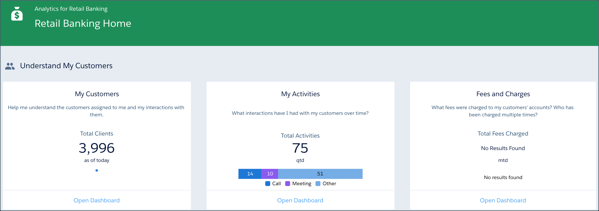
Analytics for Retail Banking Dashboard
- Analytics for Retail Banking Dashboards (Managed Package)
Analytics for Retail Banking dashboards give you insights into customers, deposits, leads, referrals, and branch activity.
Did this article solve your issue?
Let us know so we can improve!
