Help users search for available slots in their preferred work procedure step locations
with service territory prioritization rules. For every parent service territory where a therapy is
held, configure a set of child service territories where work procedure steps are held, with a
priority number assigned to each set.
Required Editions
Available in: Lightning Experience
Available in: Enterprise and Unlimited Editions with Health Cloud
or Life Sciences Cloud
User Permissions Needed
To access the Advanced Therapy Management app:
Health Cloud Advanced Therapy Orchestration permission set
To set up service territory prioritization rules:
Multi-Step Scheduling permission set
Service territory prioritization rules use ascending order of priority, that is, the
combination of conditions with priority number 1 is picked first.
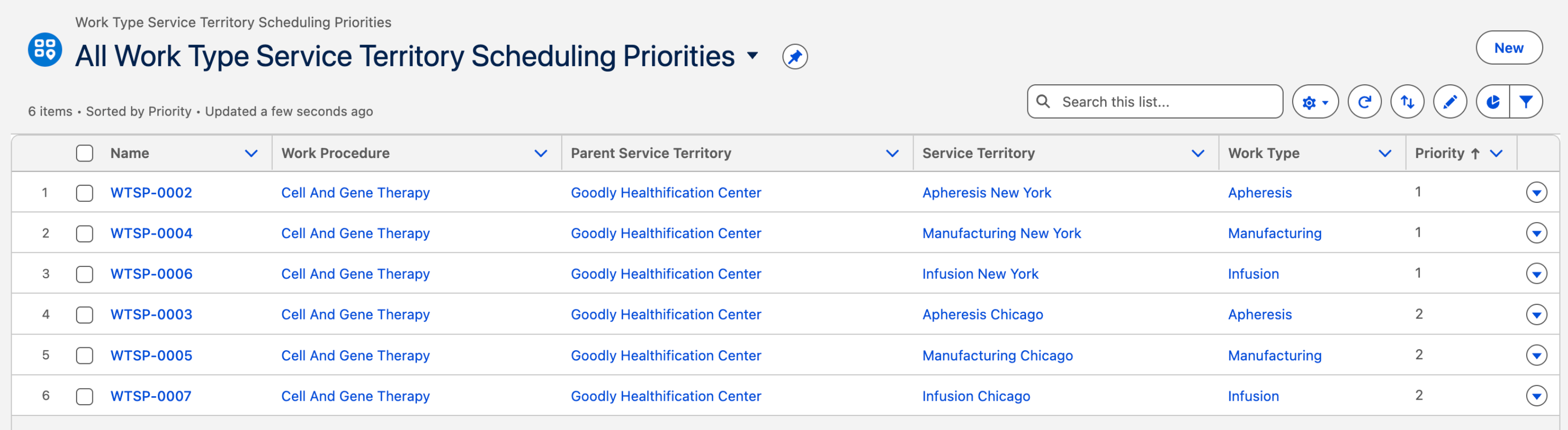
For example, Cell and Gene
Therapy is a work procedure held at Goodly Healthification Cell and Gene Therapy Center (parent
service territory). There are two sets of preferred locations for work procedure steps.
Set A: Apheresis, manufacturing, and infusion are all performed in New York (Priority
1)
Set B: Apheresis, manufacturing, and infusion are all performed in Chicago (Priority 2)
When
the treatment center coordinator searches for slots, the slot formation logic first checks for
available slots in Set A (Priority 1). If no slots are found, the slot formation logic checks
for the next preference (Set B, Priority 2).
Note Make sure that you enable Advanced Scheduling in your org. When Advanced Scheduling is
enabled, Advanced Therapy Management ignores service territory relationships while building
slot chains.
From App Launcher, find and select Work Type Service Territory Scheduling
Priorities, and click New.
Select the parent service territory.
Select the work procedure.
Select a work type that’s part of the selected work procedure.
Select the service territory where the selected work type is performed.
The service territory where the related work type is performed must be associated with a
parent service territory record, such as a treatment center.
The Usage Type field is autopopulated. Keep it as is.
Assign a priority number to the combination of conditions.
Set a priority number for all steps in a work procedure for the prioritization rule
to be valid.
Priorities are configured per work procedure. Different work procedures in the same
location can have different priorities.
The priority number must be unique for each combination of work procedure, work
type, parent service territory, and child service territory where the work type is
performed.
If the same work procedure exists in multiple locations, adjust the priority numbers
to reflect the preferred location order.
Enable Advanced Scheduling for these rules to take effect.
Save your changes.
Did this article solve your issue?
Let us know so we can improve!
Loading
Salesforce Help | Article
Cookie Consent Manager
General Information
Required Cookies
Functional Cookies
Advertising Cookies
General Information
We use three kinds of cookies on our websites: required, functional, and advertising. You can choose whether functional and advertising cookies apply. Click on the different cookie categories to find out more about each category and to change the default settings.
Privacy Statement
Required Cookies
Always Active
Required cookies are necessary for basic website functionality. Some examples include: session cookies needed to transmit the website, authentication cookies, and security cookies.
Functional Cookies
Functional cookies enhance functions, performance, and services on the website. Some examples include: cookies used to analyze site traffic, cookies used for market research, and cookies used to display advertising that is not directed to a particular individual.
Advertising Cookies
Advertising cookies track activity across websites in order to understand a viewer’s interests, and direct them specific marketing. Some examples include: cookies used for remarketing, or interest-based advertising.