
You are here:
Integrated Care Management
Integrated Care Management helps your care managers create enhanced care plans and coordinate care more efficiently for their patients. The feature’s integration with Discovery Framework (Assessments) gives care managers recommendations when they create care plans. Integrated Care Management is built over Omnistudio, which gives you greater flexibility to customize the feature to your organization’s requirements.
Reusable Templates and Problem Goal Intervention (PGI) Libraries
Create a library of definitions for problems, goals, and interventions that you can use to create reusable care plan templates. These templates help your care managers quickly create care plans for common scenarios, without having to manually create every section of the care plan from scratch. Reusable care plan templates and the PGI library also help you reduce the number of records you use in your org, with the added advantage of enhancing data consistency across records.
Care Gaps
When you enable Care Gaps in Integrated Care Management, you can identify and record gaps in patient care for a specified period. Care managers can automatically create care gaps by evaluating clinical measures using an Omniscript, which is part of Omnistudio. You can also import care gaps or create them manually.
User Interface
Integrated Care Management’s user interface is built using two Omnistudio Flexcards:
- IndustriesHCCarePlanManager Flexcard
You can place the IndustriesHCCarePlanManager Flexcard on person account, case, or clinical service request record pages. This Flexcard and its child cards display a patient’s care plans and the conditions, social determinants, goals, action plans, and interventions that make up those care plans. To view these care plan components, click
 for each care plan you want to expand. Users can use the New Care
Plan button to launch an Omniscript that creates care plans using
assessments, care gaps, and care plan templates.
for each care plan you want to expand. Users can use the New Care
Plan button to launch an Omniscript that creates care plans using
assessments, care gaps, and care plan templates.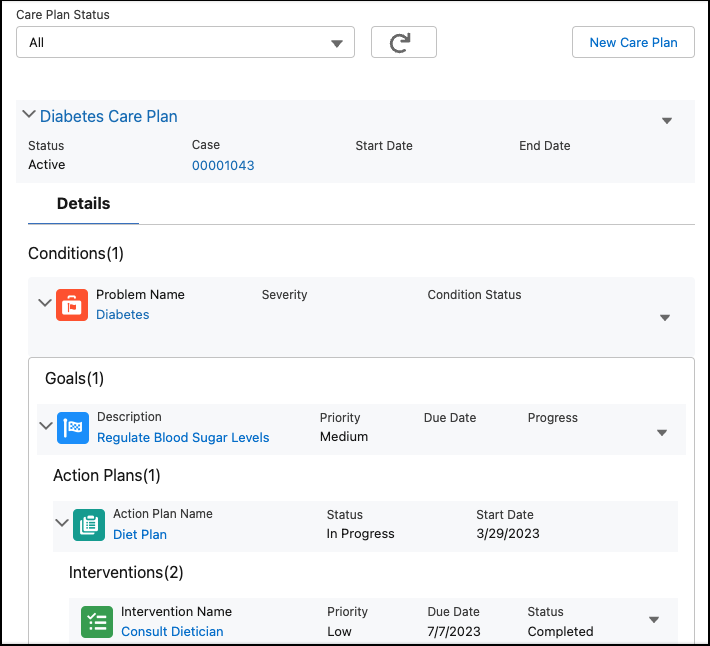
- HealthCloudCareManagementCareGapManager Flexcard
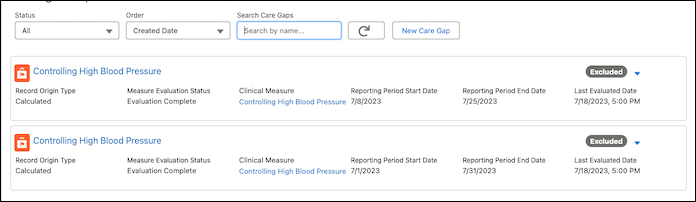
You can place the HealthCloudCareManagementCareGapManager Flexcard on a person account record page. This Flexcard displays a list of a patient’s care gaps and their details. Care managers can click New Care Gap to launch an Omniscript to evaluate a clinical measure and create a care gap.
- Integrated Care Management Data Model and Permissions
Integrated Care Management uses an FHIR R4 and USCDI-aligned data model to store its data and make it interoperable. - Integrated Care Management and the Discovery Framework
You can author assessments in the discovery framework that your care managers can use to collect information from their patients. The Discovery Framework data model and Omnistudio enable your users to create digital forms and manage every aspect of questionnaire-driven data collection in compliance with your policies. - Enable Integrated Care Management
Before your users can start using Integrated Care Management, you must enable the feature and some other settings first. - Define a Problem Goal Intervention Library
Setting up a reusable Problem Goal Intervention (PGI) library helps you reduce the number of duplicate records in your org and maintain a greater level of data consistency across similar records. A PGI library consists of problem definitions, goal definitions, and action plan templates. Definitions in this library are used in care plan templates and are instantiated to their corresponding care plan components when users use those templates. - Define Care Plan Templates
Define reusable care plan templates using the definitions you that you set up in your PGI Library. These templates determine the hierarchical structure of the care plans instantiated from them. Your users use these templates when they create care plans to add the problems, goals, and interventions they need. - Get Your Org Ready to Use the Discovery Framework
Health Cloud Assessments uses Discovery Framework and Omnistudio to build complex questionnaires. Befroe you can use Assessments, you must enable Discovery Framework, configure sharing and permissions, and place the Assessments component on a patient record page. - Set Up Assessments and Recommendations
To give your users recommendations when they create or update care plans, first create an assessment that they can use to gather information from patients. Then, map the questions and their responses to appropriate recommendations. Finally, set up a decision table to process that mapping. - Add the Care Plan Interface to Record Pages
To give your users quick access to care plans, add theIndustriesHCCarePlanManagerOmnistudio Flexcard to the person account, case, or clinical service request record pages. Flexcards display contextual information in an at-a-glance format and provide access to relevant tasks for the displayed data. - Backport the Expand All Button in the Care Plan Component
Care managers can click the Expand All button to instantly display a care plan's entire hierarchy including the problems, goals, interventions and their underlying elements. However, if you want care managers to expand and display specific care plan elements as needed, configure the flexcards with the correct integration procedures. - Configure Field-Level Security for Integrated Care Management
In order for your users create care plans, ensure they have access to certain fields that are disabled by default for most user profiles. - CRM Analytics for Integrated Care Management
CRM Analytics dashboards for Integrated Care Management give care managers insights into the status and performance of care plans, pending tasks, and their team’s task completion trends. Care managers have a comprehensive overview of patient data, making it easier for them to track high-priority tasks, manage task assignments, and take appropriate action to ensure high-quality patient care. - Expose Care Plans to Experience Site Users
Make the care plan component available on your Experience site so that authenticated users can create, update, and view care plans. Enable Digital Experiences, assign the required permissions, and create sharing rules so that users can access Omnistudio components and Health Cloud records on your site. Then, add the IndustriesHCarePlanManager Flexcard to your Experience Cloud site. - Care Gaps
When you enable and configure care gaps in Integrated Care Management, care managers can evaluate clinical measures, identify gaps in patient care, and create care plans from care gaps. The care gap Flexcard in the patient record page gives users a comprehensive view of a patient’s care gaps. This Flexcard also has a New Care Gap button that launches the Omniscript for evaluating a clinical measure and creating a care gap. - Clinical Measures for Care Gaps
Integrated Care Management supports creating care gaps from clinical measures. An Omniscript evaluates a measure against a patient’s data and if the measure isn’t satisfied, the Omniscript automatically creates a care gap record. To close an open care gap, care managers can reevaluate the measure after a patient has received the required care. - Care Gaps Access for Experience Cloud Sites
When you expose the Care Gap, Care Gap Criteria Result, Clinical Measure, Clinical Measure Criteria, and Clinical Measure Criteria Group objects in your Experience site, community users can see the care gaps identified for a patient. Then, care managers, patients, and their care teams can quickly take actions to close these care gaps. - MCG Integration with Integrated Care Management
The integration with Milliman Care Guidelines (MCG) enables care managers to access assessments based on clinical guidelines from MCG and create care plans for patients. MCG’s industry standard guidelines help users make informed decisions on patient care, resulting in improved outcomes such as reduced length of stay and higher independent quality ratings. - Streamline Patient Care with Integrated Care Management
Integrated Care Management helps care managers efficiently orchestrate care for their patients or members. With this feature, you can create enhanced care plans based on patient or member assessments. These enhanced care plans are also FHIR R4 and USCDI aligned, which makes them more interoperable than standard care plans. The integration with Milliman Care Guidelines (MCG) enables care managers to create care plans informed by industry standard guidelines, ensuring patient-centered care and improved outcomes.
