Identifying and Engaging with Prospects by Using Actionable Lists
Sales Innovations for prospect management offers powerful features to boost sales
performance and improve your revenue. Use the rich data source available with Salesforce to help
you create a targeted list of prospects, called actionable lists. Implement outreach programs to
engage with those prospects to maximize sales and meet your business goals.
Required Editions
Available in: Enterprise, Professional, Starter, and
Unlimited Editions
Create your actionable lists of targeted
prospects from multiple sources and prioritize the lists. Assign the lists to agents for
personalized prospect outreach. Enable your agents to effectively engage with the prospects
along with guidance for successful engagement. Get insights into the outreach efforts of agents,
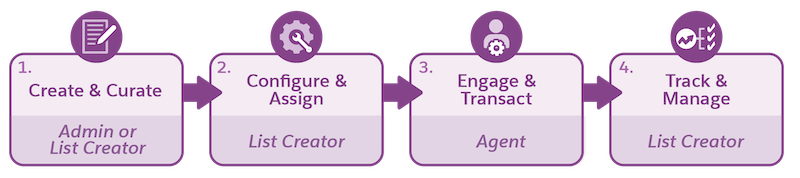
and make data-driven decisions to boost sales performance. Before you get started, understand
the end-to-end workflow and the key steps involved.
Step
Action
Who
How
1
Create an actionable list from data sources, such as CRM Analytics dataset and Data
Cloud segment.
Admin and list creators (Sales or Service Executives)
Choosing the Right Data Source for Actionable Lists
This table helps you choose the right data source for your Actionable Lists.
CRM Analytics Datasets (Actionable Segmentation)
Data Cloud Segments
Target List Size
Best for smaller actionable lists (up to 10K)
Best for medium actionable lists ( up to 50K)
List Creation and Filtering
Users filter and create actionable lists
Users instantiate actionable lists from Segments (pre-filtered)
Collaboration
Best for few users working on an actionable list
Best for many users working on an actionable list
List Updates
Users decide when to update
Segment refresh automatically updates the actionable list
Data Setup
Admins create actionable list definitions and associate datasets
Data Cloud users create Segments
Did this article solve your issue?
Let us know so we can improve!
Loading
Salesforce Help | Article
Cookie Consent Manager
General Information
Required Cookies
Functional Cookies
Advertising Cookies
General Information
We use three kinds of cookies on our websites: required, functional, and advertising. You can choose whether functional and advertising cookies apply. Click on the different cookie categories to find out more about each category and to change the default settings.
Privacy Statement
Required Cookies
Always Active
Required cookies are necessary for basic website functionality. Some examples include: session cookies needed to transmit the website, authentication cookies, and security cookies.
Functional Cookies
Functional cookies enhance functions, performance, and services on the website. Some examples include: cookies used to analyze site traffic, cookies used for market research, and cookies used to display advertising that is not directed to a particular individual.
Advertising Cookies
Advertising cookies track activity across websites in order to understand a viewer’s interests, and direct them specific marketing. Some examples include: cookies used for remarketing, or interest-based advertising.