
You are here:
Enable Allow Activities on Activity Template
Before you upgrade Insurance, enable the Allow Activities setting on the Activity Template object.
- From Setup, click the Object Manager tab.
- Click Activity Template.
- Click Edit.
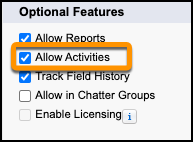
- Scroll down to the Optional Features section and verify that Allow Activities is selected.
-
If Allow Activities is not selected:
- Select Allow Activities.
- Click Save.
Did this article solve your issue?
Let us know so we can improve!
