You are here:
Create Approval Processes for Financial Authorization Workflows
Create an approval process that routes payment authorization requests to the appropriate manager or supervisor.
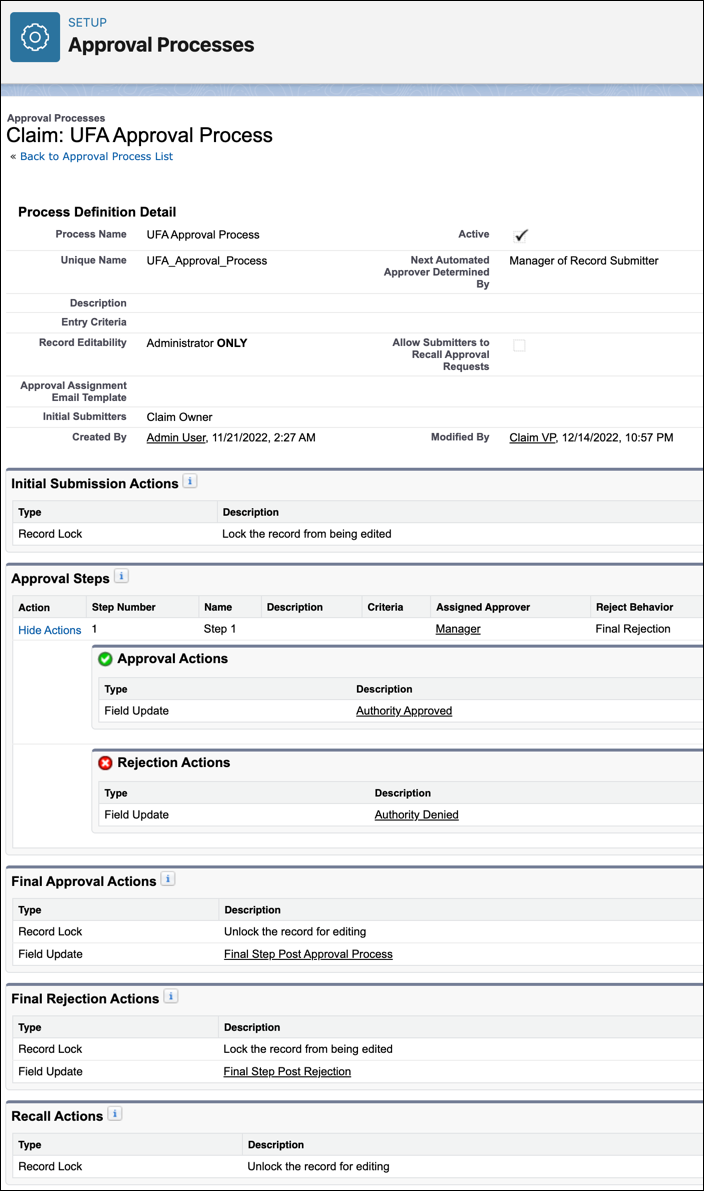
To align your approval process with pre-configured tools for financial authorization workflows, have the Approval Action update the field to Authority Approved. Have the Rejection Action update the field to Authority Denied.
The approval process locks the Claim record until an approver approves or rejects the request. To lock other claim objects during the approval process, use locking statements in Apex.
After an approver acts on a request, claims have a financial authority status of either Authority Approved or Authority Denied only temporarily. These statuses immediately trigger either an Approved flow or a Rejected flow. The flows update claim coverage and claim coverage payment detail records to the correct status. In the approval process, we recommend you configure the Final Approval Action and Final Rejection Action to update the claim's financial authority status back to No Authority Pending. If another approval process kicks off, the claim switches from No Authority Pending back to Pending Authority again.