
You are here:
Insurance Rules
Rules define the way Insurance products behave when those products are quoted, sold, and serviced.
With so many different types of rules available for Insurance products, it's important to use the right rules at the right time for the right jobs.
Rules Areas
You can use Insurance rules in five areas.
-
Product
-
Underwriting
-
Eligibility
-
-
State Model
-
State Transition
-
-
Optional Coverage
-
Eligibility
-
Required Coverage
-
Default Selected
-
Validation
-
Relationship
-
-
Attribute
-
Set Value
-
Set Default Value
-
Message
-
Hide
-
-
Attribute Value
-
Hide
-
Types of Rules, Defined
Here's what each type of rule does:
- Default Selected
You specify when an optional coverage is selected by default using these rules.
Users can manually deselect coverages selected by these rules.
For example, for Roadside Assistance optional coverage in an Auto policy, you can create a rule that makes Roadside Assistance selected by default when Comprehensive coverage is selected.
- Eligibility
When an eligibility rule evaluates to true, the product or optional coverage is available to the user during the quote process.
For example, you use eligibility rules to filter out products that aren't available in a customer's location.
For an optional coverage example, you can use an eligibility rule on an Economy Homeowners product to filter out an optional coverage for Fine Art.
- Hide
When a hide rule evaluates to true, the system hides the attribute or attribute value the rule is attached to.
- Message
When a message rule evaluates to true, the system displays the message you input into the rule.
- Relationship
Use relationship rules to create relationships between optional coverages. For example, you can set a relationship rule that makes Optional Coverage A and Optional Coverage B mutually exclusive.
- Required Coverage
For some insurance products, an optional coverage may be required. You can create rules that describe in what situations an optional coverage is required.
For example, an auto insurance policy requires Collision Deductible Waiver coverage when Comprehensive coverage is selected.
- Set Default Value
Use Set Default Value rules to decide on a value to display as the default for an attribute.
When a set default value evaluates to true, the default value specified in the rule becomes the default value for the attribute. Users can choose or enter a different value if they want to.
- State Transition
Similar to underwriting (workflow) rules, state transition rules define what action and/or transition happens when a rule evaluates to true.
You set up state transition rules on the state model. That way, the state transition rules apply to all products that use the state model.
- Underwriting (workflow)
Underwriting (workflow) rules define what action or transition happens when a rule evaluates to true.
Underwriting (workflow) rules get set up on products and have access to all product attributes and attribute values. They can be invoked for the quote object, policy object, or claim object.
Rules get hooked up to Vlocity Actions which get invoked when the rule evaluates to true.
For example, some of the things the Vlocity Actions you attach to rules can do are:
Decline
If a Decline rule evaluates to true, the quote or policy is not issued.
Automatic Issue
If an Automatic Issue rule evaluates to true, the quote or policy is issued.
Underwriter Review
If an Underwriter Review rule evaluates to true, the quote or policy goes to an underwriter for review.
Generate Trailing Documents
If a Generate Trailing Documents rule evaluates to true, the specified documents get generated.
- Validation
If you need to validate optional coverages (such as making sure an optional coverage is not selected when it's set as mutually exclusive to another optional coverage that is selected), you can create optional coverage validation rules. These rules can display errors message you write that tells your users what they need to do to fix the problem so that they can add the optional coverage to their quotes or policies.
- Set Value
Use Set Value rules to set an attribute value on a coverage, insured item, or product. When a Set Value rule evaluates to true, the specified value is set on an attribute.
For example, if a Deductible attribute has a Set Value rule, when that rule evaluates to true, the Deductible attribute value is set to the amount specified in the rule.
Where Rules Get Run
Most Insurance rules are run on the back end; that is, by the Apex server.
The following types of rules are run on the front end; that is on the JavaScript client:
-
Attribute
-
Hide
-
Message
-
-
Attribute Value
-
Hide
-
When to Use Which Types of Rules
All rules are not created equal, and each type works best for certain business needs.
This chart gives a basic overview of best practices for using rules in the different areas.
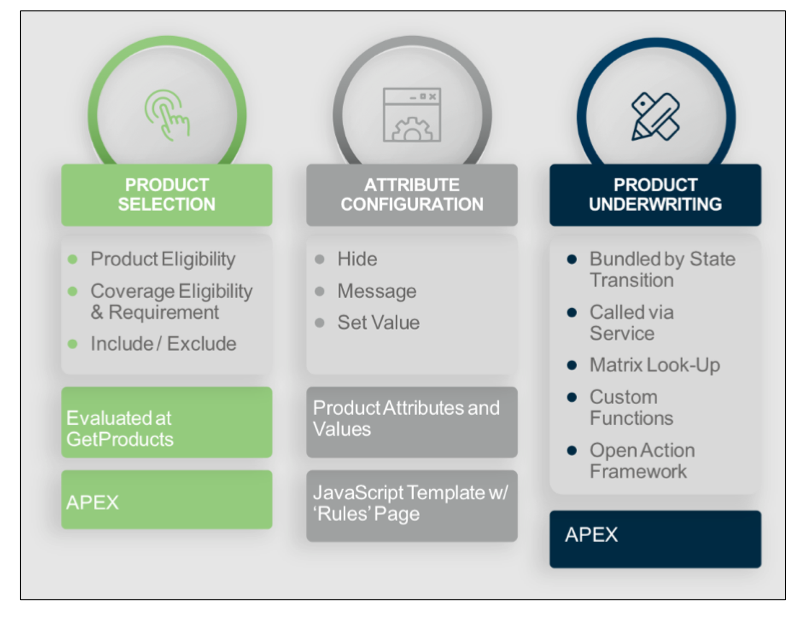
Another way to think about when to use rules is based on when in the user experience the rules run and impact the experience.
-
Before Insurance displays products to the user:
-
Eligibility rules
-
Set up on the Product > Rules tab of a root product spec.
-
Run by invokeProductRules.
-
-
-
When products are displayed:
-
Optional coverage rules (all types)
-
Set up on the Product > Coverages tab of a root product spec, on specific coverages.
-
Run by InsProductService:getRatedProducts, the single root quote UI, multi-root quote UI, and large group quote UI.
-
-
Attribute rules
-
All types of attribute rules are set up on the Attributes tab of a root product spec, coverage spec, insured item spec, insured party spec, or rating facts spec.
-
Attribute set default value rules are run by InsProductService:getRatedProducts.
Keep in mind that:
-
If a single attribute is set up with both a Set Value attribute rule and a Set Default Value attribute rule, getRatedProducts applies only the Set Default Value attribute rule.
-
As a best practice, when you set up attribute rule expressions, don't reference attribute values in lower-level structures.
-
-
Attribute hide rules and message rules are run by Javascript on the front end.
-
-
Attribute value hide rules
-
Set up on the Product > Attributes tab of a root product spec, coverage spec, insured item spec, insured party spec, or rating fact spec.
-
Run by JavaScript on the front end.
-
-
-
When users configure products, insured items, insured parties, and coverages:
-
Optional coverage validation rules and relationship rules are run by InsProductService:repriceProduct, single-root quote UI, multi-root quote UI, and large group quote UI.
-
Attribute set value rules are run by InsProductService:repriceProduct.
-
Attribute message rules and hide rules are run by Javascript on the front end.
-
Attribute value hide rules are run by Javascript on the front end.
-
-
After users submit configured products for quote, policy issue, or MTA (endorsement):
-
Underwriting rules
-
Set up on the Rules tab of the root product spec.
-
Run by the invokeProductRules service.
-
-
State transition rules
-
Set up on the Rules Admin tab of the State Model Version.
-
Run by the StateRuleService: invokeRules service.
-
-
How and Where the System Handles Rules
Insurance services and UIs execute rules and different times and in different ways.
Here's how and where Insurance services execute rules:
Rules |
Services |
||||||
|---|---|---|---|---|---|---|---|
Area |
Type |
Engine |
InsProductService: getRatedProducts |
InsProductService: repriceProducts |
invokeProductRules |
InsProductService: runRules |
insQuoteService: getQuoteDetails |
Product |
Eligibility |
Apex |
✔️ |
||||
Underwriting (workflow) |
Apex |
✔️ |
|||||
State Model |
State Transition |
Apex |
|||||
Optional Coverage |
Eligibility |
Apex |
✔️ |
✔️ |
✔️ |
||
Required Coverage |
Apex |
✔️ |
✔️ |
||||
Default Selected |
Apex |
✔️ |
✔️ |
||||
Validation |
Apex |
Optional Defaults to False |
Optional Defaults to False |
✔️ |
|||
Relationship |
Apex |
Optional Defaults to False |
Optional Defaults to False |
✔️ |
|||
Attribute |
Set Value |
Apex |
Optional Defaults to True |
||||
Set Default Value |
Apex |
Optional Defaults to True |
|||||
Message |
JavaScript |
||||||
Hide |
JavaScript |
||||||
Attribute Value |
Hide |
JavaScript |
|||||
Here's how and where the Lightning Web Component-based Quote UI executes rules:
Rules |
Quote LWC Actions |
|||||
|---|---|---|---|---|---|---|
Area |
Type |
Engine |
Add Root Product |
Add Insured Item |
Edit Insured Item |
Add Optional Coverage |
Product |
Eligibility |
Apex |
||||
Workflow |
Apex |
|||||
Optional Coverage |
Eligibility |
Apex |
✔️ |
✔️ |
✔️ |
|
Required Coverage |
Apex |
✔️ |
✔️ |
✔️ |
||
Default Selected |
Apex |
✔️ |
✔️ |
|||
Validation |
Apex |
✔️ |
✔️ |
✔️ |
✔️ |
|
Relationship |
Apex |
✔️ |
✔️ |
✔️ |
✔️ |
|
Attribute |
Set Value |
Apex |
✔️ |
✔️ |
✔️ |
✔️ |
Set Default Value |
Apex |
✔️ |
✔️ |
|||
Message |
JavaScript |
✔️ |
✔️ |
✔️ |
✔️ |
|
Hide |
JavaScript |
✔️ |
✔️ |
✔️ |
✔️ |
|
Attribute Value |
Hide |
JavaScript |
✔️ |
✔️ |
✔️ |
✔️ |

What's Next
Start planning your rule sets for different areas of your product models and state models.
- Underwriting (Workflow) Rules
Underwriting (workflow) rules can help automate your business processes as quotes get issued as policies, when policies become eligible for mid-term adjustments (MTAs), when it's time to renew or cancel a policy, and for claims processing. - Create Product Eligibility Rules
Insurance uses eligibility rules to help determine what insurance products and optional coverages a customer is eligible for. You can use eligibility rules in the quote process to screen out insurance products and optional coverages that a potential customer doesn't qualify for. For example, you can create an eligibility rule for a Medicare supplement insurance product that screens out anyone under the age of 65. - Optional Coverage Rules
Several types of rules apply to optional coverages on Insurance and Health products. Set rules up based on eligibility for optional coverage, whether optional coverages are required or selected by default, and valid combinations of optional coverages. - Attribute Rules
Show users and customers exactly the right product attributes and attribute values for the insurance products that you quote, sell, and service. - Create Attribute Value Rules
Use Attribute Value Rules to determine if and when an attribute value is visible to users. - Rules Log
The Rules Log is a Lightning web component that shows the history of all the rules run that result in a state transition. These details help users understand how records have transitioned from one state to another. - Using a Matrix Lookup with Insurance Rules
You can use a matrix lookup when you create underwriting eligibility rules.
