
You are here:
Learn About Claims Management for Insurance
Set up claim products and create dynamic first notice of loss intake flows for your users. Give claims adjusters a cohesive view of claims and financial data so they can efficiently assess and adjudicate claims. Establish financial controls and automatically route requests for financial approval to the appropriate supervisors and managers.
- Claims Configuration Checklist
- Claim Product Models
- First Notice of Loss Flow
- Claims Administration
- Claims Services
Claims Configuration Checklist
Administrators and developers configure the products and tools used by claims team members.
- Create claim injury specs and claim property specs.
- Create claim coverage specs and configure the payment detail form for each coverage spec.
- Create claim products.
- Create first notice of loss (FNOL) flows.
- Set up the Adjuster Workbench by configuring views of claim details, configuring payment actions based on claim status, and more.
- Configure the Insurance History Lightning web component (LWC) and add the History tab to claim records.
- Create a payment authorization workflow.
Claim Product Models
Claim product models include involved property specs, involved injury specs, and the same coverage specs used in your insurance product models. You can reuse claim product specs across multiple claim product models, even across different lines of business. For example, you can create an involved property spec that models third-party damaged property. You can then use it on Auto, Watercraft, Motorcycle, and RV insurance claim products.
Claim product models also include attributes. As part of the product modeling process, administrators create attributes that describe the coverages to add to insurance products and claims products. Enforce policy terms such as limits and deductibles by using power attributes, a special kind of attribute with extra metadata.
Track individual occurrence-based policy terms, such as per claim and per person limits on an auto claim. Also track aggregate policy terms across multiple claims, such as when a policyholder has met their policy deductible on a pet insurance policy.
Claim product models can also include claim product rules.
First Notice of Loss Flow
The First Notice of Loss (FNOL) flow is usually an OmniScript that a policyholder, broker, or agent interacts with when they first need to file a claim.
The FNOL flow takes in data, creates a claim record, and updates the claim record with additional data about the loss. It can also take documents like police reports and accident photos.
Rules you created on the claim product can be run at the end of the FNOL flow. At runtime, these rules can automate actions and transitions, such as opening claim coverages and creating claim line items on those claim coverages, and moving a claim record from Draft to Adjuster Review.
Claims Administration
After the FNOL flow creates the claim record, and the corresponding product rules on the claim record have run, the claims adjuster takes over administering the claim. From the Adjuster Workbench, claims adjusters monitor claim activity and recovery efforts. They also take care of business, from managing reserves, to adding loss and expense line items, to issuing payments.
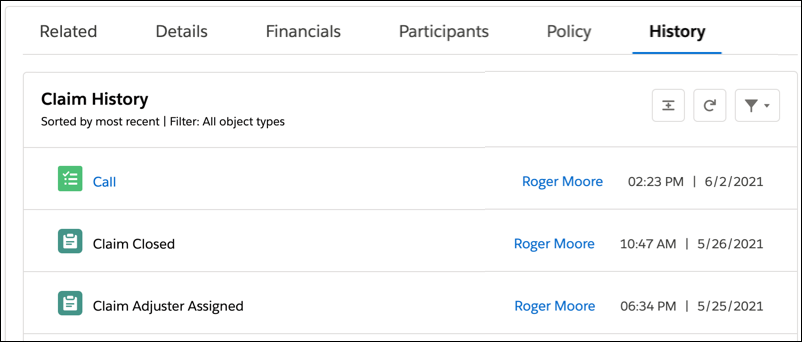
A Claim History timeline shows claim activity in a single, chronological feed that's easy to scan and drill into. Everyone on the claims team can see essential activity at a glance and expand content like notes and emails to dive into more detail.
Accelerate productivity with automation tools.
- Configure Omni-Channel to route claims to the best-fit person on your team.
- Create action plans that assign tasks and deadlines to claim team members based on their role.
- Use a payment authorization workflow to establish financial controls and automatically route requests for financial approval to the appropriate supervisors and managers.
Claims Services
Claims services retrieve data from the system, write data to the Claim object, and complete other tasks at runtime in claims flows.
Class |
Method |
|---|---|
InsClaimService |
createUpdateClaim createUpdateClaimRecoveries getClaimRecoveries getRuleLogs invokeProductRules invokeRules verifyCoverage |
InsClaimItemService |
add calculateCoverages cancelPayments claimCoverageValuation createPayments delete getClaimItems getClaimLineItemFields getCoverages getInsuranceCodes getInvolvedItems getPartyContacts getPayees invokeInitiatePaymentIP saveInvolvedItem update |
InsClaimCoverageService |
createUpdateCoverage invokeProductRules |
InsClaimRecoveryService |
getRecoveries save |
InsPolicyService |
createPolicyTerms |
InsPolicyTermsService |
getCurrentStanding process |
