
You are here:
Verify Identity
How you verify the identity of a caller depends on how your admin has configured the process.
Verify a caller’s identity before processing their requests involving sensitive information, and store details about the interaction. Additionally, if a call is about someone other than the caller, you’re able to perform verification for both people.
- Click Phone from the utility bar.
Your org has a mock integration with the Salesforce Computer Telephone Integration adapter that mimics a call.
 Note
NoteIf your organization hasn’t implemented computer telephony integration (CTI), you must first create a blank Engagement Interaction record to access the identity verification flow.
- Click Login and then click the telephone icon.
- Click Accept.
When you accept a call, an Engagement Interaction record page opens. Depending upon whether the initiating attendee (the caller) is calling from a registered or unregistered number, the Initiating Attendee field in the record page is auto-populated or left empty.
- Talk to the caller to understand the purpose of the call, then select a reason, and
click Next.
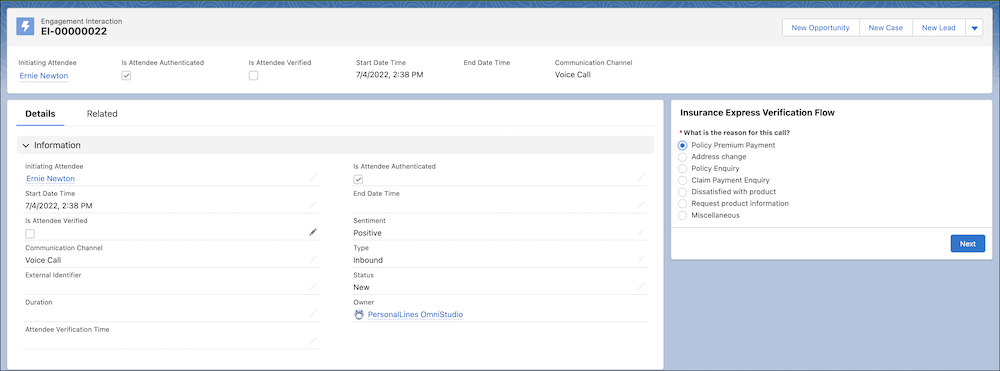
- Select who the call is about and click Next.
Only when the second-level verification succeeds, process the caller’s request.
- If the call is about the caller, verify the caller’s identity. If verification succeeds, process their request.
- If the call is about someone else, you have to first verify the identity of the caller.
- If verification succeeds, you have to verify the identity of the person the caller’s authorized to represent.
- Select the search type, search for the caller using keywords or available fields, and
click Next.
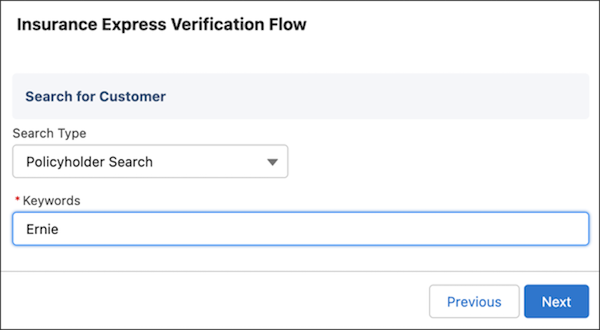
The search type menu enables you to specify which data is to be searched.
NoteIf the call’s about someone else, you have to search for the caller even if the caller’s number was registered.
- Select the relevant search result and click Next.
- Ask questions to verify the required and additional information.
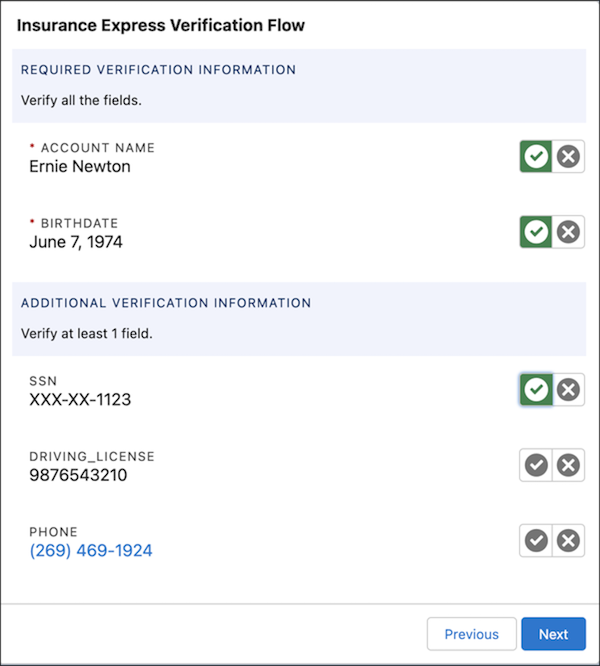
For example, your verification process could require asking a caller's account name, birthdate, and driver's license number. The admin configures the questions.
Verification succeeds only if the caller correctly answers all the questions in the required information section and the required number of questions in the additional information section. If the call is about the caller, verification ends here. Upon successful verification, process the caller’s request. If the call is about someone else, you have to now verify the identity of the person the call is about.
- Select the search type, search for the caller using keywords or available fields, and
click Next.
The search type menu enables you to specify which data is to be searched.
NoteIf the call’s about someone else, you have to search for the caller even if the caller’s number was registered.
- Select the relevant search result and click Next.
- Ask questions to verify the required and additional information.
After the user is verified, the Client 360° page for the customer is displayed.
