
You are here:
Insurance Quoting
To estimate how much a policy would cost, you use a quote. Create a quote by selecting products offered by the provider and using information supplied by the customer to calculate the estimate. The Insurance quoting solution brings everything you need right to your fingertips and does all of the heavy lifting for you.
Insurance issues policies from quotes. Think of a quote as the foundation on which you build the policy.
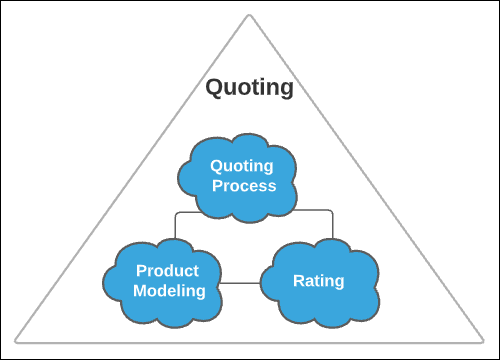
Three key aspects of quoting are addressed by corresponding Insurance components: product modeling, rating, and quoting processes. All three play a role to deliver the full quoting solution.
Product Modeling
Product Modeling (part of Product Management) supports defining the product or plan to offer, its characteristics, and the details that affect the rating calculation.
When you generate a quote, it pulls the data and configurations from the product model into the quote record. The product model is where you configure what attribute values a user sees. When creating a quote, users can select and modify values of attributes based on the configurations set on the product model.
Rules and taxes and fees are also set up on the product model.
See Build Insurance Product Models to learn more.
Rating
A rating is a risk-based calculation of a premium based on a set of input characteristics. For example, in an auto insurance policy, rating input characteristics include the type of vehicle, number of miles driven annually, and safety features of the car. Ratings determine the cost a customer needs to pay in order for the insurance carrier to take on the risk of that customer.
The rating procedure prices the product(s), then sends the prices to the quote for the user to see. Every coverage price, insured item price, and total premium comes from the rating procedure.
See Learn About Rating Procedures to learn more.
Quoting Processes
Product modeling and rating work together for the quoting processes and create the final quote. Quoting processes use services to find products and rate them.
Here's the basic flow a quoting process follows:
-
The user enters information about who and what needs insurance coverage.
-
The system uses the
getRatedProductsservice to find, rate, and display applicable product(s) and the prices for those products. -
The user chooses one or more insurance products.
-
The system creates the initial quote record.
-
The user customizes attributes, chooses optional coverages, and makes any other available modifications.
-
The system updates the quote record and runs rules, then confirms the final quote to the user.
You can build quoting processes for your users in two ways: Lightning web components and OmniScripts. Lightning web components make up the processes that your internal users can use to create quotes for your customers. Use OmniScripts to create processes to guide your external users (like customers and partners). LWCs and OmniScripts both use services to pull product and rating information into the quoting process.
Bringing It All Together
Check out Quote Business Process as an example of an auto quoting business process (from our Insurance Property and Casualty Application Suite) to see OmniScripts and the Quote LWC in action.
Next Steps
Want to see another quoting example? Check out Property Quote Business Process.
Ready to try quoting for yourself? See Single Root Quoting and Multi-Root Quoting to learn more.
- Insurance Quoting Processes
You can build quoting processes for your users in two ways: Lightning web components and OmniScripts. Lightning web components make up the processes that your internal users can use to create quotes for your customers. Use OmniScripts to create processes to guide your external users (like customers and partners).
