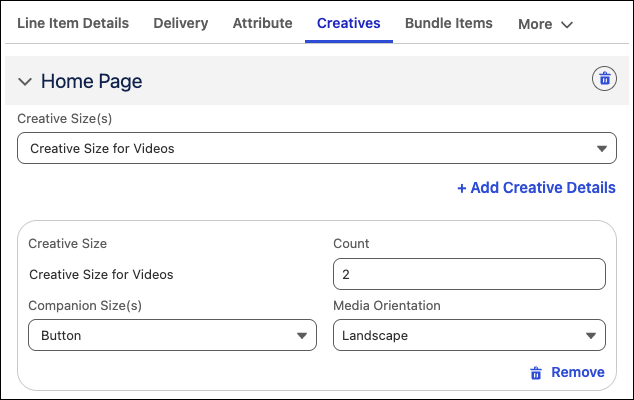
Ad Spaces and Creatives Tab of Line Item Configuration Panel
On the Ad Spaces and Creatives tab, media planners can select the ad spaces where ad
placements are planned to be served. Along with the ad space, the media planner can also select
the creative sizes for the ad placements. The Ad Spaces and Creatives tab isn't applicable for ad
placement bundles and services.
Required Editions
Available in: Lightning Experience
Available in: Enterprise, Performance, and Unlimited editions with Media Cloud -
Advanced
Ad Spaces
When configuring the publisher's product portfolio in Salesforce, the ad sales admin
associates simple ad products with the publisher's media property ad spaces where the ad product
can be served. When a media planner adds an ad placement to a media plan, the ad spaces related
to the ad placement automatically become available for media planners to select from.
If an ad sales admin marks an ad space as the default ad space for an ad product, the ad space
is automatically added as an ad space for the ad placement. In cases when there are multiple
default ad spaces or in cases where media planners want to explicitly ensure that a specific ad
space doesn't serve an ad placement, the media planner can exclude the ad space for the ad
placement. For excluded as spaces, the media planner can;t add creative sizes.
Creative Sizes
After a media planners add the ad spaces for an ad placement, they can select the creative
sizes to include for the ad space. After the media planners select the creative sizes, they can
specify the details of the creatives that are planned to be served on the creative size:
The count of creatives required for the creative size
The companion creative that's planned to be served with the primary creative
The orientation of the creatives
If media planner aren't able to find the ad spaces or creative sizes they expect to see for an ad
placement, they can ask the ad sales admin to associate the ad space with the ad product or
associate the creative size with the ad space. See Create Media Properties and Ad Attributes.
Ad Space and Creatives for Videos
A media planner at Gotham Media has added a pre-roll video as an ad placement in a media plan.
On the Ad Spaces and Creatives tab, the media planner adds the home page of the publisher's
website as the ad space and then selects the creative size that represents the video player on
the home page. As a companion creative, the media planner has added a button that will redirect
to the advertiser's shopping site.
Did this article solve your issue?
Let us know so we can improve!
Loading
Salesforce Help | Article
Cookie Consent Manager
General Information
Required Cookies
Functional Cookies
Advertising Cookies
General Information
We use three kinds of cookies on our websites: required, functional, and advertising. You can choose whether functional and advertising cookies apply. Click on the different cookie categories to find out more about each category and to change the default settings.
Privacy Statement
Required Cookies
Always Active
Required cookies are necessary for basic website functionality. Some examples include: session cookies needed to transmit the website, authentication cookies, and security cookies.
Functional Cookies
Functional cookies enhance functions, performance, and services on the website. Some examples include: cookies used to analyze site traffic, cookies used for market research, and cookies used to display advertising that is not directed to a particular individual.
Advertising Cookies
Advertising cookies track activity across websites in order to understand a viewer’s interests, and direct them specific marketing. Some examples include: cookies used for remarketing, or interest-based advertising.