
You are here:
Understand Google Ad Manager Integration with Advertising Sales Management
Advertising Sales Management with Google Ad Manager involves two integrations: a pre-built orchestration plan, and an integration procedure called Check Availability. Learn more about the integration details and expected integration workflow.
 This is an Advertising Sales Management on Managed Package feature. For Advertising Sales
Management on Salesforce Platform, see Advertising
Sales Management on Salesforce Platform.
This is an Advertising Sales Management on Managed Package feature. For Advertising Sales
Management on Salesforce Platform, see Advertising
Sales Management on Salesforce Platform.

For instructions about how to set up the Google Ad Manager integration, see Integrate Google Ad Manager with Advertising Sales Management.
Orchestration Plan Workflow
Industries Order Management provides order orchestration processes to fulfill orders and control interaction with downstream systems.
This is an Advertising Sales Management on Managed Package feature. For Advertising Sales
Management on Salesforce Platform, see Advertising
Sales Management on Salesforce Platform.
A key component of order orchestration is the orchestration plan definition, which is a set of fulfillment tasks grouped together logically in a plan. Advertising Sales Management offers pre-built orchestration plan definitions with callouts (automated interactions using REST API) to Google Ad Manager.

The orchestration plan is triggered when an order with line items is created and submitted to Industries Order Management.
-
Industries Order Management uses the Create Order callout (which invokes the Google Ad Manager API createOrders) to create a new order in Google Ad Manager. The createOrders API sends an XML request which contains order header information, such as account ID, activate date, campaign ID, effective order totals (one-time and recurring), and trafficker ID.
-
After the Order is created in Google Ad Manager, Salesforce sends another callout (which invokes the Google Ad Manager API createLineItems) to create Line Items in the Google Ad Manager server. Each line item typically contains placement information such as Ad Space, Creative size, and Media Property type. This information is critical for Google Ad Manager to understand how to execute the media campaign. The API createLineItems also passes information about the targeting sets, frequency capping, and priority type.
-
After the line items are created in Google Ad Manager, the Media Planner must log in to the Google Ad Manager server, manually associate Creatives to the created Line Items, and mark the task as complete before the orchestration process can continue.
-
Industries Order Management uses a callout (which invokes the Google Ad Manager API performOrderAction: ApproveOrders) to approve the order in the Google Ad Manager server.
-
Industries Order Management uses a callout (which invokes the Google Ad Manager API performLineItemAction: ActivateLineItems) to activate the order in Google Ad Manager. The status of the order changes to Ready and the orchestration is complete.
Modify Media Campaign Workflow
Advertising Sales Management enables you to modify a media campaign (by either modifying an existing placement or adding a new placement) after the plan has been activated on the ad server.
This is an Advertising Sales Management on Managed Package feature. For Advertising Sales
Management on Salesforce Platform, see Advertising
Sales Management on Salesforce Platform.
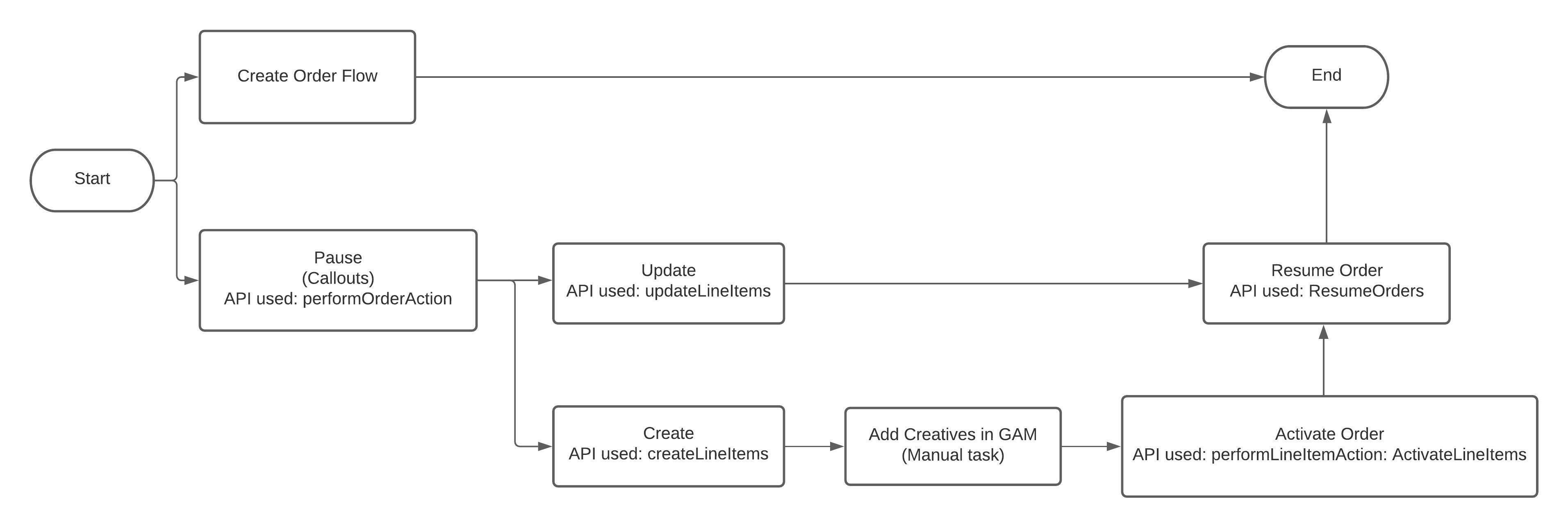
- In Advertising Sales Management, clone the media campaign which you want to modify.
-
While modifying an active media campaign, you can either update the existing placements in the media campaign or add a new media placement. Depending on what modification you want to make to the media campaign, either the Create Order flow or the Modify Campaign flow is triggered. When you submit the order, the Industries Order Management workflow begins.
All new placements move to the Create Line Item flow, where Industries Order Management uses a callout to add a new line item to the existing media campaign.
All modified placements move to the Update flow. Industries Order Management uses the Update Line Item callout to request Google Ad Manager to make the required updates to an existing placement in the media campaign.
- In Google Ad Manager, manually add the creatives that you'd added to your media campaign.
- Industries Order Management uses a callout to activate the order.
- Initiate the Resume Order callout, which changes the status of the media campaign to Ready in Google Ad Manager.
Check Availability of Requested Ad Space
One of the key steps in the Configure Media Plan workflow is to ensure that the requested Ad Space and capacity are available in the downstream ad server before the order is placed and that the campaign is guaranteed. Advertising Sales Management uses the Check Availability integration procedure from the Create Media Plan OmniScript to do so.
This is an Advertising Sales Management on Managed Package feature. For Advertising Sales
Management on Salesforce Platform, see Advertising
Sales Management on Salesforce Platform.
The Check Availability integration procedure verifies whether the requested quantity of goal units is available for the Priority and Rate Type specified for the Google Ad Manager line item. If the number of available goal units is greater than the requested quantity, then the placement is considered to be available. However, if the number of available goal units is less than the required quantity, then the integration procedure returns a message that the requested capacity is not available, and will return the available quantity. The Media Planner can then adjust the required quantity and try again.
The Check Availability integration procedure also invokes the Google Ad Manager ForecastService API, which provides methods for estimating traffic (in terms of clicks or impressions) for line items. Forecasts can be provided for line item objects which either already exist in the system, or have not yet been assigned an ID.
Google Ad Manager APIs Used in Advertising Sales Management
Advertising Sales Management uses certain Google Ad Manager APIs to communicate with and perform some basic tasks in Google Ad Manager.
This is an Advertising Sales Management on Managed Package feature. For Advertising Sales
Management on Salesforce Platform, see Advertising
Sales Management on Salesforce Platform.
| API PatH | ACTION | DESCRIPTION |
|---|---|---|
| https://ads.google.com/apis/ads/publisher/v202108/OrderService | createOrders | Creates an order in Google Ad Manager |
| https://ads.google.com/apis/ads/publisher/v202108/LineItemService | createLineItems | Creates line items for an order in Google Ad Manager |
| https://ads.google.com/apis/ads/publisher/v202108/LineItemCreativeAssociationService | createLineItemCreativeAssociations | Associates creatives with a line item in Google Ad Manager |
| https://ads.google.com/apis/ads/publisher/v202108/OrderService | performOrderAction | Approves the order in Google Ad Manager |
| https://ads.google.com/apis/ads/publisher/v202108/LineItemService | performLineItemAction | Activates the line items in Google Ad Manager |
| https://ads.google.com/apis/ads/publisher/v202108/ForecastService | Forecast Service | Checks the availability of the requested quantity of ad units in Google Ad Manager |
| https://ads.google.com/apis/ads/publisher/v202108/OrderService | performOrderAction | Pauses an order in Google Ad Manager before any modifications can be made to the media campaign |
| https://ads.google.com/apis/ads/publisher/v202108/OrderService | performOrderAction | Resumes an order in Google Ad Manager after the media plan is modified |
| https://ads.google.com/apis/ads/publisher/v202108/LineItemService | updateLineItems | Updates an existing line item in Google Ad Manager |
