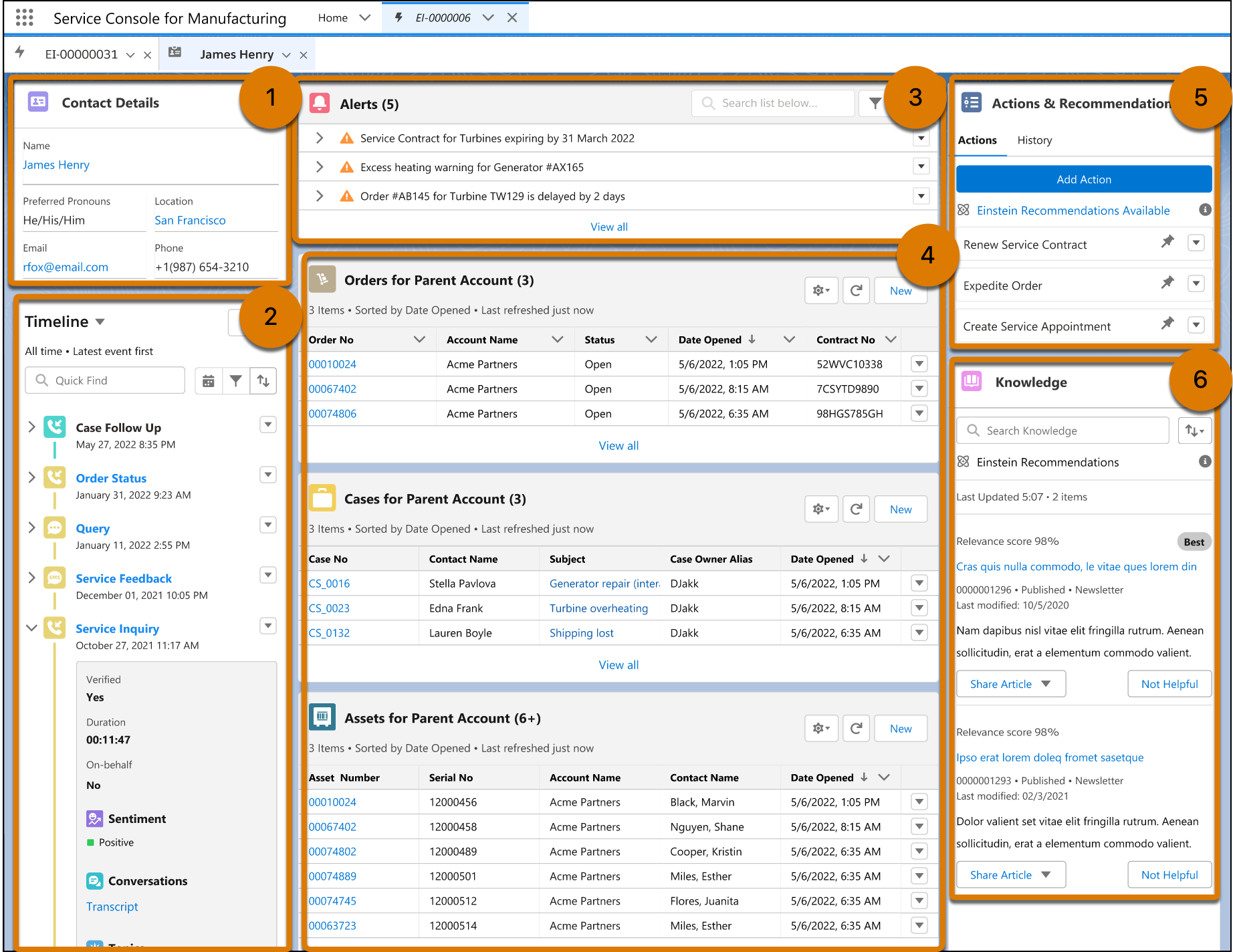
The Service Console for Manufacturing is where your customer service representatives
(CSRs) can view a timeline of interactions with the customer, get contextual alerts, review and
create assets, orders, and cases, take relevant actions, and search for knowledge articles. Learn
how the console is organized to help your CSRs manage the entire service lifecycle from one
page.
Required Editions
Available in: Lightning Experience
Available in: Enterprise, Unlimited, and Developer Editions
Manufacturing Cloud provides a preconfigured console app that displays information about your
contacts. The console is designed to help CSRs deliver excellent customer service. Here’s how
everything comes together.
View Customer Details
CSRs can see the contact details of the customer
(1).
Track Interactions with Customers
CSRs can ensure continuity in engagements with the customer with a chronological, interactive
timeline of all interactions with the customer (2). The timeline component is preconfigured
to work with contact records and engagement interactions.
Get Contextual Alerts
CSRs can receive timely alerts on related activities like upcoming warranty renewals, asset
performance issues, order delays, and open cases. These alerts can help them proactively
address issues (3). You must set up alerts as per your business needs.
Manage Related Orders, Cases, and Assets
Get a snapshot of the customer’s assets, cases, and orders. CSRs can quickly create records or
edit existing ones, with minimal clicks and scrolling (4).
Take Relevant Actions
CSRs can get recommendations and launch actions such as create a case, create a warranty claim,
buy an extended warranty, and schedule a service appointment (5). You must configure
flow-based actions according to your business needs.
Search for Knowledge Articles
CSRs can get quick access to relevant knowledge articles and answer customers’ questions (6).
Did this article solve your issue?
Let us know so we can improve!
Loading
Salesforce Help | Article
Cookie Consent Manager
General Information
Required Cookies
Functional Cookies
Advertising Cookies
General Information
We use three kinds of cookies on our websites: required, functional, and advertising. You can choose whether functional and advertising cookies apply. Click on the different cookie categories to find out more about each category and to change the default settings.
Privacy Statement
Required Cookies
Always Active
Required cookies are necessary for basic website functionality. Some examples include: session cookies needed to transmit the website, authentication cookies, and security cookies.
Functional Cookies
Functional cookies enhance functions, performance, and services on the website. Some examples include: cookies used to analyze site traffic, cookies used for market research, and cookies used to display advertising that is not directed to a particular individual.
Advertising Cookies
Advertising cookies track activity across websites in order to understand a viewer’s interests, and direct them specific marketing. Some examples include: cookies used for remarketing, or interest-based advertising.