You are here:
Claim Fields in Manufacturing Cloud
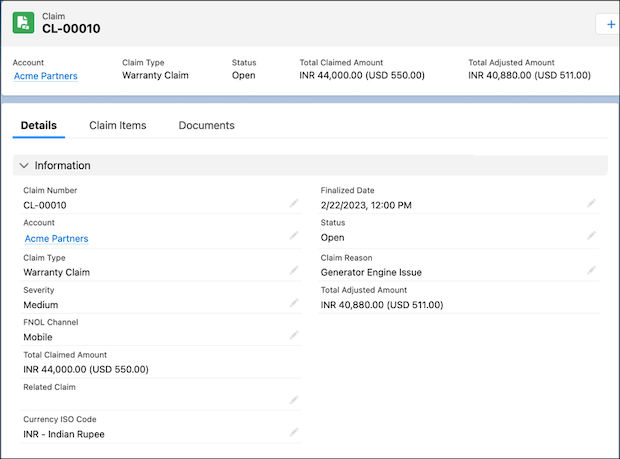
A warranty claim is a request made by a partner, dealer, or distributor to the manufacturer to repair, replace, or provide a refund for a defective asset. Capture high-level information about a warranty claim such as its type, reason, and account in Claim records. Review the fields available on the Claim record.
Required Editions
| Available in: Enterprise, Unlimited, and Developer Editions |
Warranty claims adjudicators and partners can use Claim records to capture information for different purposes. To determine the level of access of each persona to different fields, customize the Claim record page layout and field-level security settings.
| Field | Description | Usage |
|---|---|---|
| Claim Number | The claim number in the claims management system. | Specified by claim adjudicators or auto-populated based on any predefined rules. |
| Account | The account related to the claim. | Specified by partners while submitting a claim. |
| Status | The status of the claim.
|
Specified by partners or claim adjudicators, or auto-populated based on any predefined rules. |
| Claim Type | The type of the claim.
|
Specified by partners while submitting a claim. To request manufacturers to authorize a repair or replacement for a product before submitting a warranty claim, select Pre Warranty Authorization. To submit a warranty claim, select Warranty Claim. |
| Claim Reason | The reason for initiating the claim. | Specified by partners while submitting a claim. |
| Claim Reason Type | The category that the claim reason belongs to. For example, natural disaster and accident. | Specified by partners while submitting a claim. |
| Severity | The severity of the claim.
|
Specified by partners or claim adjudicators, or auto-populated based on any predefined rules. |
| FNOL Channel | The channel through which the loss was reported.
|
Specified by partners or claim adjudicators, or auto-populated based on any predefined rules. |
| Closed | Indicates whether the claim has been closed. | Specified by claim adjudicators or auto-populated based on any predefined rules. |
| Related Claim | The claim that’s related to this claim. | Specified by partners or claim adjudicators. |
| Currency ISO Code | The ISO code of the currency related to the claim. | Specified by partners while submitting a claim. |
| Summary | The description of the claim. | Specified by claim adjudicators or auto-populated based on any predefined rules. |
| Total Adjusted Amount | The claim amount that was approved. | Auto-populated based on claim coverages. |
| Total Claimed Amount | The total amount that’s being claimed. | Auto-populated based on claim coverages. |
| Finalized Date | The date on which the claim was marked resolved, with claim status as approved or rejected. | Specified by claim adjudicators or auto-populated based on any predefined rules. |
| Usage Type | The usage type of the claim record. | Auto-populated or specified by the partners while submitting a claim. Make sure that the usage type is Manufacturing. |