
You are here:
Support for Long Press of Buttons
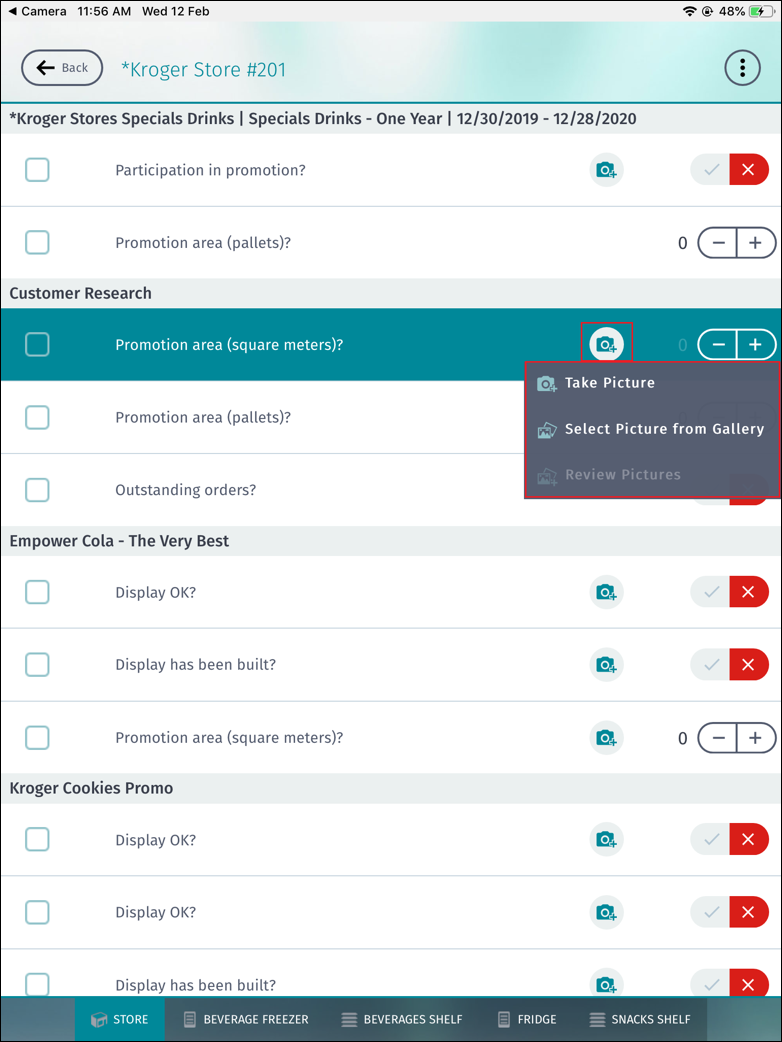
Consumer Goods Cloud Mobile App Framework displays a context menu when a user presses a button in a list for more than 0.5 seconds.
Required Editions
| Available in: Lightning Experience in Professional, Unlimited, and Enterprise Editions that have Consumer Goods Cloud enabled. |
The context menu options are actions defined based on the purpose of using the button in the list. You can define different context menu options for buttons with different bindingId. For example, if a camera button is used within a list and long press is enabled for this button, the context menu can display the options add picture from gallery, remove picture, and sketch picture. This feature is possible only by using an element, LongPressMenu, within the list controls that support the Button binding element type. In addition, the Button binding element type must include an additional attribute, longPressMenuId.

Mobile Theming Support
Mobile theming support is available for the LongPressMenu element. The theming configuration settings for defining the color properties of the ContextMenu UI component are also applicable for the LongPressMenu element. This implies that the color changes made to the ContextMenu component are also visible for the LongPressMenu element.
Attributes of the LongPressMenu Element
The table lists the attributes that are available for the LongPressMenu element.
| Attribute | Description | Values or Pattern | Required? |
|---|---|---|---|
| name | Unique name of the element. The name must match one of the values defined for the longPressMenuId attribute. | String | Yes |
| dataSource | Data binding path linked to the LongPressMenu element. | Data resource | Yes |
Subelement of the LongPressMenu Element
The LongPressMenu element can contain the Items element.
Subelement of the Items Sub Element
The Items element can contain the Bindings element.
Binding Targets of the Items Subelement
The table lists the binding targets that are available for the Items element.
| Target | Description | Type | Required? |
|---|---|---|---|
| Icon | Defines the icon of a context menu item. | Image | Yes |
| Text | Defines the text of a context menu item. | Label | Yes |
| Editable | Indicates whether the entries in the control are editable. By default, the entries are editable. | Editable | Optional |
| Visible | Indicates whether the control is visible. By default, the control is visible. | Visible | Optional |
- CG Cloud Mobile App Framework implicitly adds bindingId of the long-pressed button as a parameter to the LongPressMenuOpeningEvent event.
- The longPressMenuId attribute can be used only if the binding type is set to Button.
- If the LongPressMenu element is defined within a list control, the LongPressMenuSelectedEvent event must be declared. If this event isn’t declared, then a Framework warning is triggered.
- The value of the longPressMenuId attribute must match the name of a LongPressMenu element defined in the same contract.

<GroupedList name="myList" searchable="true" dataSource="ProcessContext::OverviewList.Items[]">
  <Items name="Items" itemPattern="myItemPattern">
    <ItemListLayout>
      <Default>
        <Col width="10em">
          <Row layoutType="ItemSecondary" bindingId="Button1" />
        </Col>
      </Default>
    </ItemListLayout>
    <Bindings>
      <Binding target="Button1" type="Button" binding=".displayedImageId" bindingMode="ONE_WAY" imageType=".svg" longPressMenuId="longPressMenu1"/>
      <Binding target="Button2" type="Button" binding=".displayedImageId2" bindingMode="ONE_WAY" imageType=".svg" longPressMenuId="longPressMenu2"/>
    </Bindings>
    <LongPressMenu name="longPressMenu1" dataSource="ProcessContext::someLo">
      <Items name="LongPressMenuItems">
        <Bindings>
          <Binding target="Icon" type="Image" binding=".actionImg" />
          <Binding target="Text" type="Label" binding=".actionId" />
          <Binding type="Editable" target="Editable" binding=".actionEnabled" />
          <Binding type="Visible" target="Visible" binding=".actionVisible" />
        </Bindings>
      </Items>
    </LongPressMenu>
    <LongPressMenu name="longPressMenu2" dataSource="ProcessContext::someLo">
      <Items name="LongPressMenuItems">
        <Bindings>
          <Binding target="Icon" type="Image" binding=".actionImg" />
          <Binding target="Text" type="Label" binding=".actionId" />
          <Binding type="Editable" target="Editable" binding=".actionEnabled" />
          <Binding type="Visible" target="Visible" binding=".actionVisible" />
        </Bindings>
      </Items>
    </LongPressMenu>
  </Items>
  <Events>
    <ListButtonPressedEvent event="buttonPressed">
      <Params>
        <Param name="pKey" value=".pKey" />
      </Params>
    </ListButtonPressedEvent>
    <LongPressMenuOpeningEvent event="someEventHandler1">
      <Params>
        <Param name="pKey" value=".pKey" />
      </Params>
    </LongPressMenuOpeningEvent>
    <LongPressMenuSelectedEvent event="someEventHandler2">
      <Params>
        <Param name="pKey" value=".pKey" />
      </Params>
    </LongPressMenuSelectedEvent>
  </Events>
</GroupedList>