
You are here:
Consumer Goods Cloud Offline Mobile App Framework
The Consumer Goods Cloud offline mobile app is an end-to-end software platform that provides sales reps and other field personnel the information they need when they need it, even when there's no network connectivity. Download the app from the App Store or Google Play. You can use the app as-is or customize it as needed.
Required Editions
| Available in: Enterprise, Performance, and Unlimited Editions that have Consumer Goods Cloud enabled |
For example, you can tailor the app's look and feel to your company branding, or introduce new capabilities and data that your sales reps need. The offline mobile app is updated when Consumer Goods Cloud ships framework updates in all major Salesforce product releases and through Consumer Goods Cloud patch releases.
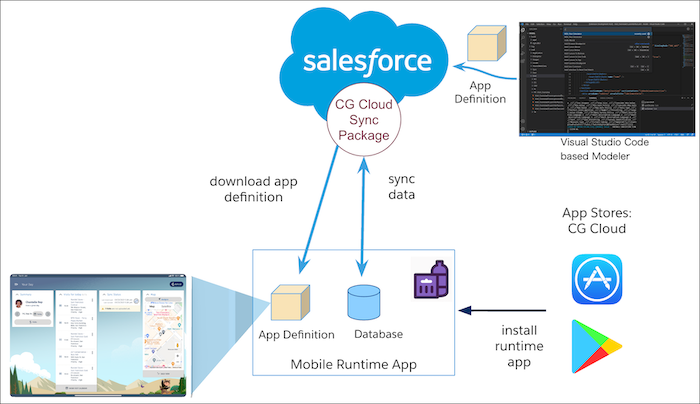
The downloaded mobile app is client independent and does not contain any preloaded data initially. It is an empty container with the capability to connect to the Salesforce platform, and basic app functionality.
After you log in to the mobile app, data is synced from Salesforce to the app database based on the configured sync rules and user roles. The app definition or deployment package, created by VS Code based Modeler, is a complete representation of the app and is downloaded to the mobile app during sync. The app definition package defines the UI, the objects that are used in the mobile app, and the type of data that is presented to the mobile app.
The mobile app framework uses contracts, compiled into deployment packages, to implement UI and business logic.
Mobile App Architecture
Here’s a look at the architecture of the CG Cloud offline mobile app.
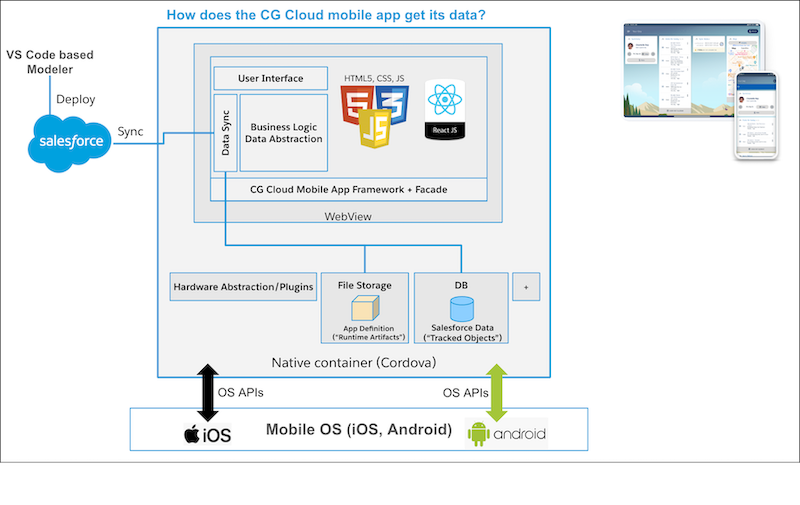
- Cordova - Acts as a container for hosting the app and gives the app access to the operating systems standard device features and hardware components such as filesystem, database access, GPS sensors, camera, Accelerometer, network, and keyboard.
- Database – The database in the framework is created using the application model and sync. It does not include data structures or models. DB Schema (tables, indices), Picklist values, and Permission Sets are transported from Salesforce org to Modeler through the sync process. The mobile database is based on SQLite and is encrypted.
- Framework - The app framework runs in a Cordova container that provides an abstraction layer to the operating system, giving the app access to device functionality such as the camera.
- A static framework – You can download the Consumer Goods Cloud offline mobile app from the App Store or Play Store. The framework interprets and converts the RTAs to render the mobile app to present the specific UI, its actions and functionalities.
- Dynamic application definition or Runtime Artifacts (RTAs) – App definition or RTAs define the actual application by using UI and business processes - description of how the UI looks like, the objects that are used in the mobile app, and the type of data that is presented to the mobile app. The app definition files are XML representations called design contracts. Consumer Goods Cloud ships the contracts (ModelerDesignContracts.zip) every release, which you can download from the Custom - Managed section of the Lightning App Builder.
- Sync - RTAs are created through VS Code based Modeler and deployed to the mobile device using standard synchronization. RTAs are interpreted by the mobile app framework during runtime. The CG Cloud Synchronization Engine synchronizes data and metadata between Salesforce and the CG Cloud offline mobile app. When you modify or customize the data in Salesforce, the sync engine identifies the difference (using tracked objects and named fetch trees) and applies the changes to the mobile database. After synchronization, to show the updated data on the user interface, you have to model the changes in Modeler and deploy the changes to the application.
Mobile App Layers and Design Contracts
To customize the mobile app, modify design contracts in VS Code based Modeler
This diagram illustrates the various layers of the CG Cloud offline mobile app and their app definitions. There are specific design contracts for different parts of the mobile app: UI, objects, methods, processes, and data sources. The image shows the various layers of the CG Cloud offline mobile app and their corresponding design contracts.
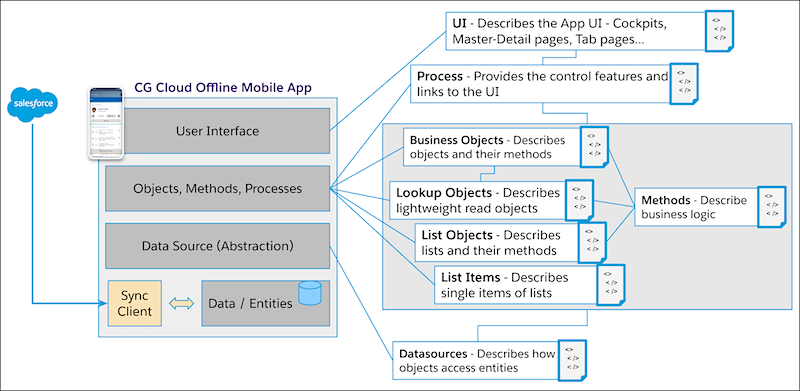
The following list describes each layer and its corresponding design contracts:
- UI layer: This layer describes the mobile app UI. Use UserInterface contracts to describe UI elements in the mobile app such as cockpits, master-detail pages, tab pages, and tab areas.
- Process layer: Process instantiates objects, processes events, and controls and interacts with the UI. It lives in the object layer or the application logic layer. Use Process contracts to define the sequence of actions carried out during the execution of a business process such as orders, promotions, or visits.
- Objects layer: The Objects layer handles business objects (BO), objects that contain data
from the org (like tasks and visits) or provide internal functionality to the app (like List
and Lookup). Use Business Object contracts to define how the objects should work, and how to
modify and trigger the objects by using different methods.
- List Objects: List objects give access to lists of 1 to n relations. Use List Object contracts to model one-to-many relations out of the main BO. For example, if the BO is a retail store with one or many contact partners in that retail store, you can build the contact partners as a listobject because that is a one-to-many relation. One retail store is the main object and the contact partners are a list object. A List Object contract consists of various list items that in this example represent the different contact partners.
- Lookup Objects: Lookup objects are light-weight objects that carry one-to-one information. In a BO, you can have one-to-one relations to other objects. Lookup Object contracts extend the BO and are used to ‘look into’ a connected data record. Using the example from List Object, a retail store can have one address. The BO has the ID of that address but the Lookup object gives you the opportunity to look further into the address record to fetch related details such as house number, street, and zip code.
- Data Source layer: The data source or abstraction layer describes the mapping or relation of each object to the data from the org. Use Datasource contracts to define the properties of an object to map to with the org data in the database and the object’s access to the individual data on entity level.
In addition to the some of the core design contracts listed above, there are other types of design contracts available in the Modeler Design Contracts package. For more information on additional design contracts and its use, see Model Your App Using Contracts.
