
You are here:
Visual Studio Code Based Modeler for Consumer Goods Cloud
Use Visual Studio (VS) Code Based Modeler for Consumer Goods Cloud to configure and customize the UI and processes of the Consumer Goods (CG) Cloud mobile app.
Required Editions
| Available in: Enterprise and Unlimited Editions that have Consumer Goods Cloud enabled |
VS Code based Modeler uses XML files called design contracts to define the user interface of the CG Cloud mobile app, the processes, objects, data sources, labels, and other parts of the offline mobile app model. Different types of design contracts represent the different elements of the app’s architecture layers. For example: UI contracts, Business Object contracts, and Datasource contracts.
By using VS Code based Modeler you can modify and create business logic, and generate and deploy the application to a real mobile device. You can even test the app in a simulator application that mimics a real device such as iPad, iPhone, Android tablet, and Android phone.
Get Started
To model and customize Modeler design contracts, knowledge of these technologies is required:
- Basic knowledge about Consumer Goods Cloud enhanced data model customization.
- Experience in programming.
- SQL
- XML
- JavaScript
- JSON
- CSS
- XHTML
About Visual Studio Code Based Modeler
A customizer or developer can work with all the tools required for VS Code based Modeler on their own machine.
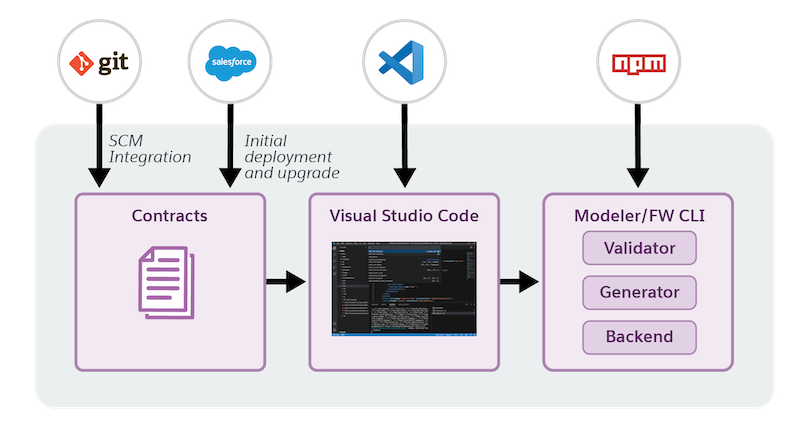
You'll use these tools to customize the offline mobile app:
- Visual Studio Code
- Salesforce CLI
- Source control management (Git recommended)
- npm
Some of the features and capabilities in VS Code based Modeler of interest are:
- XML based mobile app design contracts enable you to define and customize all data layers of the app.
- Quick verification of customizations. You can start the server locally from the Modeler CLI and test your customizations in the simulated UI of the CG Cloud offline mobile app.
- Decentralized source control. Use SCM tools like Git to efficiently manage source code and benefit from capabilities like collaborative coding, branching and merging, and conflict resolution.
- Manage core and custom design contracts. Maintain different branches in Git (or any other SCM) to logically separate the core and custom contracts.
- Easy to set up and use. Set up VS Code locally and harness the power of Modeler CLI to perform operations like create and build artifacts and generate deployment package.
- Verify new mobile framework functions in isolation through different Modeler CLI versions in different workspaces.
- Build mobile app artifacts quickly and create deployment packages for distribution to mobile devices.
Key Terms
The table lists the definition of some of the commonly used terms in Modeler.
| Term | Description |
|---|---|
| Modeler Design Contracts | A Modeler Design Contract zip consists of core design contracts for VS Code based Modeler. |
| Modeler Salesforce CLI Plugin | This plugin to Salesforce CLI comprises the modeling logic and generator. The plugin provides CLI commands which you can use to customize the CG Cloud offline mobile app. For example, there are commands to create, validate, and build contracts, and to start the simulator app. |
| Generator | Generator components are JavaScript based components that validate and transform the Modeler contracts to use them in the CG Cloud offline mobile app. |
| Simulator UI application | Use the simulator application to create a replica of the Consumer Goods Cloud offline mobile app, doing away with the need of deploying a mobile app definition to an actual physical device. You can use the simulated UI for various purposes such as testing new customizations and troubleshooting issues in the mobile app. The simulator app supports various device formats such as iPad, iPhone, Android tablet and Android phone. |
- Consumer Goods Cloud Offline Mobile App Framework
The Consumer Goods Cloud offline mobile app is an end-to-end software platform that provides sales reps and other field personnel the information they need when they need it, even when there's no network connectivity. Download the app from the App Store or Google Play. You can use the app as-is or customize it as needed. - Consumer Goods Cloud Offline Mobile App Customization Workflow
You can customize the core design contracts or add custom contracts and define the desired customization. Test the customization in the simulator app and deploy the customizations to Consumer Goods Cloud offline mobile app users.
