
You are here:
PageHeader Component
The PageHeader UI element displays a header with a title, buttons, and menus.
Required Editions
| Available in: Lightning Experience in Professional, Unlimited, and Enterprise Editions that have Consumer Goods Cloud enabled |
Component name: pageheader
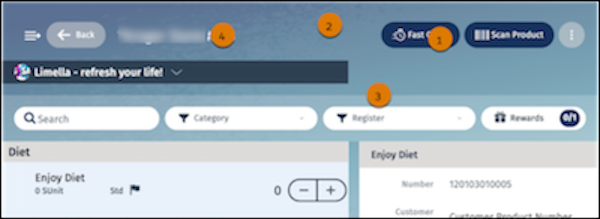
In the PageHeader component, you can configure:
- Toolbar buttons: fill color, transparency and gradient; border color and transparency; icon color; and label color (1)
- Toolbar background color and transparency (2)
- Toolbar separator color and transparency (3)
- Font label color (4)
This table lists the images and icons that are available for the PageHeader component.
| Image Name | Description |
|---|---|
| Icon_Hamburger.svg | Icon to open the navigation panel in the mobile app. |
| Icon_Hamburger-reverse.svg | Icon to close the navigation panel in the mobile app. |
| ArrowsSynch.svg | Image that appears before the animated GIF. |
| Loading.gif | Animated GIF that appears while sync is in progress. |
| Icon_Back.svg | Icon for the back button. |
| Icon_Overflow.svg | Icon to expand the context menu. |
Did this article solve your issue?
Let us know so we can improve!
