
You are here:
Picture Taking
Model a picture taking process that allows picture taking, saving, deletion, and replication of pictures.
Required Editions
| Available in: Enterprise, Performance, and Unlimited Editions |
You can take pictures from the Consumer Goods Cloud offline mobile app and save them as attachments in the app. You can also delete or view the image in full screen mode by using the context menu options that are available with a long tap of the MediaControlList element.
The picture capturing feature is implemented by using the generic Cordova camera API. The following image shows the image capture workflow in the Consumer Goods Cloud offline mobile app and the simulator app.
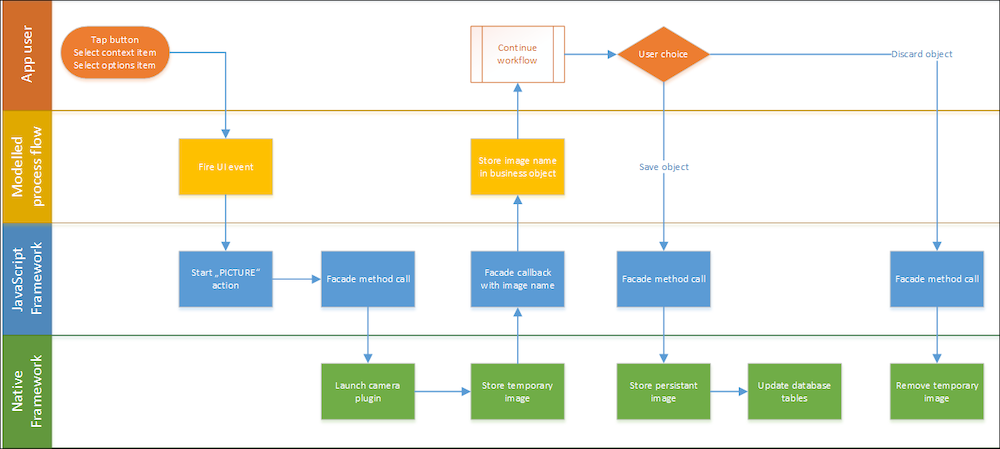
PictureCapturing in Simulator App
Hardware emulation and storage access (HESA) provides emulation for picture capturing for each workspace. You can specify the relative path to the image specified for a workspace in the referenceImagePath attribute in appl/config/config.json in your Modeler workspace and the Framework Facade API.
When you call Facade.getPictureAsync() on the simulator app of an event, it returns the relative path of the configured picture as the default picture. In the relative path <timestamp> is the exact time when getPictureAsync() is called. This means, every time you call getPictureAsync(), the timestamp is updated.
After the path of the picture is returned, the picture can be stored or deleted.
Sketches on Attached Images in Simulator App
After you attach a picture from the image gallery or a picture captured by using your device camera, to a visit in the simulator app, when you draw or sketch on the attached image, the simulator app doesn’t save the sketches. To save the sketches on attached images in the simulator app, perform a sync before you sketch on the attached image.
- Model Picture Capturing
The images captured with the Consumer Goods offline mobile app are stored in the same structure as attachment files and a thumbnail is created. The database stores only the path where the image is stored as a BLOB string. The images are deleted if you delete or discard the record that contains the BLOB string with the path.
