You are here:
CSV File Format for Importing Employee Data
Import data from an external source to show relevant metrics in the Employee Insights dashboard.
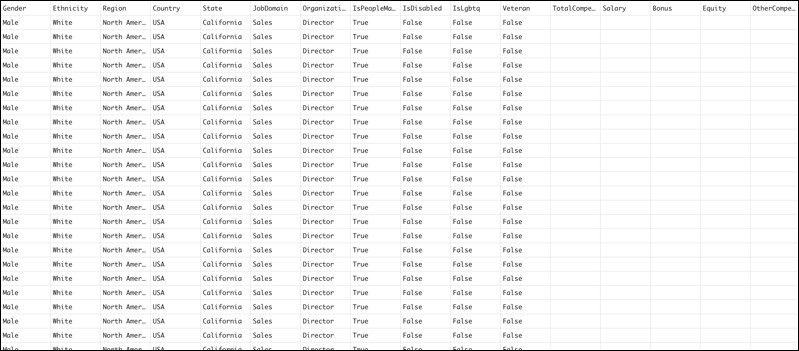
Create a CSV file with the following column headers, in this order, and using the exact names provided.


| CSV Column Header | Column Value |
|---|---|
Gender |
Indicates the gender of the employee. For example, Male, Female, and Nonbinary. |
Ethnicity |
Indicates the ethnicity of the employee. For example, Caucasian, Pacific Islander, and Latinx. |
Region |
Indicates the region of the employee. For example, North America, Asia-Pacific (APAC), and Europe. |
Country |
Indicates the country of the employee. For example, France, India, and the United States. |
State |
Indicates the state of the employee. For example, California, Washington, and Utah. |
JobDomain |
Indicates the job domain of the employee. For example, Marketing, Sales, and Finance. |
OrganizationalRank |
Indicates the organizational rank of the employee. For example, Director, Vice President, and Senior Director. |
IsPeopleManager |
Indicates whether the employee manages other people. |
IsDisabled |
Indicates whether the employee is a person with a disability. |
IsLgbtq |
Indicates whether the employee belongs to the LGBTQ+ community. |
Veteran |
Indicates whether the employee is a veteran. |
TotalCompensation |
Indicates the overall remuneration, including salary, benefits, and bonuses, that an employee receives for their work. |
Salary |
Indicates the fixed regular payment that an employee receives for their work. |
Bonus |
Indicates the additional payment that an employee receives, beyond their regular salary. |
Equity |
Indicates the shares of the company that an employee receives. |
OtherCompensation |
Indicates the other benefits that an employee receives beyond their basic salary. For example, incentives, allowances, and stock options. |
Here’s a sample CSV for importing employee data.