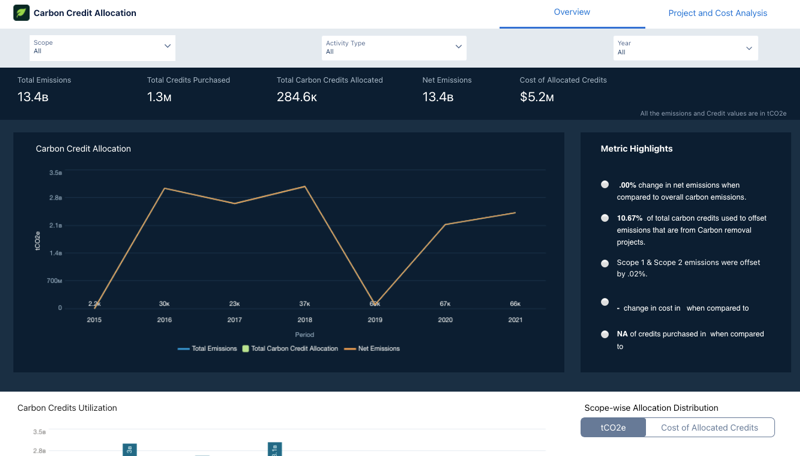
Get insights into the overall carbon credits allocation for the year to understand the
allocation progress.
Required Editions
Available in: Enterprise, Professional, Unlimited, and
Developer editions where Net Zero Cloud is enabled
The Carbon Credit Allocation dashboard, available in the Net Zero Analytics app template,
consists of Overview, and Project and Cost Analysis pages. Filter the charts on the dashboard
based on scope, activity type, year, region, project type, mitigation type, avg cost per tCo2e,
and project start year.
Overview page: View the overall summary of carbon credits allocated or retired this year,
analyze the distribution of carbon credits across scope 1, scope 2, and scope 3 emissions.
Assess the carbon credits allocated for each activity under the different scopes, identify the
various types of carbon projects used this year, and review the carbon credits allocated for
each project type.
Project and Cost Analysis page: Evaluate cost efficiency - credits per dollar spent across
projects, assess the overall credits available to allocate, monitor the current net emissions,
and analyze the new impact of overall allocation for each scope.
Key Performance Indicators Learn the definitions and calculations of key metrics shown in the Carbon Credit Allocation dashboard.
We use three kinds of cookies on our websites: required, functional, and advertising. You can choose whether functional and advertising cookies apply. Click on the different cookie categories to find out more about each category and to change the default settings.
Privacy Statement
Required Cookies
Always Active
Required cookies are necessary for basic website functionality. Some examples include: session cookies needed to transmit the website, authentication cookies, and security cookies.
Functional Cookies
Functional cookies enhance functions, performance, and services on the website. Some examples include: cookies used to analyze site traffic, cookies used for market research, and cookies used to display advertising that is not directed to a particular individual.
Advertising Cookies
Advertising cookies track activity across websites in order to understand a viewer’s interests, and direct them specific marketing. Some examples include: cookies used for remarketing, or interest-based advertising.