
Net Zero Analytics App
Use the dashboards in the Net Zero Analytics app to analyze your scope1, scope 2, and scope 3 emissions data and take measures to reduce your carbon footprint.
Required Editions
| Available in: Enterprise, Professional, Unlimited, and Developer Editions where Net Zero Cloud is enabled |
You can quickly access the Net Zero Analytics dashboards from the Net Zero Cloud app's home page.
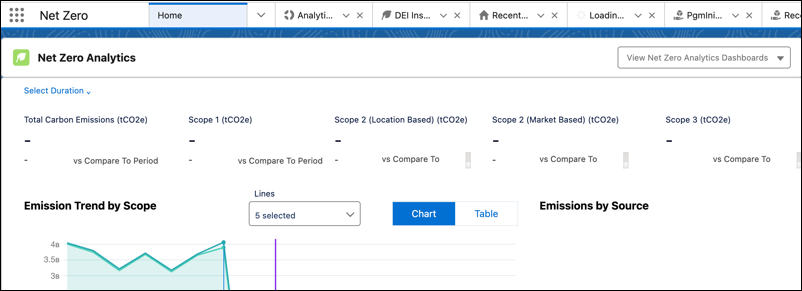

Note To use the Net Zero Analytics dashboards, you need the CRM Analytics Plus User and Net Zero
Analytics User permissions. If you have the Net Zero Analytics Base license, you need either the
Net Zero Analytics Base3 Apps User or Net Zero Analytics Base5 Apps User permission.
- Audit Dashboard
Analyze your carbon emissions, verify the accuracy of the emissions data, and ensure that the measures taken by your organization are effective. - Building Energy Intensity Dashboard
Analyze and compare the variance of energy intensity of the office buildings with similar offices in the US using CBECS (Commercial Buildings Energy Consumption Survey) data and emissions from each office. - Business Travel Impact Dashboard
Learn how your business travel contributes to your organization’s overall emissions, and take effective measures to make your travel sustainable. - Carbon Credit Allocation Dashboard
Get insights into the overall carbon credits allocation for the year to understand the allocation progress. - Climate Action Dashboard
Get insights into your organization's carbon emissions data that you can use to devise a climate action plan to reduce your emissions. - Emissions Forecast and What-If Analysis Dashboard
Use the Emissions Forecast and What-If Analysis dashboard to gain insights into your organization's emissions forecast, analyze fairness scenarios, and visualize potential outcomes. Use the interactive What-If Analysis feature to experiment with various forecast metrics and see how adjustments to these values impact the total emissions. - Predicted Air Travel Emissions Dashboard
See the predicted carbon emissions from air travel and compare the predicted emissions and actual emissions for the selected date range. - Predicted Carbon Emissions and Fuel Consumption by Stationary Assets Dashboard
See predicted carbon emissions and fuel consumption for stationary assets in a particular year in the future. You can also view the percentage increase in predicted carbon emissions compared to the current year’s carbon emissions. - Predicted Carbon Emissions for Stationary Assets Dashboard
See predicted carbon emissions by stationary assets in a particular year in the future and the percentage increase in carbon emissions from the current year. - Predicted Supply Chain Emissions Dashboard
See predicted carbon emissions for a year in the future. You can filter the predictions data by growth factors. The prediction calculations are spend-based or quantity-based. - Program Analysis Dashboard
Get a comprehensive view of multiple sustainability programs in an organization and their collective impact. - Scope 3 Procurement Dashboard
Get actionable insights into your organization’s procurement data. Learn how your procurement contributes to your scope 3 carbon emissions by using the Procurement dashboard available in the Net Zero Analytics app template. - Supplier Dashboard
Track the sustainability score of your suppliers and get insights into where each supplier stands in their sustainability effort. - Waste Management Dashboard
Get data-driven insights into the carbon emissions caused by your organization’s waste. - Water Management Dashboard
Analyze the company’s water management efforts by using the Water Management dashboard available in the Net Zero Analytics app template. - Embedded Dashboards in Net Zero Analytics
The Net Zero Analytics app includes dashboards that Salesforce admins can embed in specific Lightning Experience pages. - Recipes and Datasets for Net Zero Analytics Dashboards
The app created using the Net Zero Analytics template generates multiple recipes, each serving as instructions for data processing and analysis.
Did this article solve your issue?
Let us know so we can improve!
