Example: Calculate Emissions Forecast
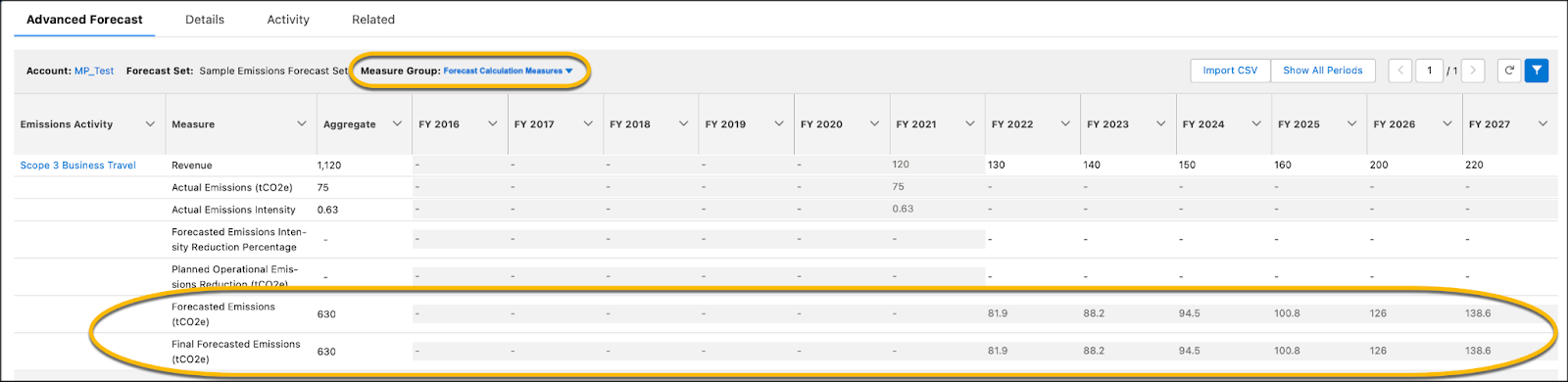
Consider the calculation for the Scope 3 Business Travel emissions activity.
Required Editions
| Available in: Lightning Experience |
| Available in: Enterprise, Performance, Unlimited, and Developer Editions |
The emissions forecasts are calculated in two stages for each emissions activity and then summarized by scope:
- Emissions intensity is calculated for the previous year for which emissions data is
available:
Actual Emissions Intensity = Actual Emissions (tCO2e) / Business metric
- The intensity value is multiplied by the associated business metric values for the forecast years to generate their emissions.
For the scope 3 business travel, emissions forecast is based on the revenue business metric, which is uploaded manually for the years 2020–2030.
Let’s assume that for the year 2021, revenue = 120.
If no targets were set for business travel, the target measure isn’t shown.
Let’s also assume that the actual emissions related to business travel in 2021 retrieved from the Annual Emissions Inventory record for 2021 = 75.
The actual emissions intensity for 2021 is calculated based on the actual emissions value and the revenue:
-
Actual emissions intensity = Actual emissions / Revenue
Actual emissions intensity = 75/120 = 0.625 (rounded off to 0.63)
Now consider revenue for 2026 = 200
Then Forecasted Emissions (tCO2e) for 2026 = 200 * 0.63 = 126
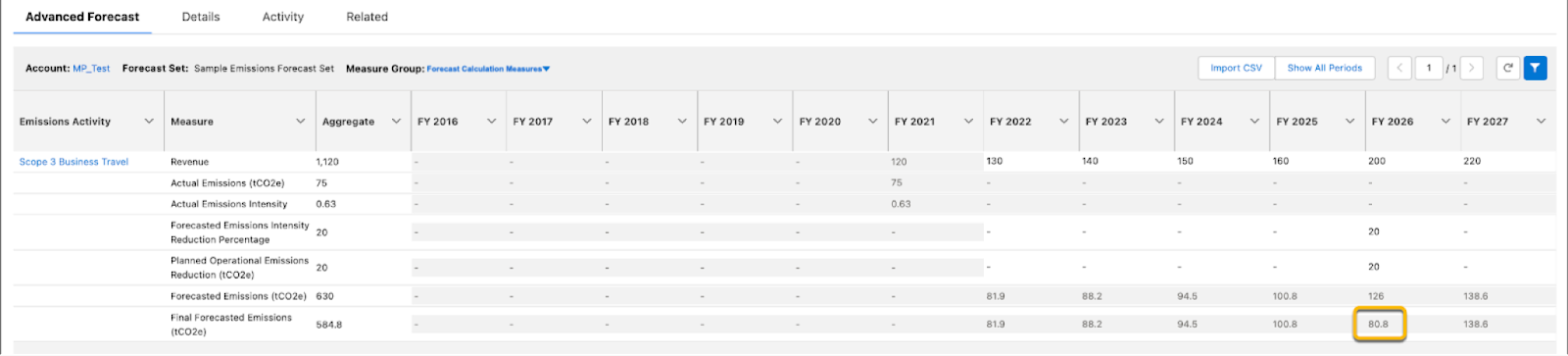
You can update the calculated forecasts for 2026 for the Scope 3 Business Travel emissions activity, which is based on the forecasted emissions intensity reduction percentage and planned operational emissions reduction values.
For example, consider these values:
-
Forecasted Emissions Intensity Reduction Percentage: 20
-
Planned Operational Emissions Reduction (tCO2e): 20
To update the calculations run the Calculate Emissions Forecasts data processing engine job.
The Final Emissions Forecast is calculated after reducing these operational emissions:
Final Forecasted Emissions (tCO2e) = Forecasted Emissions (tCo2e) * (1- Forecasted Emissions Intensity Reduction Percentage/100) ) - Planned Operational Emissions Reduction (tCO2e)
= 126 * (1 - (20/100)) - 20 = 80.8