
You are here:
Greenhouse Gas Emissions
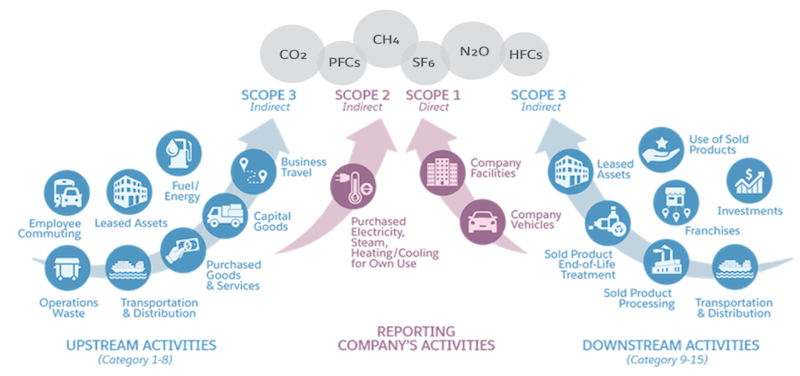
The Greenhouse Gas Protocol established an inventory that categorizes greenhouse gas (GHG) emissions to delineate direct and indirect emissions sources. Use Salesforce Net Zero Cloud to collect, categorize, analyze, and report energy usage data for all business activities of your organization from various sources.
Scope 1 GHG Emissions
In Net Zero Cloud, you can calculate scope 1 emissions, which are direct GHG emissions from assets that your organization owns or operationally controls.
Examples:
-
Onsite natural gas combustion in own buildings
-
Direct fuel use such as from heating oil in generators
-
Refrigerant leaks in own buildings
-
Fuel use for corporate private jet travel
-
Fuel use for corporate shuttles
Scope 2 GHG Emissions
In Net Zero Cloud, you can calculate scope 2 emissions, which are indirect emissions from the use of purchased or acquired electricity, steam, heat, or cooling that your organization consumes.
Examples:
-
Electricity use at leased offices and data centers
-
Steam use at leased facilities
-
Refrigerant leaks at leased facilities
Scope 3 GHG Emissions
In Net Zero Cloud, you can calculate scope 3 emissions, which are emissions from sources owned or controlled by other entities in your organization's value chain that are excluded from scope 2 emissions. Scope 3 emissions are categorized into distinct categories.
-
Upstream emissions, which are indirect emissions related to purchased or acquired goods and services.
-
Category 1 Purchased goods and services
-
Category 2 Capital goods
-
Category 3 Fuel- and energy-related activities (not included in scope 1 or scope 2)
-
Category 4 Upstream transportation and distribution
-
Category 5 Waste generated in operations
-
Category 6 Business travel
-
Category 7 Employee commuting
-
Category 8 Upstream leased assets
-
-
Downstream emissions, which are indirect emissions related to sold goods and services.
-
Category 9 Downstream transportation and distribution
-
Category 10 Processing of sold products
-
Category 11 Use of sold products
-
Category 12 End-of-life treatment of sold products
-
Category 13 Downstream leased assets
-
Category 14 Franchises
-
Category 15 Investments
-
Use Net Zero Cloud to manually enter supplemental scope 1 emissions, scope 2 market emissions, scope 2 location emissions, and scope 3 emissions on all energy use record and carbon footprint record types. Manually enter supplemental emissions to adjust emissions inputs for factors that aren’t explicitly delineated on those record types. You can also use Flow Builder to populate data into these supplemental fields based on custom calculations. Negative values are accepted in all supplemental fields.
