
Manage Carbon Accounting
Boost productivity and manage your carbon accounting projects by using Net Zero Cloud.
Required Editions
| Available in: Lightning Experience |
| Available in: Enterprise, Performance, Unlimited, and Developer Editions |
Use Net Zero Cloud’s predefined set of stages to work through the carbon footprinting process. The stage is a required field on the carbon footprint record. View an individual record’s stage in the process or on the kanban view in the Carbon Footprint tab.
Carbon footprinting process includes these stages:
| Emission Source Confirmation | Net Zero Cloud Manager confirms whether to include an individual building or vehicle asset in the carbon footprint. |
| Data Collection | Enters all energy consumption records. For example, enter monthly energy usage from utility bills. |
| Data Gap Filling | For any missing energy consumption records, fill energy use data gaps. |
| Data Validation | Net Zero Cloud Manager determines whether the initial data is accurate. |
| Renewable Energy Allocation | Adds the renewable energy allocation information to the energy consumption records. |
| Internal Audit | An internal auditor validates the energy consumption and carbon footprint information. |
| External Audit | An external auditor validates the carbon footprint information. |
| Completed | The validated carbon footprint record is complete. |
Manage carbon accounting using Kanban boards, which is a visual representation of a workflow. Kanban boards track multiple individual workflow components through the workflow stages. Use a kanban view while working with your carbon footprint records to visually track where each record is in the footprinting process.
The default kanban view is All. To create your own list view and Kanban board:
- From the Net Zero Cloud app, click the Carbon Footprint tab.
- Create a list view that contains the fields and filters that you require to organize your data.
-
From Display As, select
 .
.
-
Select the record type to view.
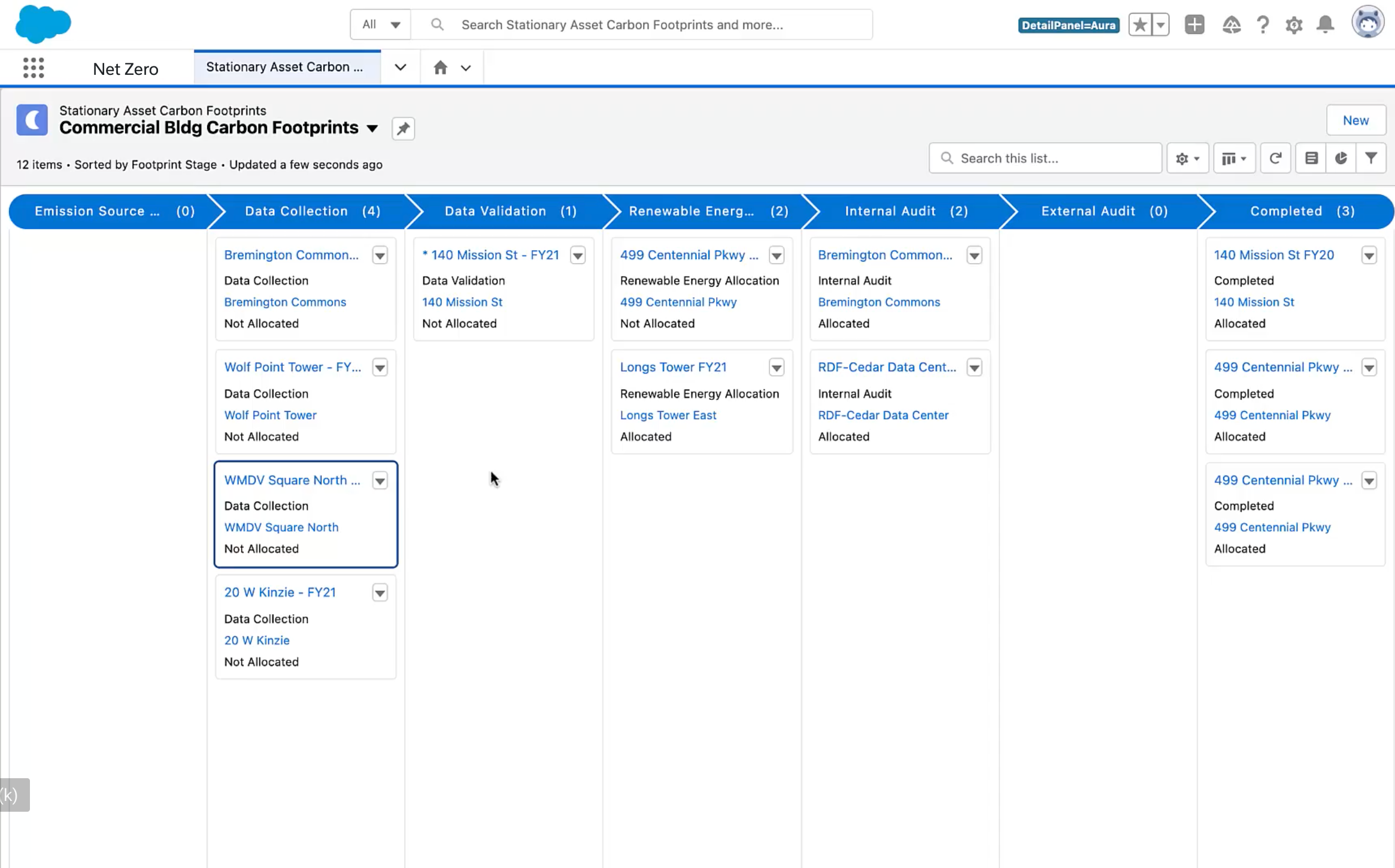
- Drag records to change the stage.
Communicate the changes to your stakeholders. Use Chatter to @mention internal Net Zero Cloud team members. These conversations become part of the record and provide historical context for the decisions made at key stages of the project.
