
Revise Disclosure Responses During Authoring with Einstein Generative AI
Summarize, elaborate, or rephrase disclosure responses by using Einstein generative AI. Revising disclosure responses not only improves process efficiency but also shows your company's commitment to environmental, social, and governance practices. To enhance the credibility and transparency of the responses, revise the answers during the disclosure creation process.
Required Editions
| Available in: Lightning Experience |
| Available in: Enterprise, Performance, Unlimited, and Developer Editions with the Net Zero Cloud Growth license or the Net Zero Cloud User add-on license and the Agentforce for Net Zero Cloud add-on license. Einstein generative AI is available in Lightning Experience. To edit Word documents, you need a Microsoft 365 license. To edit Google documents, you need a Google account |
| Available with the Salesforce Foundations license. |
| To purchase the Agentforce for Net Zero Cloud add-on, contact your Salesforce account executive |
| User Permissions | |
|---|---|
| To generate disclosure and compliance reports: | Disclosure and Compliance Hub User |
| To generate disclosure reports by using the Salesforce Disclosure and Compliance Hub for Microsoft 365 Word add-in: | Disclosure and Compliance Hub plugin for Microsoft 365 |
| To generate disclosure reports by using the Salesforce Disclosure and Compliance Hub Connector add-on for Google Docs: | Disclosure and Compliance Hub plugin for Google Docs |
| To analyze and improve disclosure responses by using generative AI: | Use Einstein to Analyze Disclosure Response |
Confirm that your Salesforce admin set up Einstein generative AI for Net Zero Cloud. See ESG Report Generation by Using Einstein Generative AI.
- From the App Launcher, find and select Disclosure and Compliance Hub.
- From the Disclosures and Compliance Hub menu, select Disclosures and Compliance Hub.
-
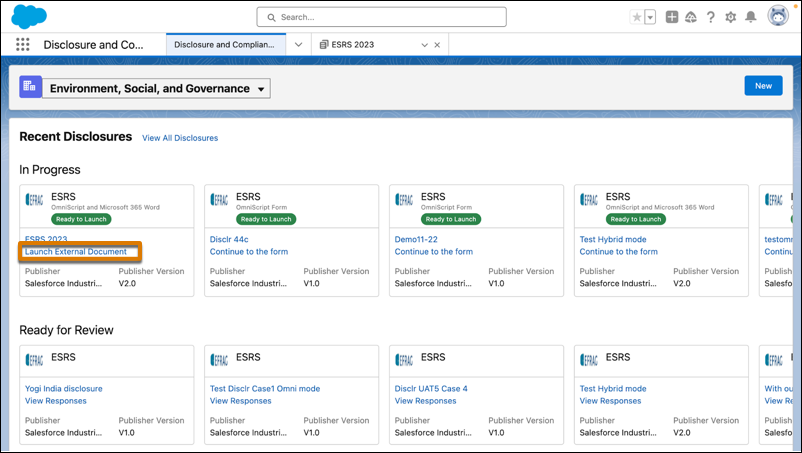
In the In Progress section, for a disclosure, click Launch External
Document.
- On the document Home tab, select Salesforce Disclosure and Compliance Hub for Microsoft 365 Word or the Disclosure and Compliance Hub Connector for Google Docs.
- To revise specific text in the document, select the text, and from the available actions in the add-in, select Revise Selected Text.
- To revise the response for a question, select the question on the add-in Document tab, and from the question’s actions menu, select Revise Response.
-
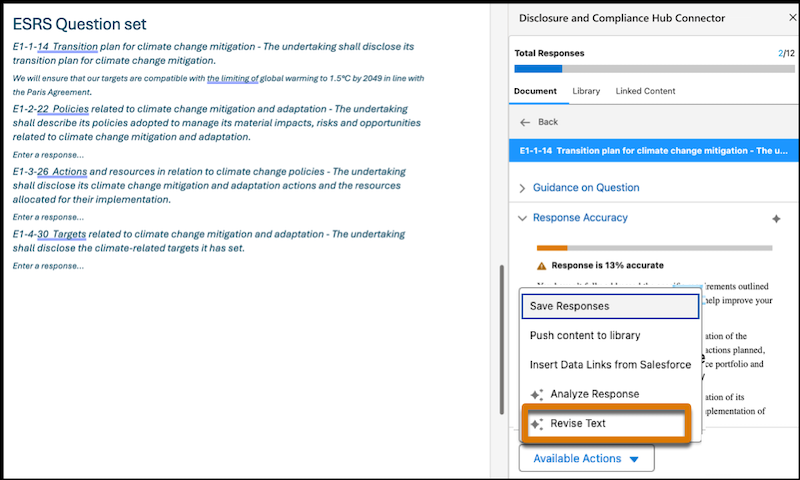
To revise the response for a question, go to the question details in the add-in, and
from the available actions, select Revise Text.
-
Click Revise, and select one of these actions.
Formalize Rephrases the text so that the style of writing is formal. Condense Reduces the length of the content without losing its essential meaning or key points. Summarize Provides a brief overview of the main points or ideas in the text. Casualize Rephrases the text so that the style of writing is relaxed, informal, and conversational. Expand Elaborates the content by adding more details. Create Title Generates a concise title that summarizes the main idea or key point of the text. Paraphrase Rephrases the text by using different words and structures without losing the original meaning. List Organizes the content as a list of items to make sure that the information is clear, concise, and in an easy-to-read format. You can add more actions by using the Prompt Builder.See Create a Custom ESG Revise Response Prompt Template in ESG Report Generation with Einstein Generative AI.
 Important This tool uses generative AI, which is known to include inaccurate or harmful responses. Before you use the tool, review the output for accuracy and safety. You assume the responsibility for the output when you make business decisions.
 - To further modify the response, click Revise, and select an action.
- To use the revised response, click Copy Response, and paste the answers to the Word document.
Did this article solve your issue?
Let us know so we can improve!
