
You are here:
Materiality Assessments
A double materiality assessment identifies the relative impact that different environment, social, and governance (ESG) topics can have on your business’s success, and the impact that your business can have on these topics for the environment and society.
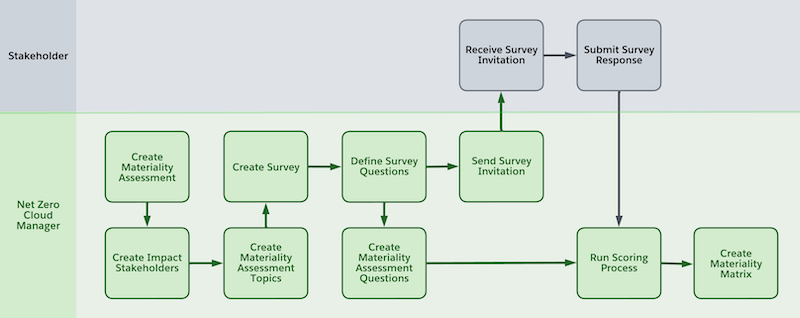
Gathering social and governance data involves these high-level steps.
- Configure users and other components to create surveys, send survey invites, and track
survey responses (see Set up Salesforce Feedback Management).
If you have more than 1,300 survey responses, you need additional survey response packs. For more information, contact your account executive.
- Create your materiality assessment survey, including all the questions that you want to ask your stakeholders.
- To use the Calculate Materiality Assessment Topic Scores data processing engine job for scoring materiality assessment, clone the job and set the cloned job name in Setup Materiality Assessment: Set Data Processing Engine.
- Create a materiality assessment.
- Create a survey invitation email template to send your survey to stakeholders.
- Distribute survey invitations to your stakeholders to gather their responses.
- Calculate and view the materiality matrix scores.
To evaluate impacts, risks, or opportunities in line with Corporate Sustainability Reporting Directive (CSRD) guidelines, conduct an impacts and risks and opportunities assessment.
- Create a Materiality Assessment in Net Zero Cloud
Create a materiality assessment to conduct an assessment of material topics. Then, calculate impact scores for each topic, to compare the impact to the company and the impact to the environment and society across different topics. - Send a Materiality Assessment Survey Invitation to Stakeholders
Survey stakeholders to gather their responses regarding materiality topics.
Did this article solve your issue?
Let us know so we can improve!
