Example: Track Sustainability Initiatives and Measure Performance
Learn how Net Zero Cloud can use Program Management and Outcome Management to create sustainability programs, add initiatives to the program, assign them to emission sources (or assets), and capture targets and results to track progress and drive emissions reduction.
Required Editions
| Available in: Lightning Experience |
| Available in: Enterprise, Developer, Performance, and Unlimited Editions with the Net Zero Cloud Growth license |
Before you follow along, review the overall work flow for this example.
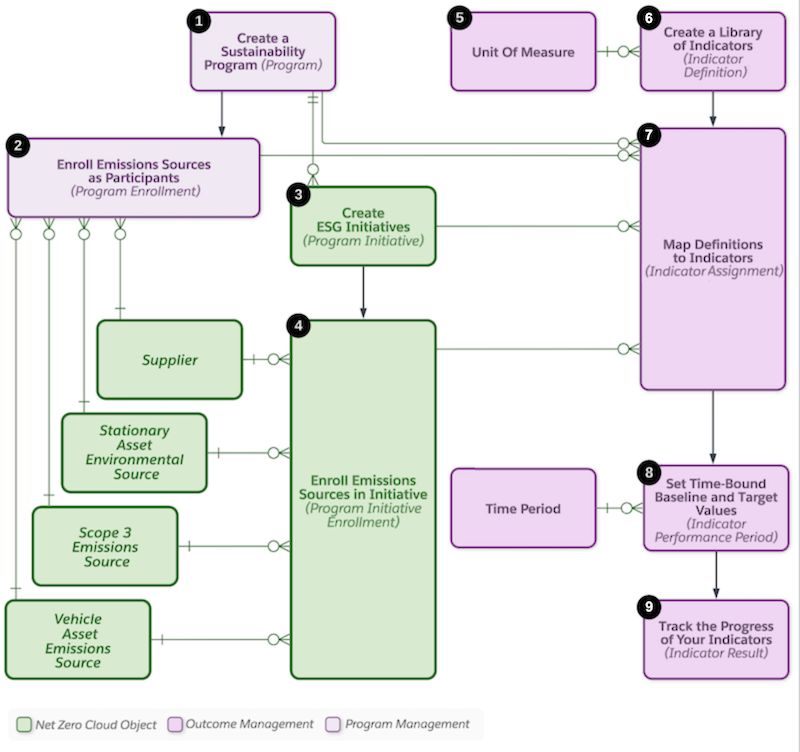
Company A wants to improve the energy efficiency of their commercial buildings or data centers in order to reduce their scope 2 emissions. Complete these steps to recreate this example in your org.
-
Create a sustainability program.
Program Name: Energy Efficiency Program
Category: Environmental, Social, and Governance (ESG)
-
Enroll buildings as emissions sources for the Energy Efficiency Program.
Program Enrollment Name: Cirrus Tower SF
- Stationary Asset Environmental Source: Cirrus Tower SF
Program Enrollment Name: Cirrus Tower Bangalore
- Stationary Asset Environmental Source: Cirrus Tower Bangalore
-
Create a program initiative. As part of the energy efficiency program, company A wants
to work on various initiatives, such as installing solar panels in their buildings.
- Program Initiative Name: Solar Installation Initiative
- Type: Environmental
- Program: Energy Efficiency Program
-
Enroll emissions sources in the program initiatives.
- Program Initiative Enrollment Name: Cirrus Tower SF
- Program Initiative Enrollment Name: Cirrus Tower Bangalore
-
Create a unit of measure.
Unit of Measure Name: Emissions reduction in tCO2e
- Unit Code: tCO2e
- Type: Integer
-
Create an indicator definition.
- Indicator Definition Name: Scope 2 Reduction at Commercial Building
- Unit of Measure: Emissions reduction in tCO2e
-
Create an indicator assignment for the program initiative enrollment to measure the
performance of installing solar panels at Cirrus Tower SF. Indicators can be created for
program, program initiative, or program initiative enrollments.
Indicator Assignment Name: Measure emissions reduction via solar installation at Cirrus Tower SF
- Program Initiative Enrollment=Cirrus Tower SF
- Intended Direction: Decrease
- Indicator Assignment Type: Program Initiative Enrollment
- Indicator Definition: Scope 2 Reduction at Commercial Building
-
To set targets to measure performance, create an indicator performance period. Company
A sets the baseline and targets for multiple time periods and captures results against
them.
Indicator Performance Period Name: Performance of solar installation at Cirrus Tower SF for 2022
- Indicator Assignment: Measure emissions reduction via installation install at Cirrus Tower SF
- Time Period: FY 2022
- Target Value: 500 (tCO2e)
- Baseline Value: 3000 (tCO2e)
Indicator Performance Period Name: Performance for Energy Efficiency program for 2023
- Indicator Assignment: Measure emissions reduction via solar installation at Cirrus Tower SF
- Time Period: FY 2023
- Target Value: 200 (tCO2e)
- Baseline Value: 3000 (tCO2e)
-
To capture results against the targets for 2022, create indicator results.
- Indicator Result: IR-000000006
- Indicator Performance Period: Performance of solar installation at Cirrus Tower SF for 2022
- Result Value: 1500 (tCO2e)
-
Create action plan templates.
- Action Plan Template: ESG program template
- Action Plan Type: Industries
- Target Object: Program
-
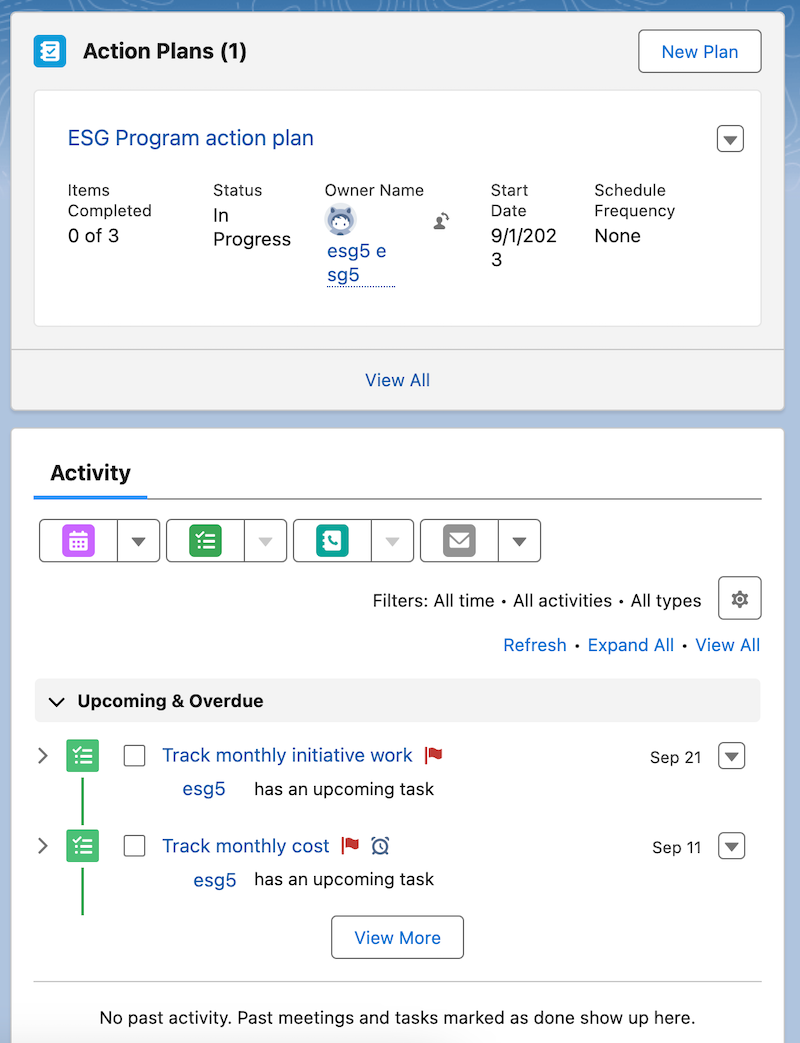
Create an action plan.
- Action Plan: ESG Program action plan
- Start Date: 9/1/2023
- Action Plan Template: ESG program template
- Target Record: Energy Efficiency Program
-
Track your actions by creating action plan tasks.
Task Name: Track monthly cost
- Related To: Energy Efficiency Program
- Status: Not Started
- Priority: High
Task Name: Track monthly initiative work
- Related To: Energy Efficiency Program
- Status: Not Started
- Priority: High