
You are here:
Open Audit Trail
You can open Audit Trail from the App Launcher, the navigation menu, or the Service Console.
Required Editions
| Available in: Lightning Experience |
| Available in: Enterprise, Professional, Starter, and Unlimited Editions |
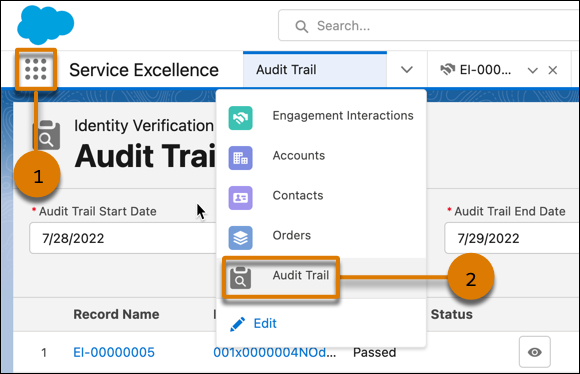
- To open Audit Trail from the App Launcher (1), search for and select Audit Trail.
-
To open Audit Trail from the navigation menu, add Audit Trail (2) to the navigation
menu, and then open Audit Trail from the menu:
- In the navigation menu, click Edit.
- Click Add More Items.
- Search for and select Audit Trail.
- Click Add 1 Nav Item.
- Click Audit Trail.
-
To open Audit Trail from the Servie Console, add Audit Trail to the Service Console
app:
- From Setup in Lightning Experience, in the Quick Find box, enter App Manager, and then select App Manager.
- Click Edit next to the Service Console app.
- In the Navigation Items section, move Audit Trail to the Selected Items list and click Save.
- In the User Profiles section, verify that the user profiles who need access to Audit Trail are in the Selected Profiles list.
本文章是否解决您的问题?
请与我们共享您的想法,以便我们进行改进!
