
You are here:
Order Item Scope
If Scope for the Technical product is set to Order Item, then the corresponding instances are merged within the following structure and the decomposition source takes a direct parent order item.
Take a look at the following catalog structure.


The resulting order may consist of a mobile line bundle containing Voice, Data, Call Forwarding, Roaming, etc. From a technical product perspective, every bundle needs a SIM card. Therefore, Order Management generates one instance of SIM card for every mobile line offering.
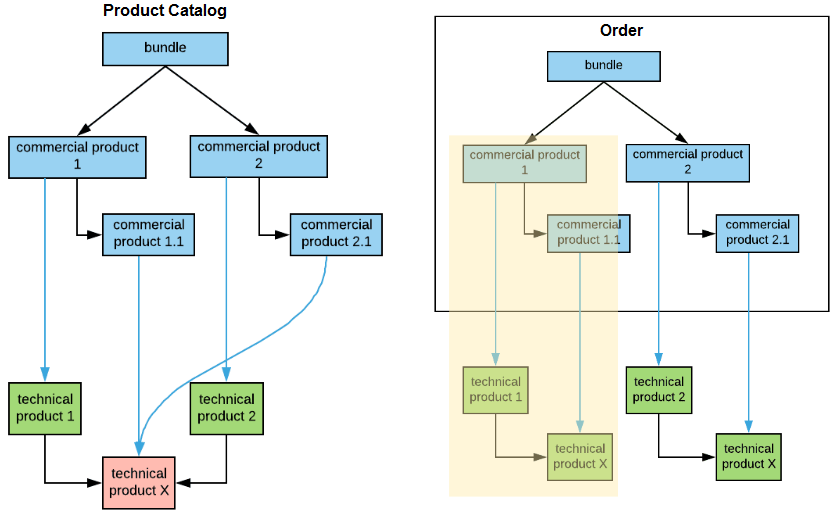
The following example shows the product catalog structure and the resulting order with the Product Scope set to Order Item Scope. The yellow area highlights what's contained in the scope.
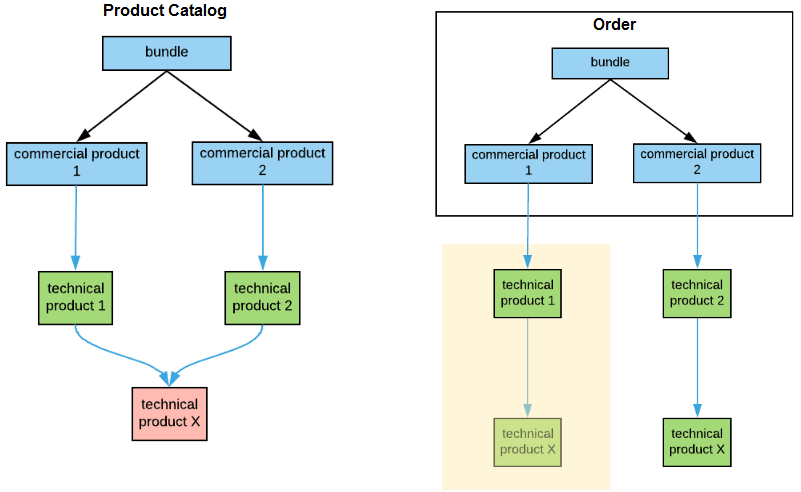
Another example of the product catalog structure and the resulting order with the Product Scope set to Order Item Scope.
If there are multiple valid decomposition rules between the source product and the destination product, only one instance of the destination product is created, but attribute mappings from the decomposition rules are merged.
Rules are considered valid when either no condition is specified on the rule, or the rule condition evaluates to true.
According to the Order Item scope rule, Destination is merged in the schema below, whether a condition is set to TRUE, FALSE, or there is no condition at all.
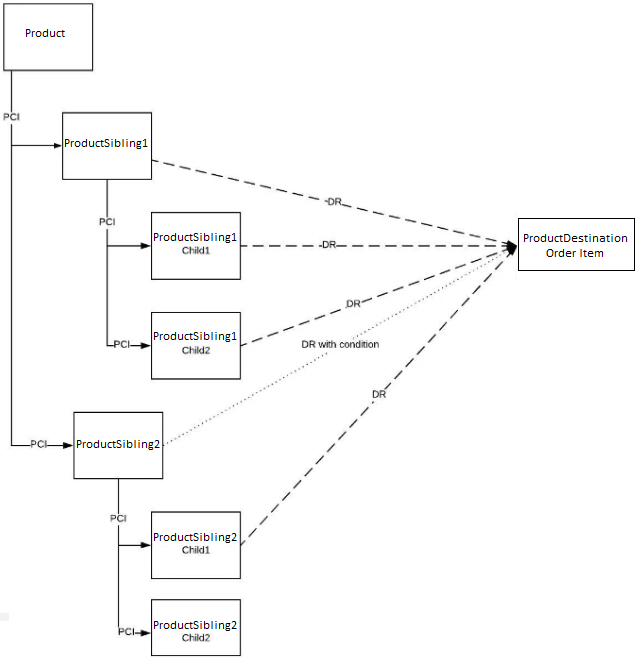
The following rules apply to this scenario, resulting in Destination being merged for each situation:
If there is a condition between ProductSibling2 and ProductDestination and the condition resolves to TRUE, then the destination is merged because the scenario is the same as described above, with no condition.
If there is a condition between ProductSibling2 and ProductDestination and the condition resolves to FALSE, then the destination is merged. The reason for this is to avoid a scenario where the future MACD attribute value is a condition, so it becomes True, and you need to merge destinations, which involves disconnecting one inventory item.
If there is no condition between ProductSibling2 and ProductDestination:
Destination for Sibling1, Sibling1 Child1, and Sibling2 Child2 are merged.
Destination for Sibling2 and Sibling2 Child1 are merged.
Both destinations are merged as Sibling1 and Sibling2 share the same parent, which is Product.
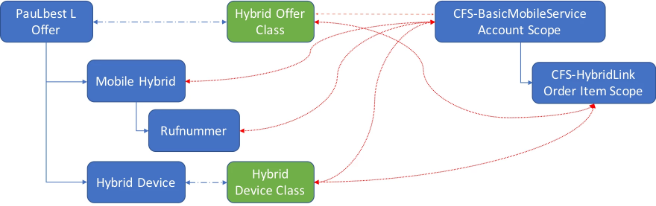
In the following example, there will be one instance of CFS-BasicMobileService and one instance of CFS-HybridLink:
Consider the following decomposition relationship:
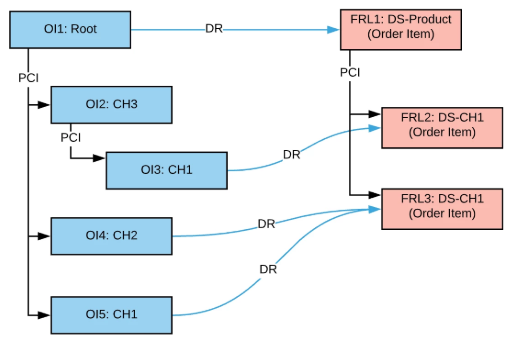
In the example:
OI1 root order item generates a single instance of DS-Product (FRL1).
OI4 and OI5 generate a single instance of DS-CH1 (FRL3).
OI3 generates another instance of DS-CH1 (FRL2) because it's parent OI2 is different from OI4 and OI5.
The system generates PCI relationships between FRL1-FRL2 and FRL1-FRL3 based on the logic that for each FRL, Order Management goes to the source order item and checks if it also generates an FRL that could be the parent. If not, Order Management goes up the source hierarchy to find such a parent. For example, consider FRL2:
Source Order Item OI3 is not decomposed into anything else, so go to the next OI in the hierarchy.
OI2 is not decomposed into anything, so go to the next OI in the hierarchy.
OI1 is decomposed into FRL1 and DS-Product is the potential parent of DS-CH1 according to the catalog, so FRL1 becomes a parent for FRL2.
