
You are here:
Create the State Transitions
You create the default and alternate State Transitions for your State Model in the State Model Version.
To create the State Transitions in the Report Card State Model Version:
- In the Vlocity State Model Version section of the Report Card State Model page, click the Report Card State Model V1 link.
- In the Vlocity State Transition section of the Report Card State Model V1 page, click New.
- Specify the following settings for the Enrolled to Completed transition:
Setting
Value
Vlocity State Transition Name
Enrolled to Completed
From
Enrolled
To
Completed
Alternate
Incomplete
Default Transition
(checked)
- Click Save & New.
- Repeat the previous two steps to create the transitions in the following table. After creating the last transition, click Save.
State Transition Name
From
To
Alternate
Default Transition
Enrolled to Incomplete
Enrolled
Incomplete
(blank)
(not checked)
Incomplete to Completed
Incomplete
Completed
(blank)
(not checked)
Completed to Passed
Completed
Passed
Failed
(checked)
Completed to Failed
Completed
Failed
(blank)
(not checked)
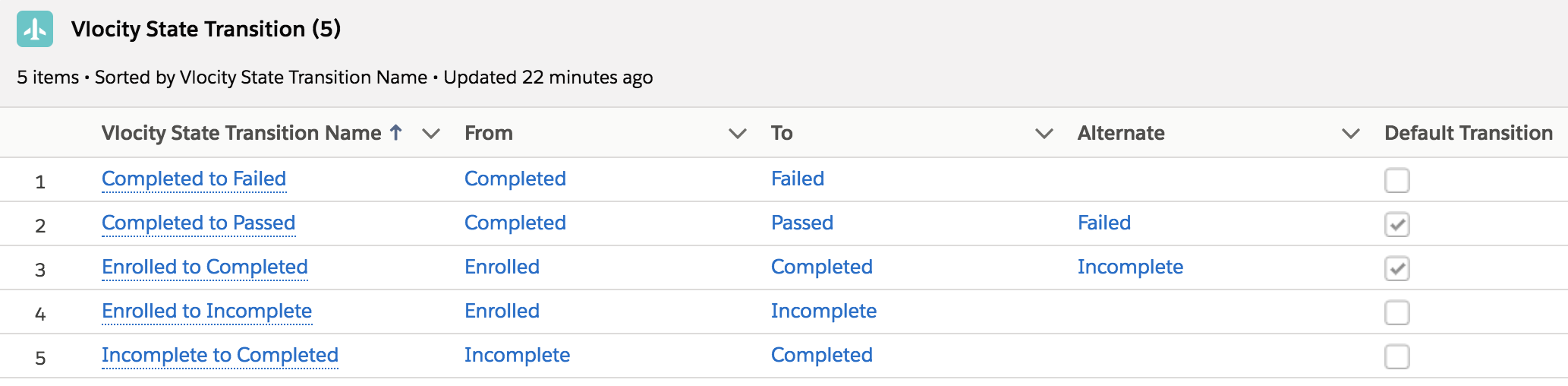
- Make sure the list of State Transitions looks like this:
This is the last task in the current workflow. For the next task in the parent workflow, see Workflow for Creating State Transition Rules.
Did this article solve your issue?
Let us know so we can improve!
