
You are here:
Overview of State Models, Transitions, Rules, and Actions
A State Model lets you track changes to an object record's status over time and to configure rules for when a record transitions from one state to another. Examples are a quote going from acceptance to approval or an insurance claim being opened, assessed, and closed.
State Models can be applied to Asset, Contract, Quote, Insurance_Claim__c, and Application__c objects out of the box. In Spring '20 and later releases, you can also apply a State Model to another existing object or a new custom object.
The states that a State Model tracks, such as Accepted, In Review, and Approved, can come from an existing Status field. You can also specify custom states.
In Spring '20 and later releases, State Transition Rules determine whether a specific transition between two states can occur. For example, a rule for the transition from In Review to Approved might be based on an applicant's credit score. A transition can have no rules, one rule, or more than one rule with Any True or All True logic.
You can define actions and invoke them in two ways: by transition rules, or by arrival at specific states. These Vlocity Actions can invoke Apex methods, OmniScripts, Cards components, and more.

For Salesforce Industries Communications, Media, and Energy, expanded object support and State Transition Rules are available in Fall '20 and later releases.
Workflow for Creating a State Model
Creating a State Model is a complex process. You must prepare the base object, then configure the states, transitions, rules, and actions.
Student Report Card Example
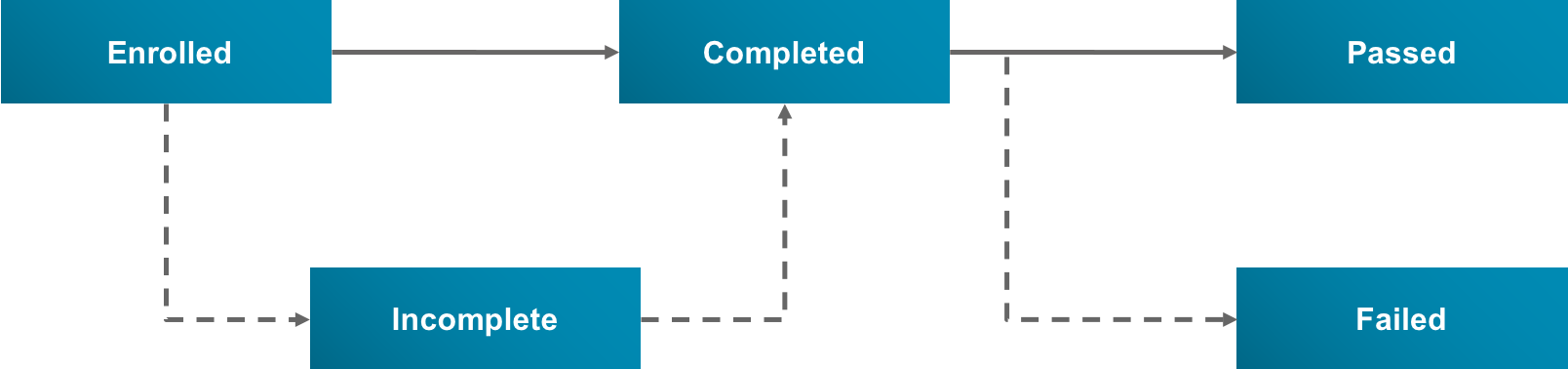
The primary example for the basic tasks models a student enrolling in a class, completing the class, and receiving a grade. Its purpose is to teach beginners how to build a State Model, therefore it is simpler than a realistic customer use case would be. The base object is Report_Card__c. The states are Enrolled, Incomplete, Completed, Passed, and Failed. Rules are based on grades. Actions consist of emails sent to the student.
The following diagram illustrates the states and the transitions between them. Default transitions along the "happy path" are solid arrows. Departures from the "happy path" are dashed arrows.
To create a State Model requires that you complete a number of sub-workflows.
-
Prepare the base object and its fields and record page, whether it's a standard base object, another existing object, or a new custom object.
-
Create the State Model, States, State Model Version, and State Transitions. See Workflow for Creating a State Model, States, and Transitions.
-
Create the State Rules. Specify the linked objects on which rules are based, the expressions that define what the rules do, and the order in which rules are invoked. See Workflow for Creating State Transition Rules.
-
Create the transition and state actions, including the entities the actions invoke, such as Email Templates. See Workflow for Creating Actions for States and Rules.
-
Test the State Model by enabling the State Model Version, creating a new base object record, going through the states, and observing the rules and actions. See Workflow for Testing a State Model.
Advanced topics include:
-
More complex State Transition Rule examples — see State Transition Rule Examples.
-
How to use an On Creation Action if a State Model requires initialization when a new base object record is created — see Workflow for Using a Trigger and an On Creation Action.
-
How to automate a state transition and its action using a scheduled batch job — see Automatic State Model Transitions.
-
How to set up caching for State Model data — see Workflow for Setting Up Caching for State Models.
-
How to create a custom Apex class for State Transition Rule evaluation — see Custom Rule Evaluator Class.
- Workflow for Preparing the Base Object for a State Model
Setting up a base object for a State Model requires setting up its fields and record page, then configuring the State Model object definition to recognize the base object and its states field. - Workflow for Creating a State Model, States, and Transitions
A State Model consists of references to a base object and States. A State Model Version consists of State Transitions, State Rules, and Actions. Here you'll learn how to create the State Model, States, and State Transitions using the Report Card State Model as an example. Later you'll learn how to create State Rules and Actions. - Workflow for Creating State Transition Rules
In Spring '20 and later releases, State Transition Rules (also called State Rules) determine whether transitions between states in a State Model can occur. A non-alternate State Transition can be subject to no rules, one rule, or multiple rules. - Workflow for Creating Actions for States and Rules
You can define Vlocity Actions for your State Model and invoke them in two ways: by arrival at specific States, or by State Rules (in Spring '20 or later releases). These actions can invoke Apex methods (in Spring '20 or later releases), OmniScripts, Cards components, and more. In the Report Card State Model, all of the actions send emails to the student. - Workflow for Testing a State Model
Testing a State Model involves taking the "happy path" through the states, taking departures from this path, and testing every rule and action. If your State Model is especially complex, you can test it after creating all the rules, then test it again after creating the actions. - State Transition Rule Examples
There are many ways to use expressions to reference base object and linked object fields in State Transition Rules. - Workflow for Using a Trigger and an On Creation Action
You can configure a trigger to perform initialization tasks when a new base object record is created. A common initialization task, available in Spring '20 and later releases, is to process an On Creation Action associated with the State Model Version. Other initialization tasks are possible. For example, a trigger for Application__c records sets the initial state of the associated State Model to the Submitted state. - Automatic State Model Transitions
In Spring '20 and later releases, you can automate state transitions in your State Model. This makes manually clicking on a state to advance to it unnecessary, although it's still an option. - Workflow for Setting Up Caching for State Models
Using the Salesforce Platform Cache to store frequently accessed, infrequently updated data saves round trips to the database and improves performance. - Custom Rule Evaluator Class
If the Rule Evaluation Class Name and Rule Evaluation Method Name settings of the State Model Version are blank, a default algorithm evaluates the State Transition Rules.
