
You are here:
Workflow for Creating Actions for States and Rules
You can define Vlocity Actions for your State Model and invoke them in two ways: by arrival at specific States, or by State Rules (in Spring '20 or later releases). These actions can invoke Apex methods (in Spring '20 or later releases), OmniScripts, Cards components, and more. In the Report Card State Model, all of the actions send emails to the student.
Before You Begin
Before you can create Vlocity Actions for States, you must create the States. See Workflow for Creating a State Model, States, and Transitions.
Before you can create Vlocity Actions for State Rules, you must create the State Rules. See Workflow for Creating State Transition Rules.
Before you can create actions, you must create the entities the actions invoke. The actions in the Report Card State Model invoke an Apex class, which then invokes one of a set of Email Templates. The following sections show you how to create the Apex class, the Email Templates, and the Vlocity Actions.
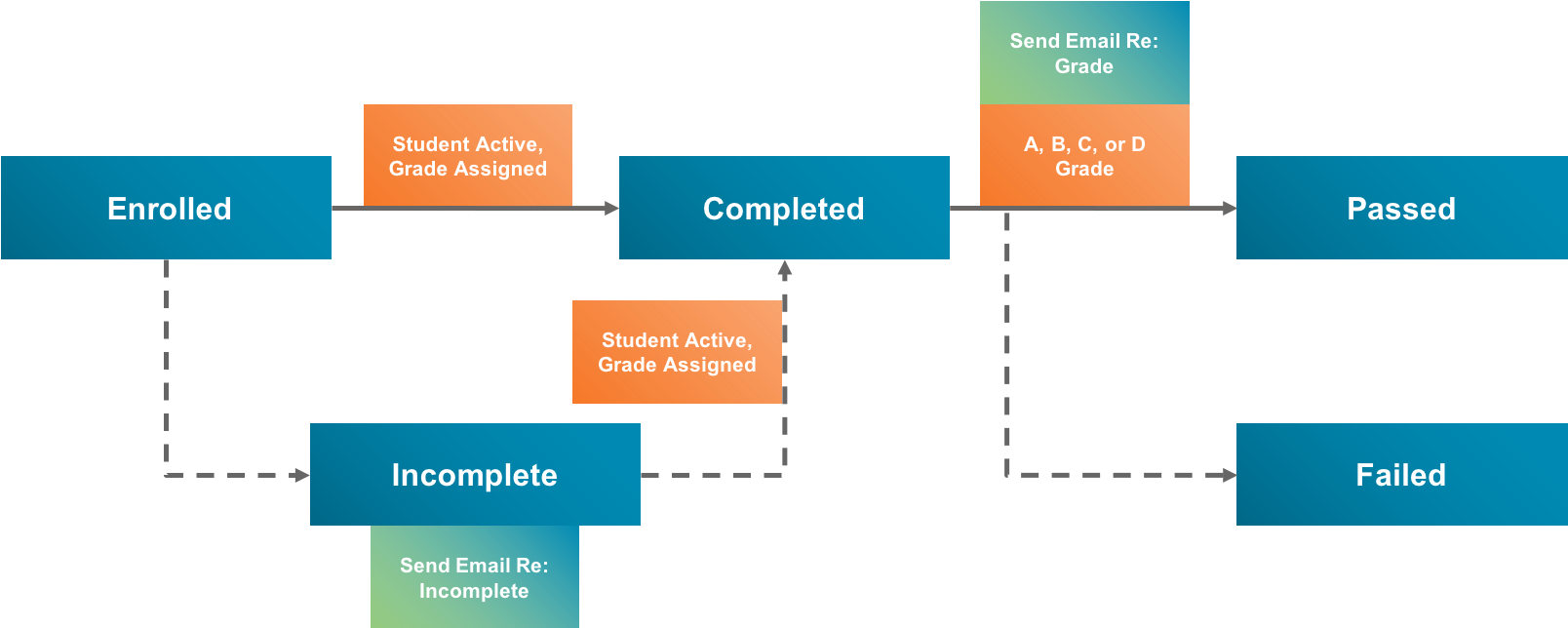
This diagram illustrates the actions (green boxes) in the Report Card State Model.
- Create the Apex Class that Sends Emails.
- Create the Email Templates for the State Model Example.
- Choose State Actions vs. State Rule Actions.
- Create the Vlocity Actions for the State Model Example.
- Add Actions to the Grade Rules.
- Enable the State Model Version.
After you have created Vlocity Actions and associated them with States and State Rules, you are ready to proceed to the next task in the parent workflow. See Workflow for Testing a State Model.
- Create the Apex Class that Sends Emails
The ReportCardEmail Apex class sends an email based on the specified Email Template to the Contact related to the current Report_Card__c object. You can rewrite it to work with a different base object. - Create the Email Templates for the State Model Example
The emails sent to students in the example use Email Templates. - State Actions vs. State Rule Actions
You can assign Vlocity Actions to States, State Rules, or both. There are several considerations for deciding. - Create the Vlocity Actions for the State Model Example
The actions in the Report Card State Model invoke a custom class, but you can invoke prebuilt services in your State Model actions. - Add Actions to the Grade Rules
To implement results based on grades, you must add Vlocity Actions to the State Rules for grades. - Enable the State Model Version
Enabling the State Model Version disables editing of the State Rules and allows the State Model to run.
