
You are here:
Workflow for Creating State Transition Rules
In Spring '20 and later releases, State Transition Rules (also called State Rules) determine whether transitions between states in a State Model can occur. A non-alternate State Transition can be subject to no rules, one rule, or multiple rules.
Before You Begin
Before you can create State Transition Rules, you must create State Transitions. See Workflow for Creating a State Model, States, and Transitions.
An alternate transition doesn't have rules. It is subject to any rules defined for the corresponding default transition.
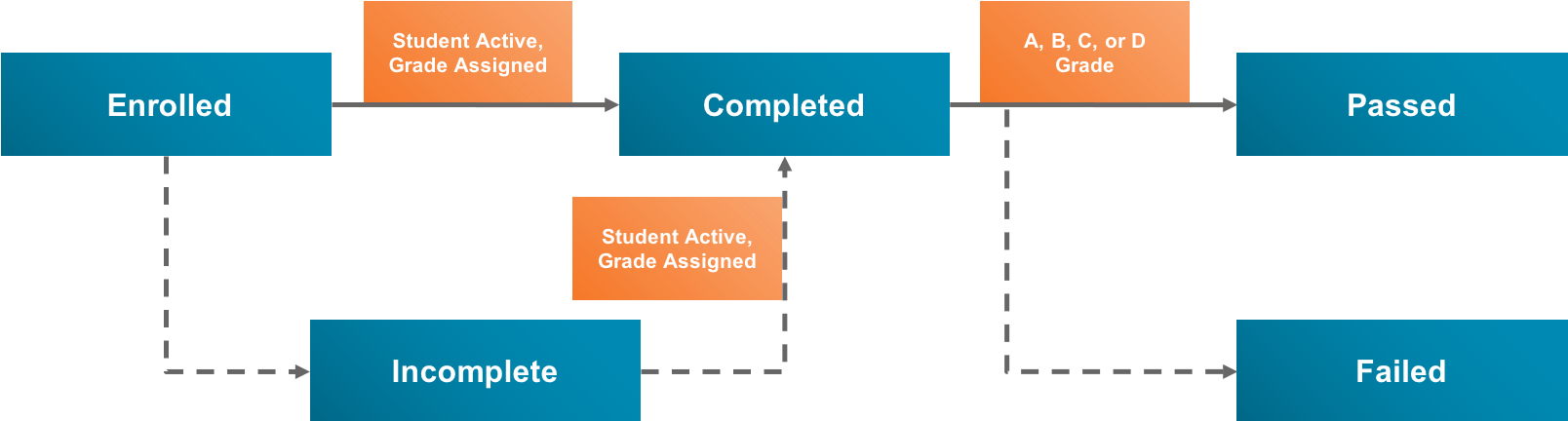
The following diagram illustrates the rules (orange boxes) in the Report Card State Model.

The rule expressions in this topic use the namespace vlocity_ins for custom objects and fields. If your org has a different namespace, vlocity_cmt or vlocity_ps, use that instead.
- Configure a Linked Object.
- Choose Multiple Conditions vs. Multiple Rules.
- Configure the Completion Rules.
- Configure the Grade Rules.
After you have created State Transition Rules, you are ready to proceed to the next task in the parent workflow. See Workflow for Creating Actions for States and Rules.
- Configure a Linked Object
You must configure a linked object if State Transition Rules depend on field values in a related object, such as Account or Contact, rather than the base object. - Multiple Conditions vs. Multiple Rules
A state transition often depends on multiple conditions. Whether you put conditions in the same rule or different rules depends on whether different conditions must result in different actions. - Configure the Completion Rules
The completion rules in the Report Card State Model include base object direct lookups of linked object fields. That is, they use Salesforce child-to-parent Relationship Query notation. - Configure the Grade Rules
The final transition rules you must configure in the example are for the Completed to Passed transition.
