
You are here:
Track Progress with Indicator Results
Measure the value of indicator assignments with indicator results.
Required Editions
| Available in: Education Cloud, Energy and Utilities Cloud, Net Zero Cloud, Nonprofit Cloud, Nonprofit Cloud for Grantmaking, and Public Sector Solutions. View edition availability. |
| User Permissions Needed | |
|---|---|
| To use Outcome Management: | Outcome Management permission set OR Manage Outcomes system permission Learn more about these permissions. OR Net Zero Cloud Manager permission set OR Manage Environmental, Social, and Governance Programs system permission |
| To run a flow: | Run Flows app permission |
- Collect Data to Aggregate for Indicator Results
Use Discovery Framework and Assessments and other solutions to determine the success of your efforts. - Automatically Calculate Indicator Results from Data in Your Org
Add a flow to calculate indicator results to an indicator definition, and with the click of a button, generate indicator results associated on an indicator performance period. - Create Multiple Indicator Results
Save time and manage your impact strategy more intuitively by entering multiple indicator results in a spreadsheet-like experience. If you don’t see a way to enter multiple results at once, talk to your Salesforce admin about adding the Create Indicator Results component to the record page. - Add and Manage Indicator Results One at a Time
Enter indicator results to track them against time-bound, baseline, and target values. - Compare Targets and Results
Check whether indicator performance periods are tracking as expected on the Outcome Management home page. - Review Results with Reports and Dashboards
Use Salesforce reports to monitor and analyze how your indicator results are tracking towards your organizational goals.
Collect Data to Aggregate for Indicator Results
Use Discovery Framework and Assessments and other solutions to determine the success of your efforts.
Before you can enter an aggregated result value, you must collect data about what you’re measuring. Data collection can be done through many different venues. You can collect data through assessment or survey tools available in Salesforce, talking to participants in person or on the phone, online forms, or external datasets, to name a few.
If you plan to collect data using a survey or assessment tool, Salesforce offers Discovery Framework and Assessments, which can be directly managed from Outcomes Management. From the Outcome Management home page you see a quick way to get to assessments, assessment questions, or assessment question sets via the launch pad component.
Automatically Calculate Indicator Results from Data in Your Org
Add a flow to calculate indicator results to an indicator definition, and with the click of a button, generate indicator results associated on an indicator performance period.
-
Add the flow to an indicator definition.
- In Setup, in the Quick Find box, enter Flows, and then select Flows.
- Copy the API name for the flow that your admin created to calculate indicator results.
- In the Outcome Management app, find the indicator definition that’s associated with the indicator performance period that you want to calculate indicator results for.
- On the indicator definition, paste the flow API name in Flow Definition API Name.
-
Run the flow to create indicator results.
- On the indicator definition, go to the related lists and select an indicator assignment.
- On the indicator assignment, go to the related lists and select the indicator performance period you want to measure.
- Click Calculate Indicator Results.
- Find and select a goal definition and, if applicable, select the result type.
- Follow the prompts to create the indicator results.
Create Multiple Indicator Results
Save time and manage your impact strategy more intuitively by entering multiple indicator results in a spreadsheet-like experience. If you don’t see a way to enter multiple results at once, talk to your Salesforce admin about adding the Create Indicator Results component to the record page.
- In the Outcome Management app, select the record where you want to enter results. For example, select a program or outcome.
- Click Create Indicator Results.
- Select a time period.
- To further refine the results, select filters.
- Click Next.
- Enter results and other values as needed.
-
Save your work.
Salesforce creates indicator results for each row you complete in the grid.
Add and Manage Indicator Results One at a Time
Enter indicator results to track them against time-bound, baseline, and target values.
- Aggregate the data collected.
- Find the indicator performance period that you want to add an indicator result to.
- Go to the related lists.
- In the Indicator Definitions related list, click New.
- Enter a Result Value.
- Enter a Measurement Date.
- To track interim or final results, select a Result Type.
- Provide more information about the results in Description.
- Save your work.
Compare Targets and Results
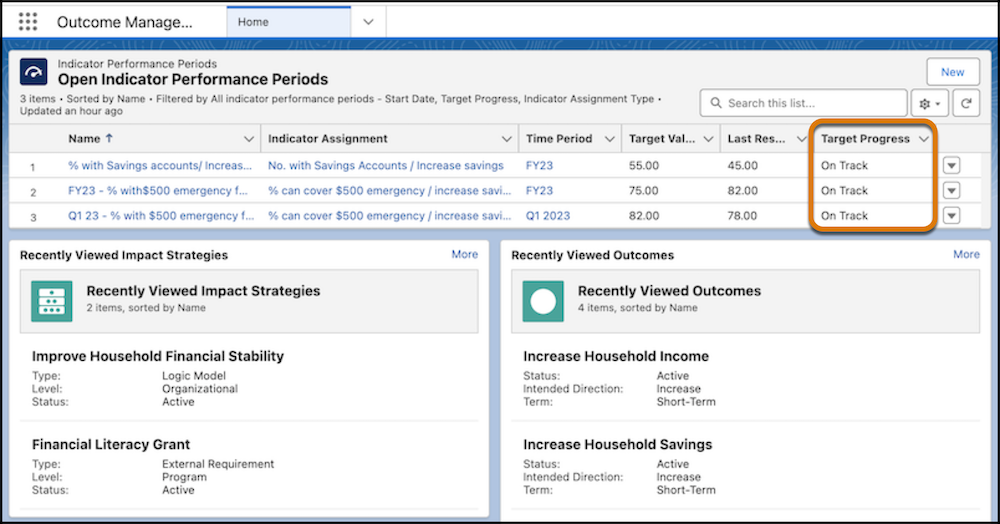
Check whether indicator performance periods are tracking as expected on the Outcome Management home page.
After you start entering results, return to the Outcome Management home page. The Open Indicator Performance Periods component displays Target Process for you to quickly see how the results compare to indicator performance period target values. To see the target process alongside other details like baseline value, click the name of the indicator performance period.
Review Results with Reports and Dashboards
Use Salesforce reports to monitor and analyze how your indicator results are tracking towards your organizational goals.
You did it! You entered all of the data to track what your organization wants to achieve with outcomes, managed the time-bound and measurable indicators, and captured the results achieved through your efforts. Now, it’s time to reap the benefits of your data wrangling with Salesforce reports and dashboards.
If you don’t see reports or report types for the Outcome Management objects, talk to your Salesforce admin about getting reports and report types set up.
